EasyManua.ls Logo

Panasonic SC-CH7 - Amplifier Controls and Display

Panasonic SC-CH7
61 pages
Print Icon
To Next Page IconTo Next Page
To Previous Page IconTo Previous Page
Loading...
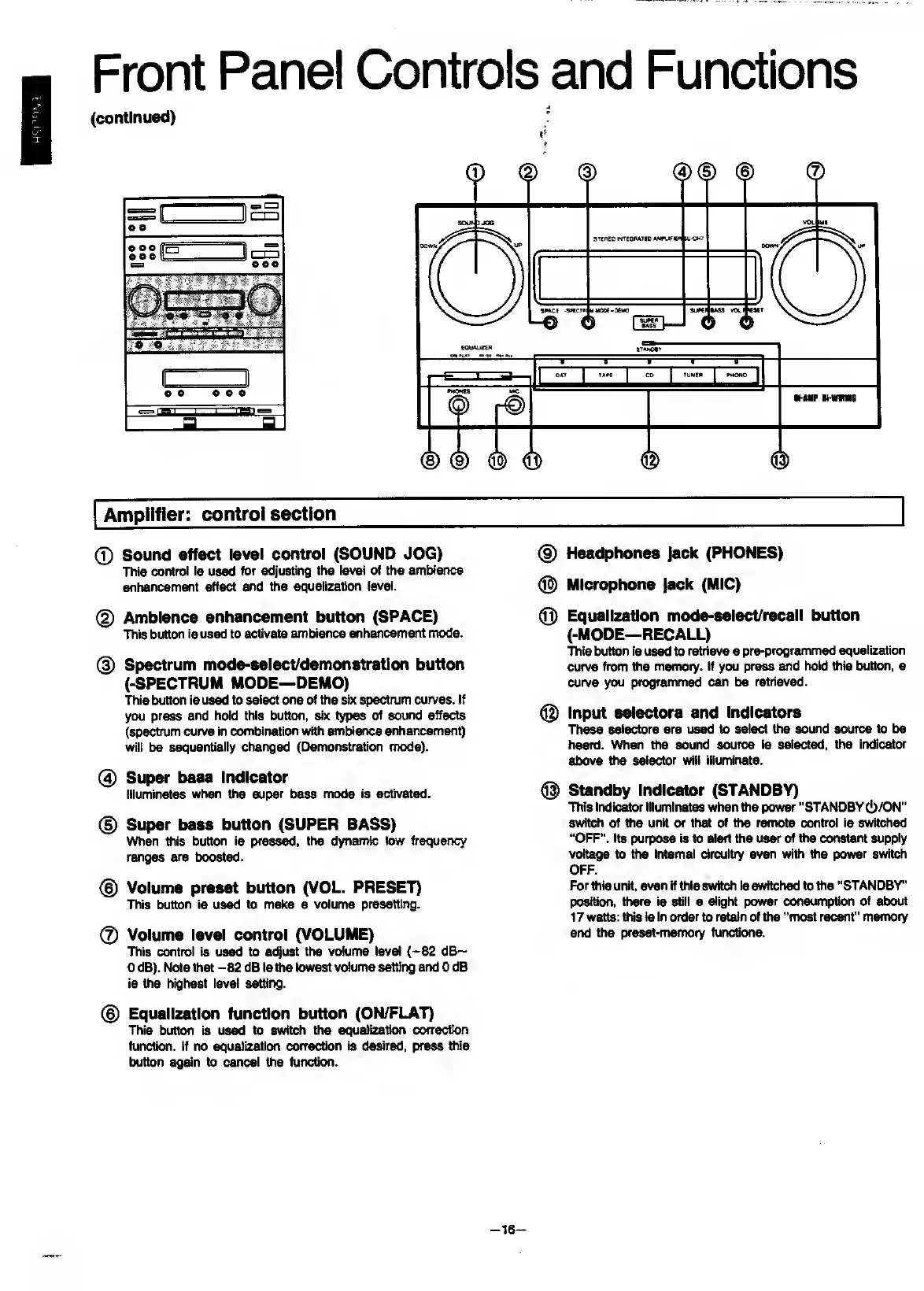
Front
Panel
Controls
and
Functions
(continued)
0
Sound
effect
level
control
(SOUND
JOG)
This
control
is
used
for
adjusting
the
level
of
the
ambience
enhancement
effect
and
the
equalization
level.
0
Ambience
enhancement
button
(SPACE)
This
button
is
used
to
activate
ambience
enhancement
mode.
0
Spectrum
mode-eelect/demonetratlon
button
(-SPECTRUM
MODE—DEMO)
This
button
is
used
to
select
one
of
the
six
spectrum
curves.
If
you
press
and
hold
this
button,
six
types
of
sound
effects
(spectrum
curve
in
combination
with
ambience
enhani^m^t)
will
be
sequentially
changed
(Demonstration
mode).
0
Super
base
Indicator
Illuminates
when
the
super
bass
mode
is
activated.
0
Super
bass
button
(SUPER
BASS)
Virtien
this
button
is
pressed,
the
dynamic
tow
frequency
ranges
are
boosted.
0
Volume
preset
button
(VOL.
PRESET)
This
button
is
used
to
make
a
volume
presetting.
0
Volume
level
control
(VOLUME)
This
control
is
used
to
adjust
the
volume
level
(-82
d6~
0
dB).
Note
that
-82
dB
is
the
lowest
volume
setting
and
0
dB
is
the
highest
level
setting.
0
Equalization
function
button
(ON/FLAT)
This
button
is
used
to
switch
the
equalization
correction
function.
If
no
equalization
correction
is
desired,
press
this
button
agctin
to
cancel
the
function.
0
Headphones
Jack
(PHONES)
0
Microphone
Jack
(MIC)
0
Equalization
mode-select/recall
button
(-MODE—RECALL)
This
button
is
used
to
retrieve
a
pre-programmed
equalization
curve
from
the
memory.
If
you
press
and
hold
this
button,
a
curve
you
programmed
can
be
retrieved.
®
Input
selectors
and
Indicators
These
selectors
are
used
to
select
the
sound
source
to
be
heard.
When
the
sound
source
is
selected,
the
indicator
above
the
selector
will
illumirtate.
@
Standby
Indicator
(STANDBY)
This
indicator
illuminates
when
tiie
power
“STANDBY
c!)/ON''
switch
of
the
unit
or
that
of
the
remote
control
is
switched
“OFF".
Its
purpose
is
to
alert
the
user
of
the
constant
supply
voltage
to
the
internal
circuitry
even
with
the
power
switch
OFF.
For
this
unit,
even
if
this
switch
is
switched
to
the
“STANDBY*
position,
there
is
still
a
slight
power
consumption
of
about
17
watts:
this
is
in
order
to
retain
of
the
“most
recent”
memory
and
the
preset-memory
functions.
-
16
-

Related product manuals