EasyManua.ls Logo

Panasonic SC-CH7 - Page 48

Panasonic SC-CH7
61 pages
Print Icon
To Next Page IconTo Next Page
To Previous Page IconTo Previous Page
Loading...
Using
the
Timer
(continued)
Set
the
volume
level
for
timer
play
In
advance
(See
page
51.)
TIMER
SET
SELECT
A
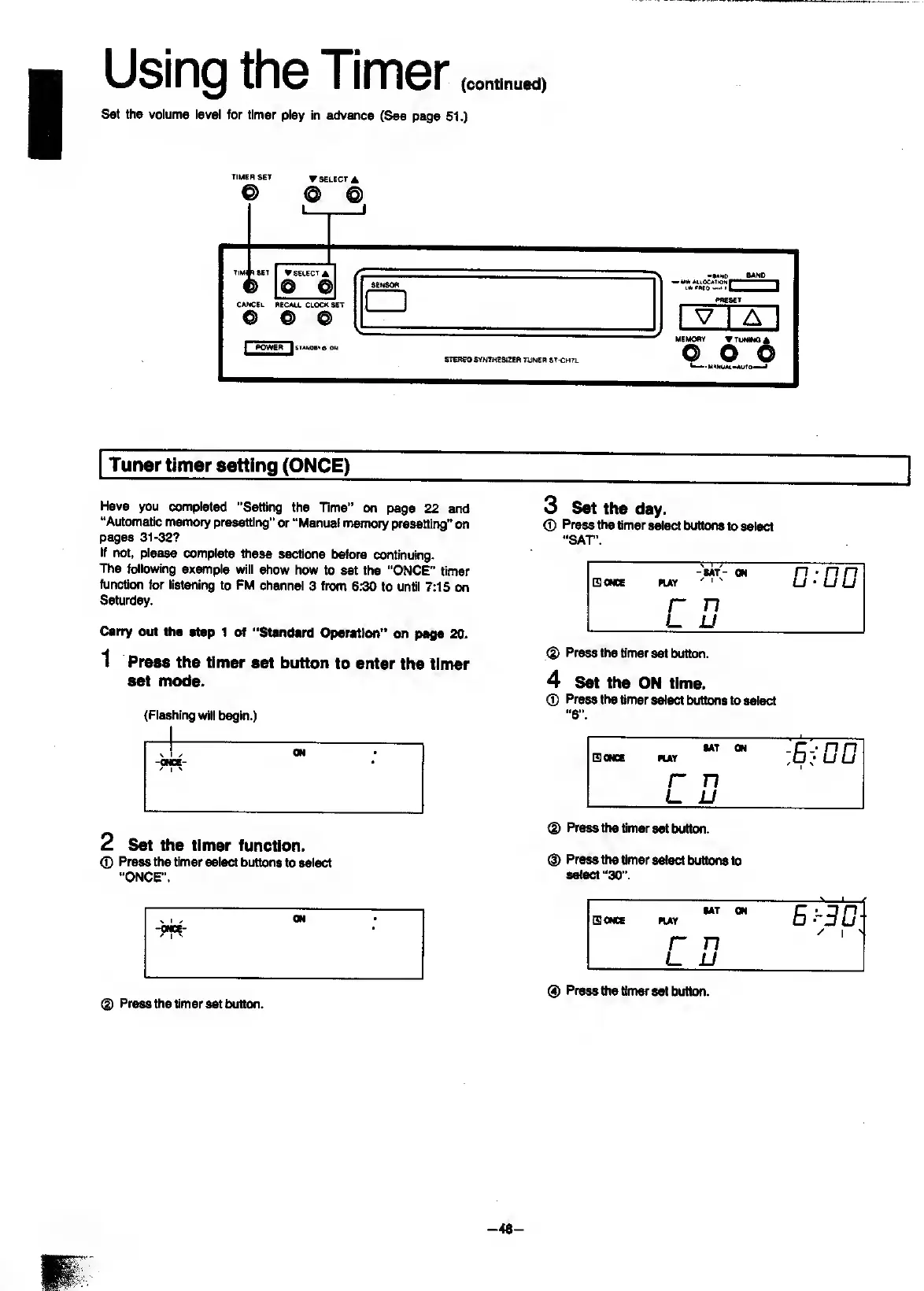
Tuner
timer
setting
(ONCE)
Have
you
completed
"Setting
the
Time”
on
page
22
and
“Automatic
memory
presetting"
or
“Manual
memory
presetting”
on
pages
31-32?
If
not,
please
complete
^ese
sections
before
continuing.
The
following
example
will
show
how
to
set
the
"ONCE”
timer
function
for
listening
to
FM
channel
3
from
6:30
to
until
7:15
on
Saturday.
Carry
out
the
step
1
of
“Standard
Operation”
on
page
20.
1
P
ress
the
timer
set
button
to
enter
the
timer
set
mode.
(Flashing
will
begin.)
si/
ON
-ONCE-
'
I
'
2
S
et
the
timer
function.
O
Press
the
timer
select
buttons
to
select
"ONCE”.
®
Press
the
timer
set
button.
3
S
et
the
day.
0
Press
the
timer
select
buttCHis
to
select
"SAT'.
(3
ONCE
ruY
-MT-
ON
^
1
^
D:DD
r
n
u
u
(|)
Press
the
timer
set
button.
4
S
et
the
ON
time.
0
Press
the
timer
select
buttons
to
select
"
6
".
(SONCE
MAY
MT
ON
r
n
u
0
Press
the
timer
set
button.
0
Press
the
timer
select
buttons
to
select
“30”.
(5
ONCE
HAY
SAT
ON
B:-3D
r
n
/
1
'
u
jj
(3)
Press
the
timer
set
buttcNi.
-40-

Related product manuals