SC-HM910/SC-HM810
10
7.1 Disassembly and assembly main unit
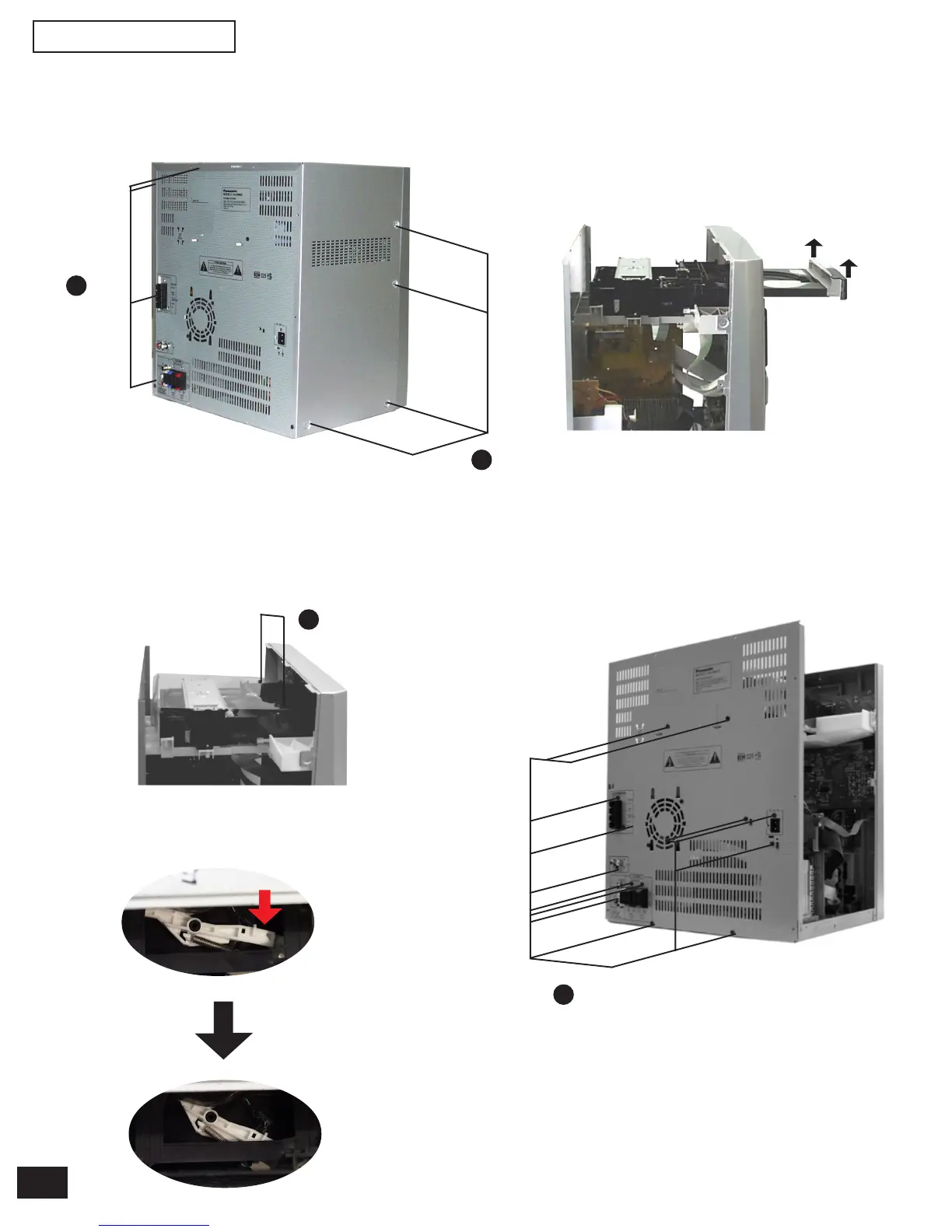
Step 1 Remove 4 screws each side and 8 screws at rear panel.
Step 2 Lift up both sides of cabinet ass’y, push the cabinet
ass’y toward the rear and remove the cabinet ass’y.
Step 4 To open the CD tray, release the lever as show.
a x 4
b x 2
Step 5 Pull out the CD tray as shown and remove the CD
lid. Push back the CD tray after the CD lid has
been removed.
CD lid
Step 6 Remove the screws.
b x 13
Step 3 Remove 2 screws and remove the dust cover.
b x 8
7.2 Disassembly for the CD changer ass’y
(The CD changer unit can be removed after the CD Lid is removed)
• Follow the (Step 1) (Step 2) of item 7.1.


 To Next Page