SC-HM910/SC-HM810
12
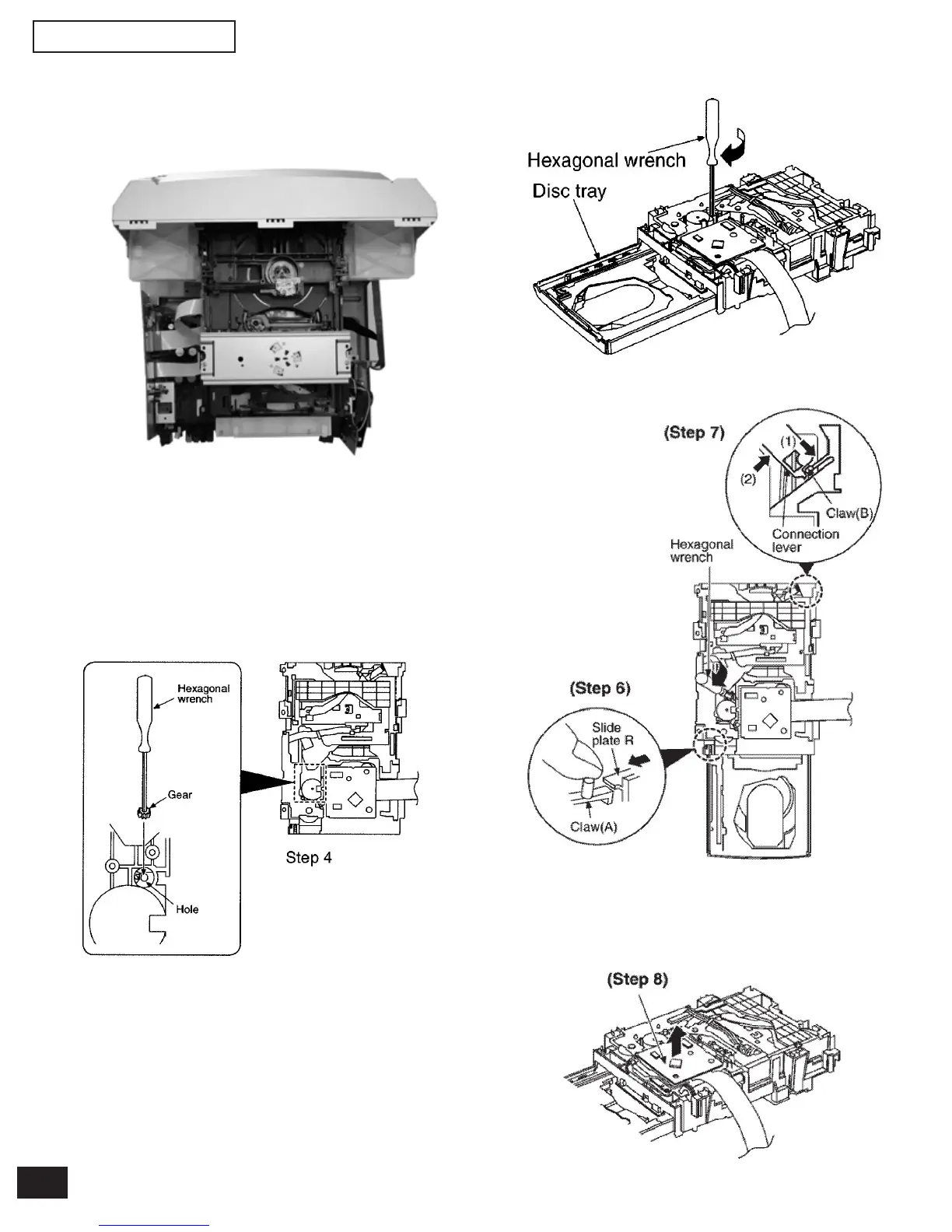
Step 5 Rotate the hexagonal wrench in the direction of arrow
(clockwise), and then open the disc tray fully.
Step 4 Insert the gear with hexagonal wrench into the hole.
Step 6 With pressing the claw (A), rotate the hexagonal
wrench clockwise. (The slide plate R moves for a little
amount.)
Step 7 Pressing the claw (B) in the direction of arrow (1), the
connection lever moves in the direction of arrow (2).
Step 8 Lift up the traverse deck ass’y.
7.4 Main Component Replacement Procedures
7.4.1. Replacement of the Traverse Deck
Step 1 Follow the (step 1 ) - (step 2) of item 7.1.
(Back side)
Catch
Catch
CN309
CN310
Step 2 Remove the wire CN309 and CN310 (main
P.C.B.), release the 2 catches.
Step 3 Remove the CD changer unit.


 To Next Page