SC-HM910/SC-HM810
15
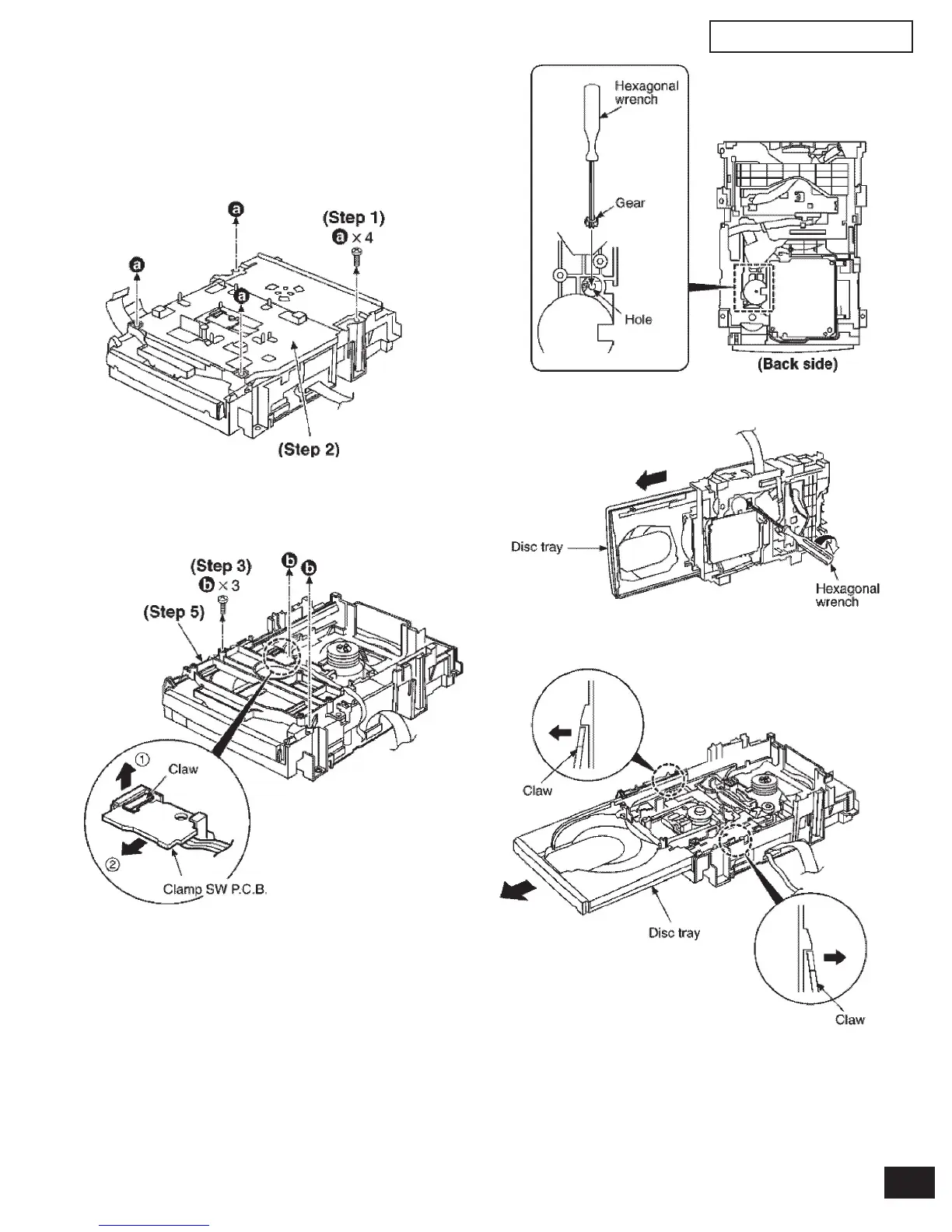
7.5 Replacement for the disc tray
Step 1 Remove 4 screws.
• Follow the (Step 1) - (Step 2) of item 7.1
• Follow the Disassembly for the CD changer of item 7.2.
• Follow the (Step 1) - (Step 8) of item 7.4.
Step 2 Remove the upper plate.
Step 3 Remove 3 screws.
Step 4 With lifting the claw in the direction of (1), draw the clamp
SW P.C.B. in the direction of arrow (2).
Step 5 Remove the mechanism cover.
Step 6 Insert the gear with hexagonal wrench into the hole.
Step 7 Rotate the hexagonal wrench in the direction of arrow,
and then open the disc tray fully.
Step 8 Release the both claws, and then draw the disc tray.


 To Next Page