16
Unit Setup
Home Screen
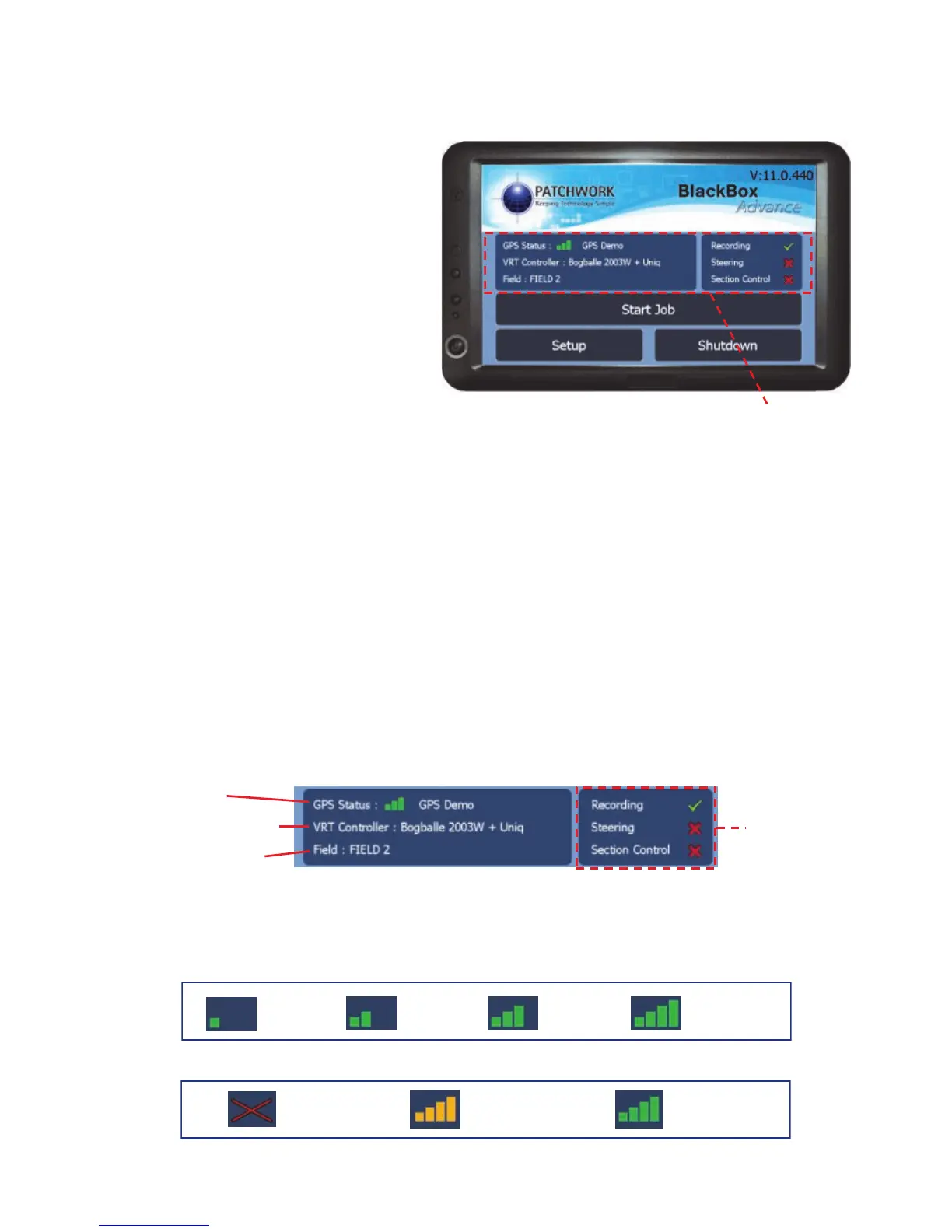
The Home Screen is the main
menu for setting up and accessing
the different job modes of the
BlackBox software.
Start Job - Start a guidance job, Field Boundary Map, Resume a Job, Planned
Job (Farm Management Software plan) or Variable Rate Plan (VRT Software
required) for more details see ‘Starting a Job > Start Job’ on page 33.
Setup - Opens the setup menu for the unit. Before starting a job it is important
that the unit is setup for your requirements (see Setup Menu on page 18).
Shutdown - Will shutdown the software and open up to the Program Sub Menu
(See page 17).
Status Screen - Displays relevant system information.
Status Screen
No GPS
Signal
GPS No
Differential
GPS With
Differential
GPS status
1 to 4
Satellites
5 to 6
Satellites
7 to 8
Satellites
9 or more
Satellites
GPS signal strength
Field Recognition
GPS Status*
Selected Controller
Feature Status
*GPS Status icons



 To Next Page