Chapter 3 Installing Drivers for 6000 Boards
23
steps below to install PenMount Windows Universal Driver:
Since PenMount Windows Universal Driver v2.1.0.263 and later versions
doesn’t support non-PnP devices by default. Should you need to install the
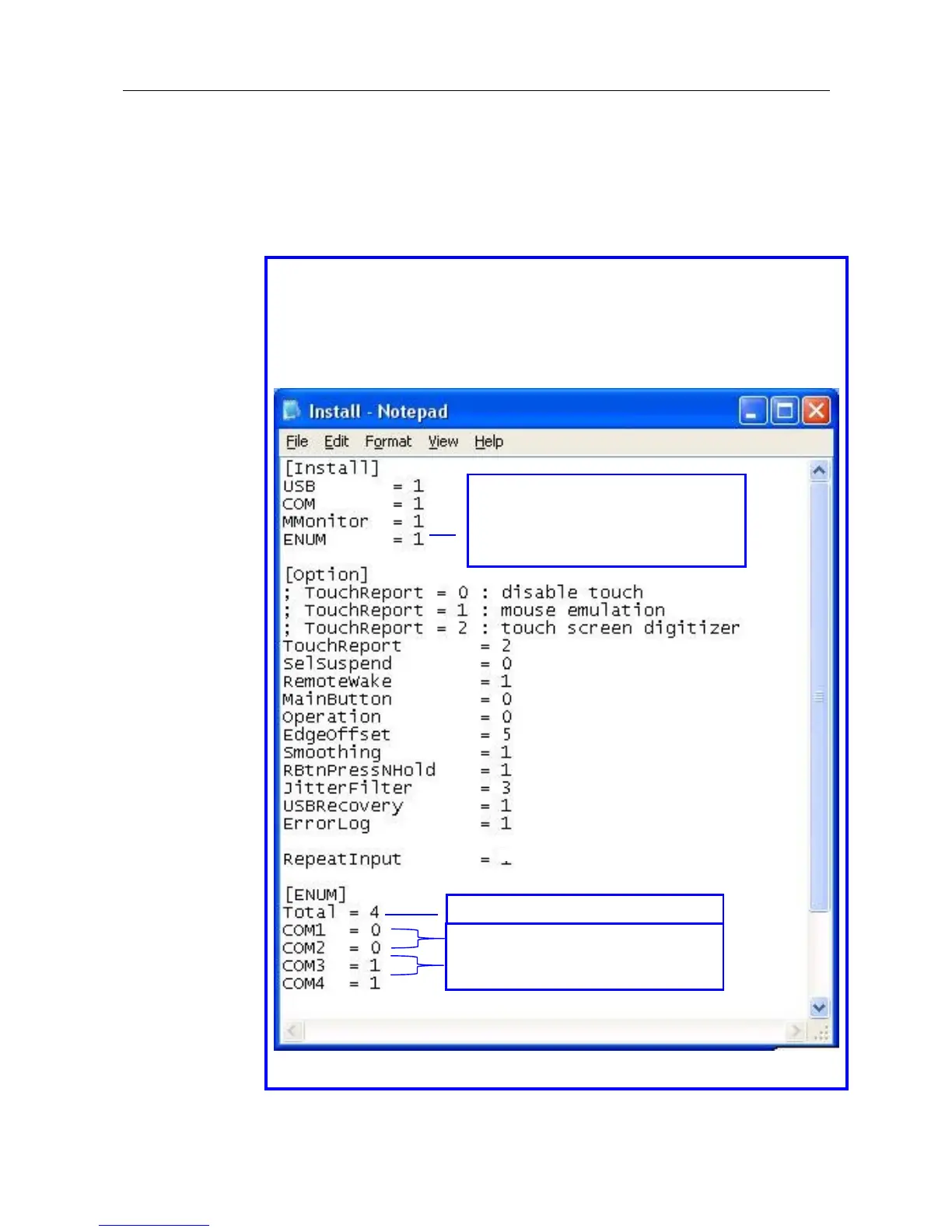
control board to COM ports, you need to make change to \PenMount
Universal Driver V2.1.0.XXX\Driver\Install.ini as indicated in the following
paragraph that is circled in blue line otherwise you can skip it:
Make change to [ENUM] as below:
Taking COM3 for example, if you are using COM3 to install PenMount RS232
non-PNP device:
Set COM3 = 1 to have COM3 detect PenMount non-PnP device.
(Set COM3 = 0 to have COM3 NOT detect PenMount non-PnP device.)
Save the change.
Set to 0 to NOT support PenMount
RS232 non-PnP devices.
Set to 1 to support PenMount
RS232 non-PnP devices.
Total number of COM ports.
COM1 and COM2 will not detect
PenMount non-PnP device while
COM3 and COM4 will.



 To Next Page