2-6
Wireless Pen
2.6 Calibration
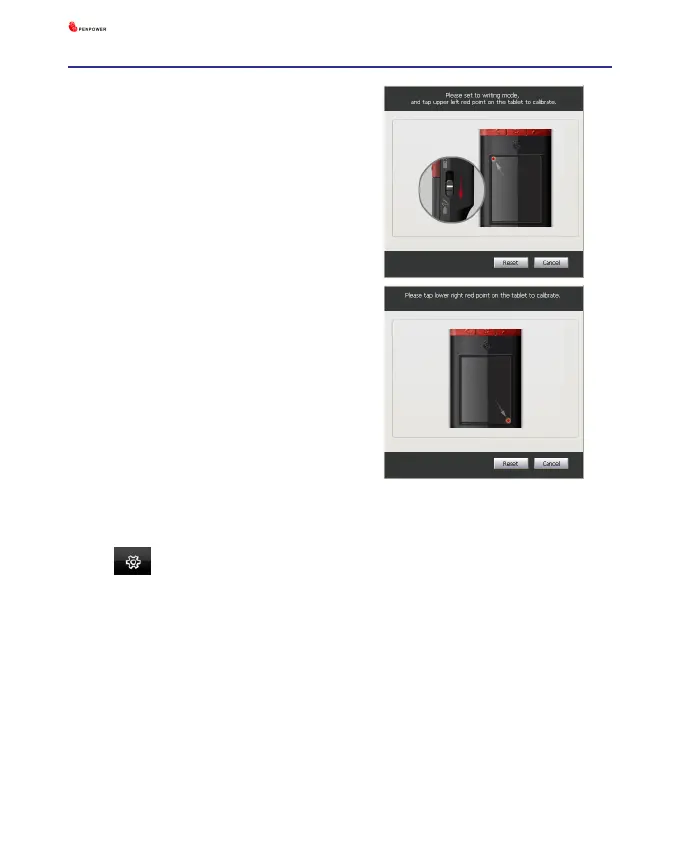
When you rst time launch the
Wireless Pen, the system will ask
you to calibrate the Wireless Pen.
Tip : After calibration, the new conguration would take effect immedi-
ately. You do not need reboot or reload handwriting system.
1. Switch the [Presenter/Handwrit-
ing mode switch] downward to
the [Handwriting mode].
2. Click on the top-left corner spot
of touch pad by the writing pen.
3. Click on the bottom-right corner
spot of touch pad by the writing
pen.
4. Click on [OK] to nish the cali-
bration.
In the future, if you nd that your handwriting on the screen is not on
the right location, you need to calibrate your Wireless Pen. Please click the
menu icon and select [Settings]/ [Tablet setting]/ [Tablet calibra-
tion] to launch the calibration window.



 To Next Page