Chapter 4 Full Screen Handwriting Mode
4-11
4.6.4 Articial Intelligence
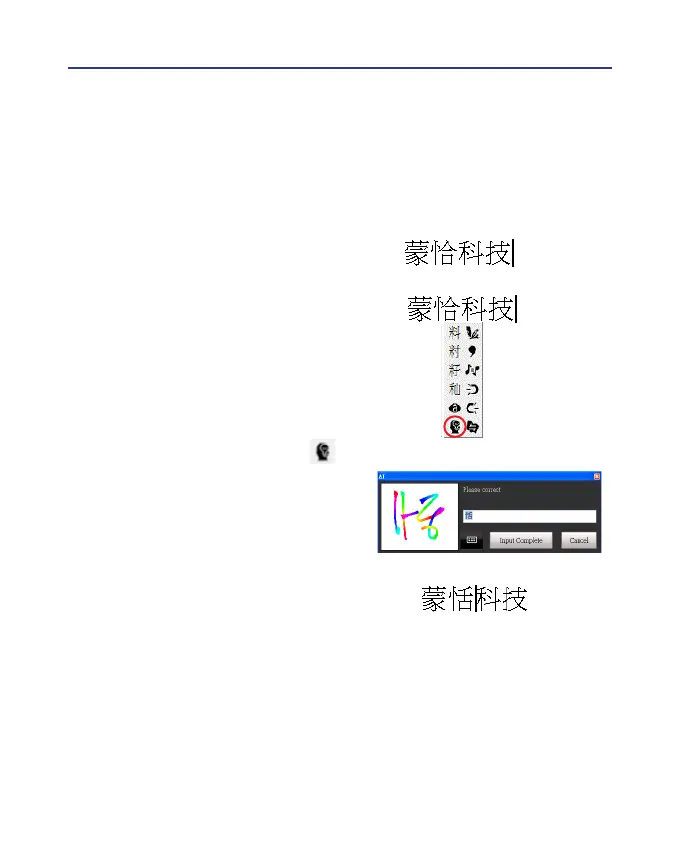
When you use candidate word or AI button to correct result, the system
will modify its recognition database to adapt your personal writing style.
The may improve the recognition rate.
1. Handwrite some words. The result would be sent in the caret.
2. e.g.
『恬』
is wrongly recognized as
『恰』
.
3. Move the cursor on the word
『恰』
for a while to pop up the function
tool bar.
4. Click the candidate word if the cor-
rect word is there.
5. Otherwise click the AI button to
open the AI correction dialog.
6. Input the correct word
『恬』
, and
then click [Input Complete].
7. You will see the wrong result
『恰』
is already updated as
『恬』
. Your
personal writing style of inking has
also been learned.



 To Next Page