Chapter 4 Full Screen Handwriting Mode
4-3
4.2 Candidate Words
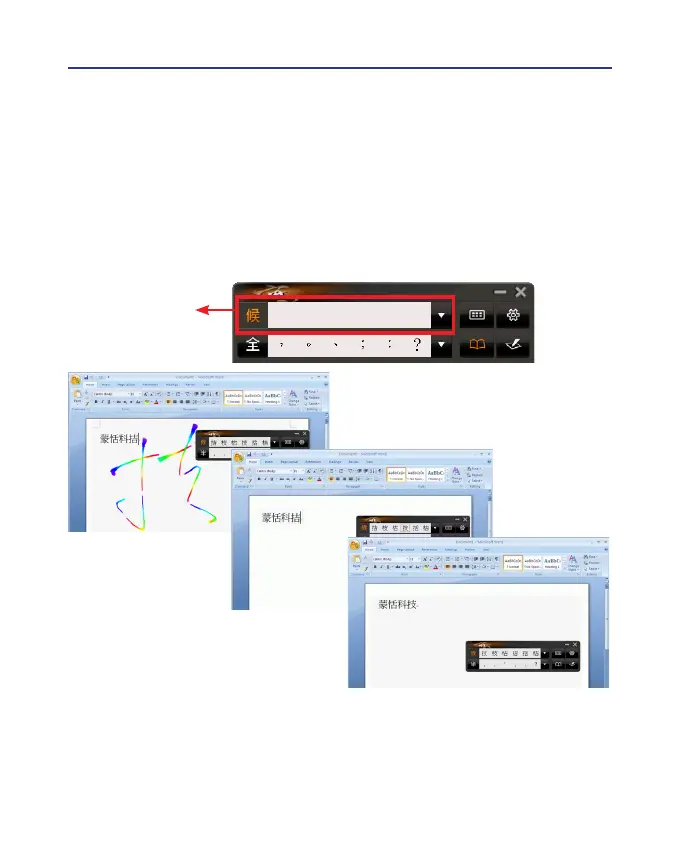
When you write a word on the tablet, the possible words that Wireless
Pen recognized will be listed in the candidate words area. You can select
the word you want among the candidate words to replace the original word
which displays in the word processor. For example, you write the word [
技
],
but the word shown in the word processor is [
拮
] . Then you can select the
right word [
技
] in the candidate words area to replace the wrong word [
拮
].
Candidate Words
Tips: When writing, candidate words based on the previous input will be
displayed on the handwriting toolbar. Each press of the left function
button on the touch tablet will move the candidate words forward
by one and correct the results. Please refer to section 7.5 to set
different functions of the buttons on the touch tablet.



 To Next Page