4-10
Wireless Pen
4.6.3 Phrase Correction
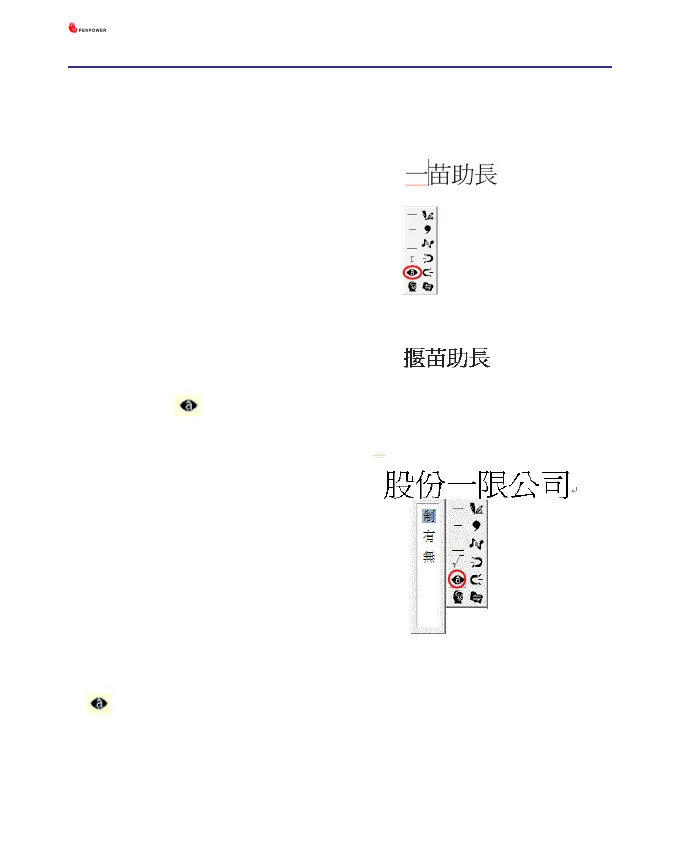
1. When entering an idiom in Full
Screen mode such as
『揠苗助長』
,
and you are not sure of how to write
the character
『揠』
, you can enter
the character
『一』
instead to input
『一苗助長』
.
2. Move the mouse over the character
『一』
and pause for a moment to
bring up the “Candidate Characters
Window”. Click the phrase correc-
tion button and the
『一』
char-
acter will be changed to
『揠』
.
3. If the phrase correction function
came up with multiple candidate
words, these will be shown in the
candidate words window for you
to choose from. For example, if the
input was
『股份一限公司』
when
you pause the mouse cursor over the
『一』
character, this will bring up
the “Candidate Characters Window”.
Pressing the phrase correction button
will bring up a list of all phrase
correction candidate words for you to
choose and make the correction with.



 To Next Page