Chapter 5 Writing Pad
5-1
Chapter 5 Writing Pad
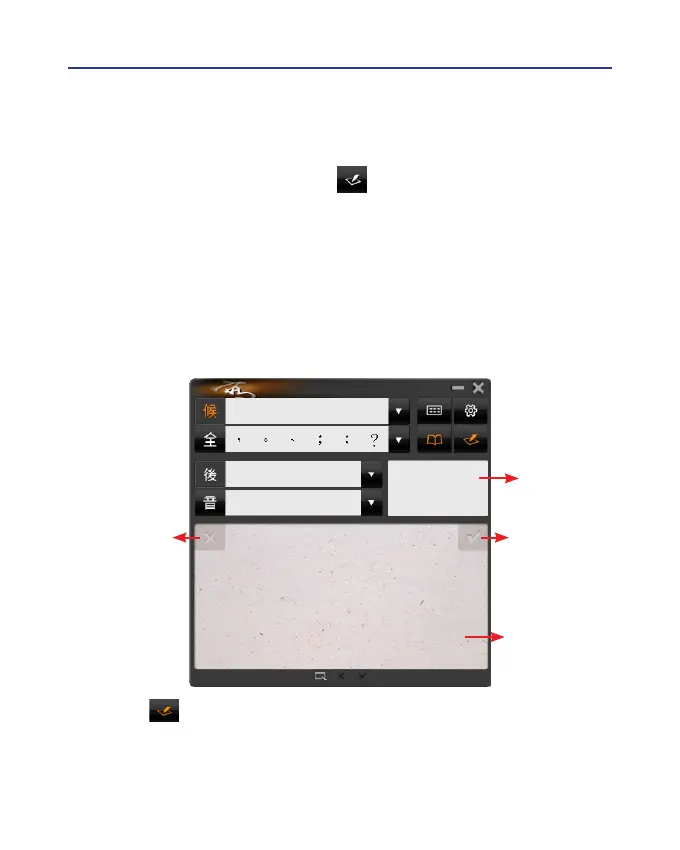
Besides the full screen writing mode, you can also select writing pad
mode. Click the writing pad button and the writing pad will appear.
Open any word processor, for example Microsoft Word or WordPad, and
write a word on the writing tablet. You can see the stroke shown on the
writing pad. Select the word you want in the candidate words area with
your mouse and the word will display on the word processor immediately.
Wireless Pen can recognize various characters including Traditional
Chinese, Simplied Chinese, English, Japanese(Hiragana/ Katakana), num-
bers, and symbols.
Related
Phrase
Writing Pad
Virtual Button:
Clear
Virtual Button:
Finish
Tip: Click to switch to full screen handwriting mode or writing pad
mode.



 To Next Page