INSTRUMENT PANEL
3
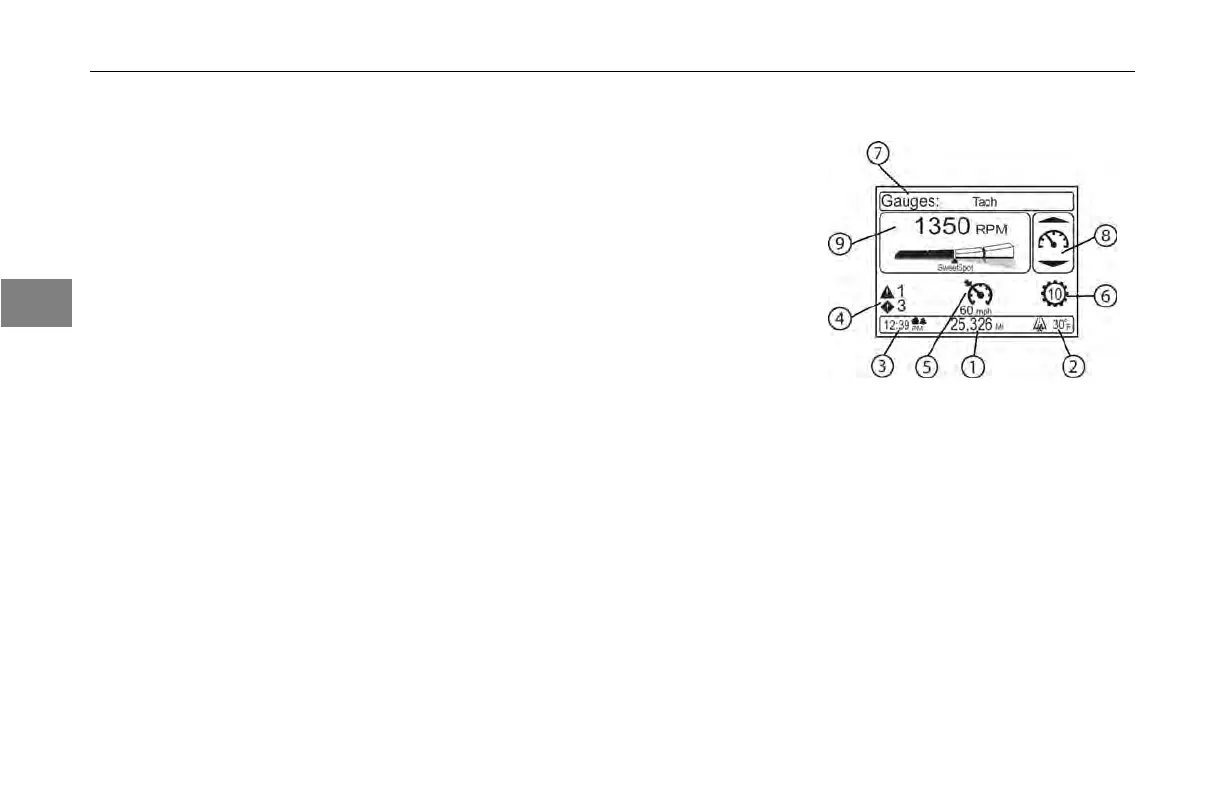
9. Driver Information Display
The display
can show multiple warning
lights. Warning information will appear
momentarily and then will minimize in
the screen. Reviewing the warnings
can be done by navigating the menu
via the Menu Control Switch.
10. Trip
Reset
The cluster
mounted trip reset button
is the only way to zero trip data. After
toggling the trip ODO (short pushes to
select Trip A, B, C, or D) to the desired
trip, HOLD the trip reset button, that
resets the displayed trip data.
Driver Information Display
1 Odometer/Trip Odometer
2 Outside Air Temperature
3 Clock
4 Active Warnings
5 Cruise Control Indicator
6 Automated Transmission
and Shift
Indicator Area
7 Header
8 MCS Knob Cue
9 Main Content Window
3-14
Y53-6047–2C (04/13)



 To Next Page