Programming
11 - 25
1 2
3
4 5 6 7 9 0
Enter
8
Esc
Clear
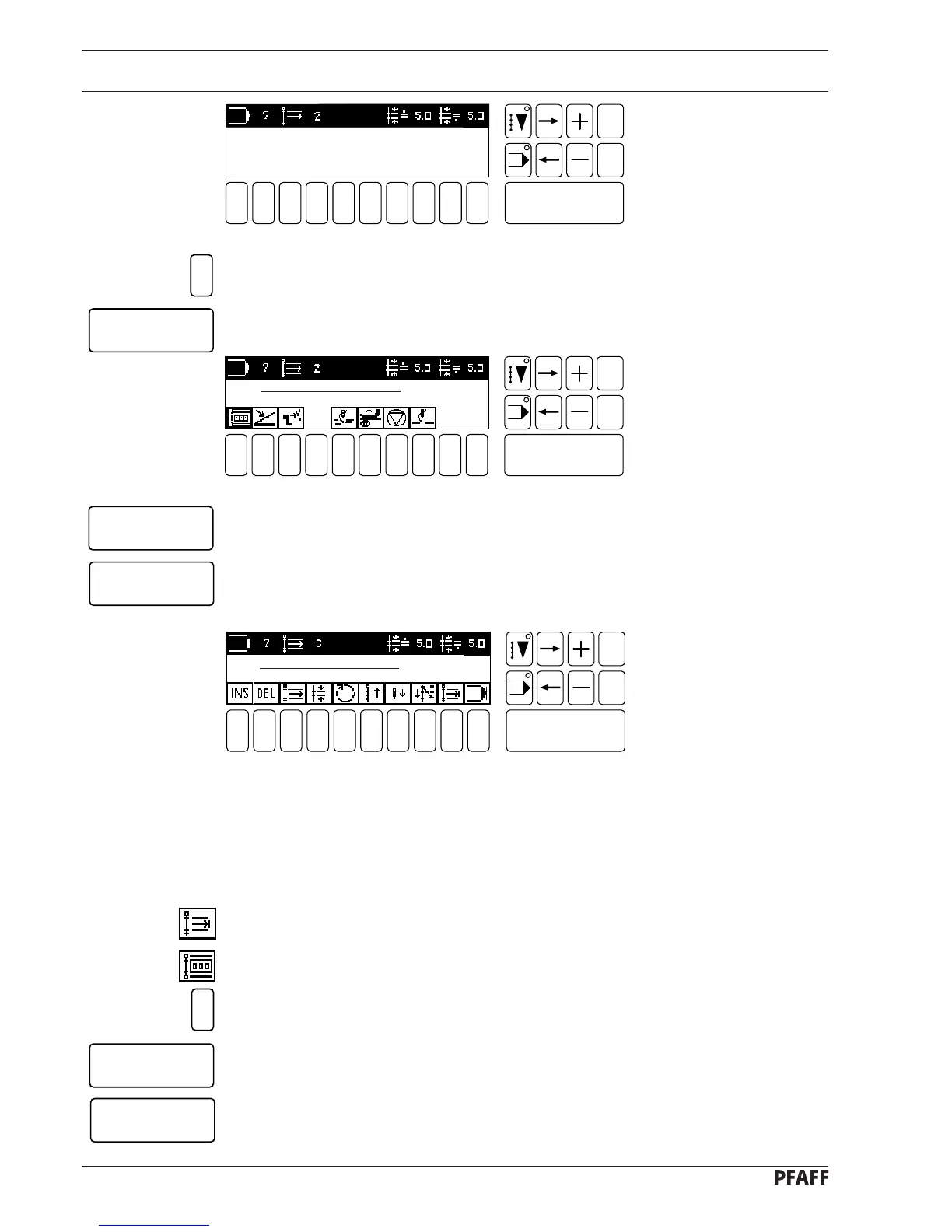
Fig. 11 - 45
NO. OF STITCHES: 0 STITCHES
[ PERMISSIBLE: 1 - 99 ]
● Enter the desired number of stitches.
● Confirm this number of stitches with the Enter key.
1 2
3
4 5 6 7 9 0
Enter
8
Esc
Clear
Fig. 11 - 46
● Press the Enter key to confirm the seam section end.
● Press the Enter key to confirm the second seam section end.
The machine jumps to the third seam section.
# 3
NO. OF STITCHES 0
● Program the third seam section so that:
- the stitch length is 5.0 mm,
- a stitch count is carried out (1 stitch)
- and the seam is sewn in reverse.
● Select the seam section end function (number key 9).
● Select the stitch counter function (number key 1).
● Enter the desired number of stitches.
● Confirm the number of stitches with the Enter key.
● Confirm the seam section end with the Enter key.
Display Fig. 11 - 48 appears.
1
Enter
Enter
Enter
1
Enter
Enter
# 2
NO. OF STITCHES 1
1 2
3
4 5 6 7 9 0
Enter
8
Esc
Clear
Fig. 11 - 47



 To Next Page