Programming
11 - 28
Fig. 11 - 55
1 2
3
4 5 6 7 9 0
Enter
8
Esc
Clear
Fig. 11 - 53
1 2
3
4 5 6 7 9 0
Enter
8
Esc
Clear
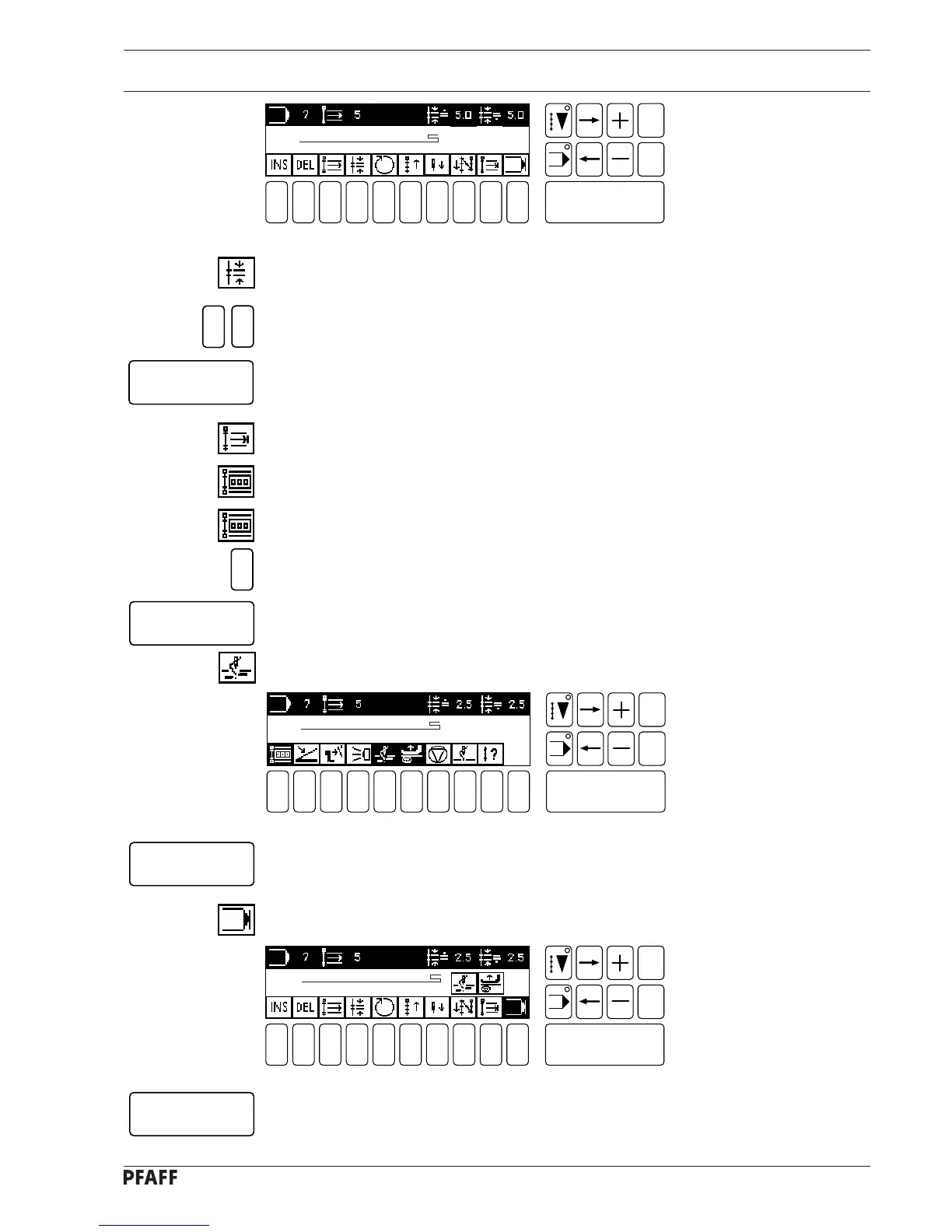
● Save the seam program by pressing the Enter key.
# 5
NO. OF STITCHES 1
● Confirm the seam section by pressing the Enter key.
● Select the program end function.
5
Enter
5
Enter
Enter
Enter
2
# 5
NO. OF STITCHES 5
# 5
NO OF STITCHES1
● Select the stitch length function (number key 4).
● Enter the value for the stitch length.
● Confirm this entry by pressing the Enter key.
● Select the seam section end function (number key 9).
● If the stitch counter function is not active, switch it on (number key 1).
● Activate the stitch counter function once again to open the menu for inputting.
● Enter the number of stitches.
● Confirm this entry by pressing the Enter key.
● Switch on the thread trimmer function (number key 5).
Fig. 11 - 54
1 2
3
4 5 6 7 9 0
Enter
8
Esc
Clear



 To Next Page