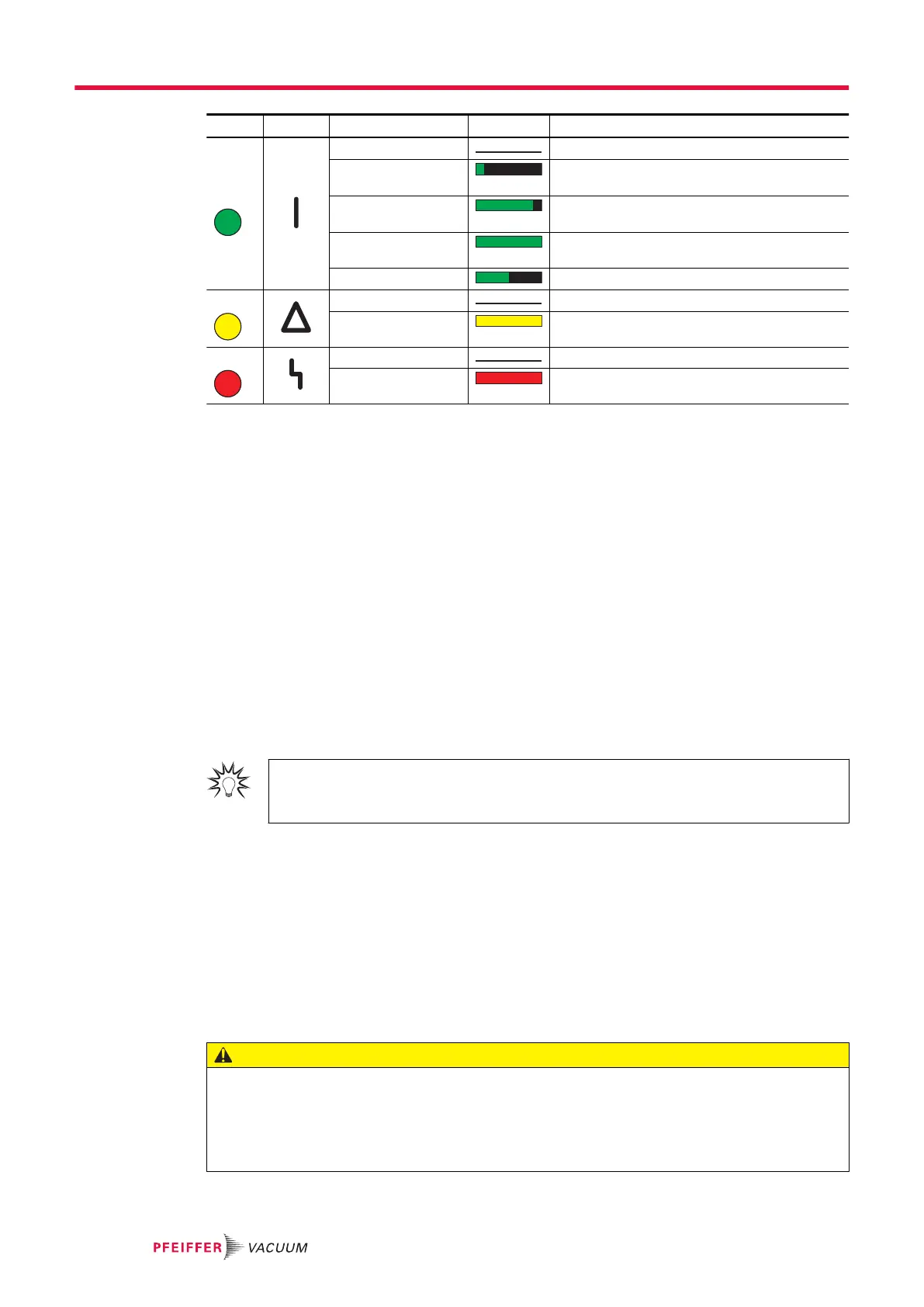
LED Symbol LED status Display Meaning
Green
Off Currentless
On, flashing "pumping station OFF", rotation speed
≤ 60 rpm
On, inverse flashing "pumping station ON", set rotation speed not
reached
On, constant "pumping station ON", set rotation speed
reached
On, flashing "pumping station OFF", speed > 60 rpm
Yellow Off No warning
On, constant Warning
Red Off No error, no warning
On, constant Error, malfunction
Tbl. 14: Behavior and meaning of the LEDs on the electronic drive unit
6.4.2 Temperature monitoring
If threshold values are exceeded, output signals from temperature sensors bring the turbopump to a
safe condition. Depending on the type, temperature thresholds for warning and error messages are im-
mutably stored in the electronic drive unit. For information purposes, various status requests are set up
in the parameter set.
●
In order to avoid switching off the turbopump, the electronic drive unit already reduces the power
consumption in case of exceeding the warning threshold for excess temperature.
─
Examples are an impermissible motor temperature, or impermissibly high housing tempera-
ture.
●
Further reduction of drive power and thus decreasing speed can potentially lead to underrun the
rotation speed switchpoint. The turbopump switches off.
●
Exceeding the temperature threshold for error messages switches off the turbopump immediately.
6.5 Switching off and venting
We recommend
Vent the turbopump after shutdown. By doing so, you prevent particles flowing back into
the vacuum system from the fore-vacuum area.
6.5.1 Switching off
Notes for switching off the turbopump
1. Shut down the turbopump via the control unit or remote control.
2. Close the fore-vacuum line.
3. Switch off the backing pump, if necessary.
4. Vent the turbopump (options see below).
5. Close the supply lines (e.g. for cooling water or sealing gas).
6.5.2 Venting
CAUTION
Risk of injuries due to contact with vacuum when venting
While venting the vacuum pump there is a risk of minor injuries due to the direct contact of body parts
with the vacuum, e.g. hematomas.
►
Do not fully unscrew the venting screw out of the housing during venting.
►
Keep a distance from automatic venting device, such as venting valves.
Operation
44/74




 To Next Page