7.4.2 Installing the electronic drive unit
Required tools
●
Allen key, size 3
●
Calibrated torque wrench (tightening factor ≤ 1.6)
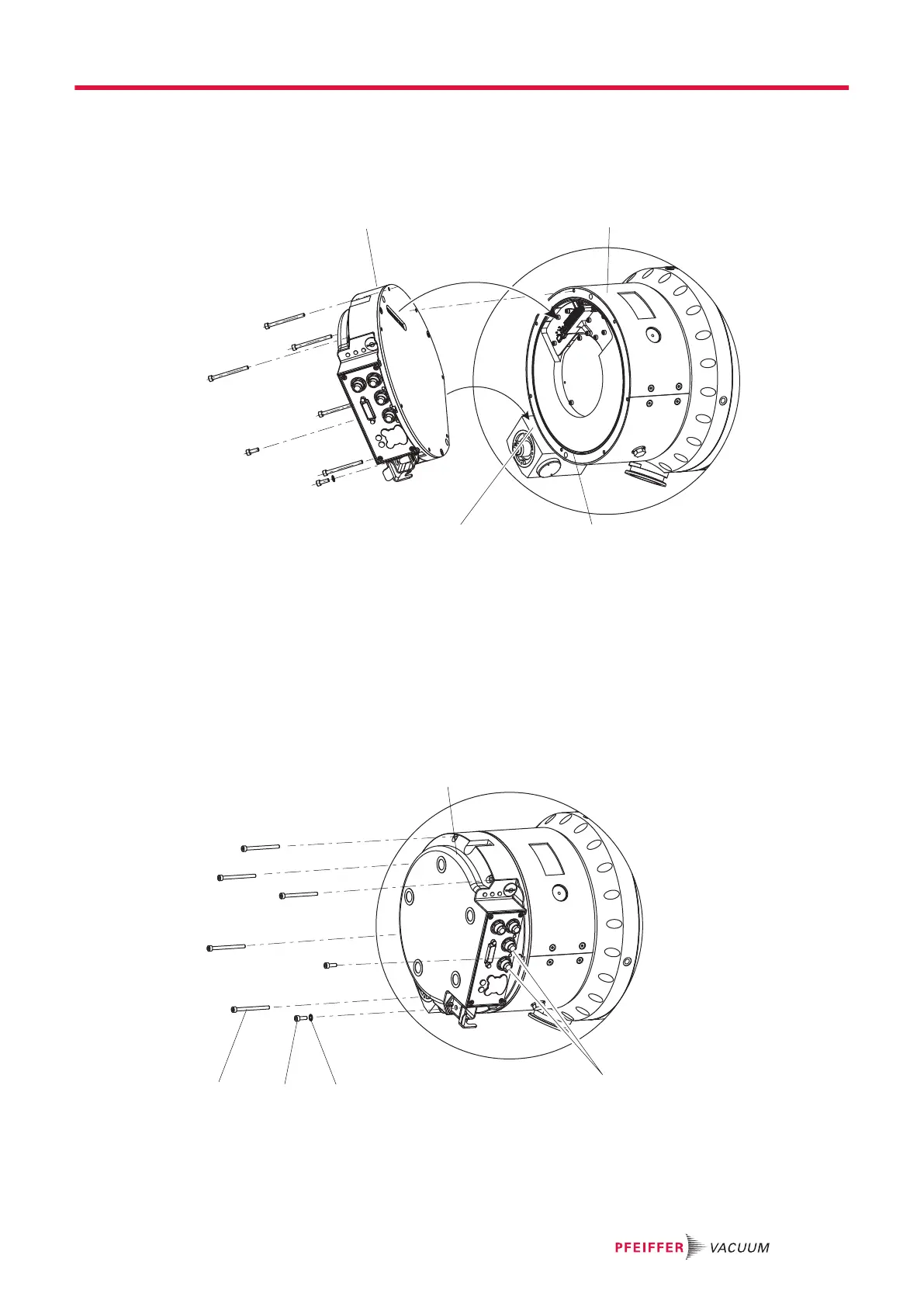
Fig. 29: Fitting the electronic drive unit
1 Electronic drive unit TC 1200 3 O-ring
2 Connecting plug 4 Straight edge of the operating fluid pump
Installing the electronic drive unit
1. If needed, secure the O-ring in the groove in the pump base.
2. Line up the new electronic drive unit with the straight edge of the operating fluid pump.
3. Carefully place the electronic drive unit on the connecting plug of the turbopump, making sure that
it is straight.
4. Check that the electronic drive unit is correctly seated on the pump base and in relation to the
screw connection bores.
Fig. 30: Attaching the electronic drive unit
1 Electronic drive unit TC 1200 4 Allen head screw M4 × 12
2 Screw plug 5 Allen head screw M4 × 65
3 Shake proof washer
Maintenance
51/74






 To Next Page