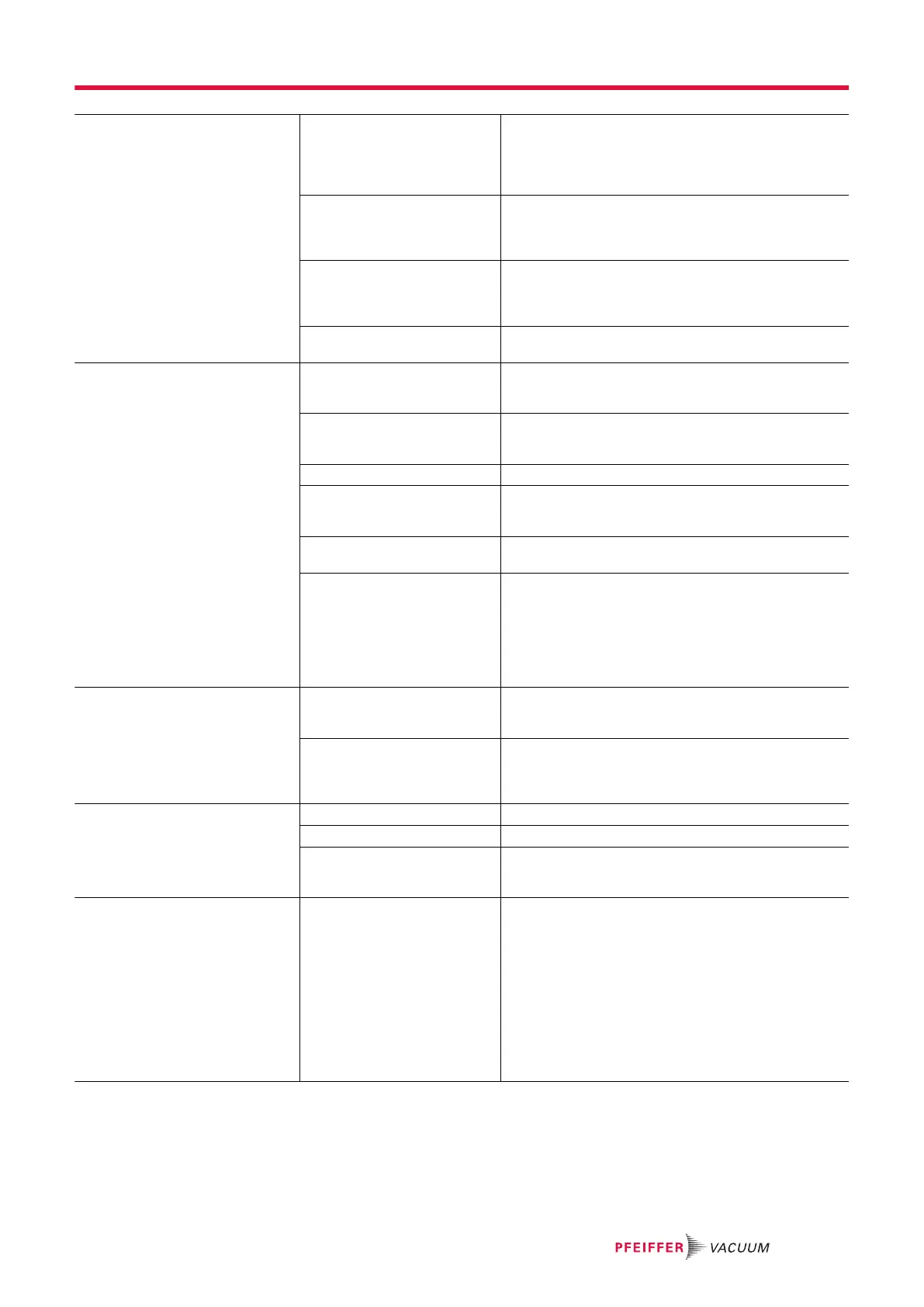
Turbopump will not start up;
green LED on the electronic drive
unit is flashing
● For operation without
control unit: Pins 1-3,
1-4 and 1-14 on the “re-
mote” connection are not
connected
● Connect the connections according to the elec-
tronic drive unit connection diagram.
● Install the mating plug from the shipment.
● For operation via
RS-485: The bridge be-
tween pins 1 and 14 in-
hibits control commands
● Remove the bridge at the “remote” connection.
● Remove the mating plug from the electronic drive
unit.
● For operation via
RS-485: Parameters not
set in the electronic drive
unit
● Set the parameters [P: 010] and [P: 023] via the
interface RS-485 to 1 = "ON".
● Voltage drop in the cable
is too high
● Check the connection cable.
● Use a suitable connection cable.
Turbopump fails to reach the
nominal rotation speed within the
set run-up time
● fore-vacuum pressure
too high
● Check backup pump compatibility (see technical
data).
● Check that the backup pump is working.
● Leakage on the turbo-
pump
● Carry out leak detection.
● Check seals and flange connections.
● Eliminate leaks.
● Gas throughput too high ● Reduce the process gas load.
● Rotor not running
smoothly, defective bear-
ing
● Check the turbopump for noise development
● Contact Pfeiffer Vacuum Service.
● Run-up time setpoint ad-
justed too low
● Extend the run-up time setpoint [P:700] via a dis-
play and control unit.
Thermal load due to:
● lack of ventilation
● water flow too low
● fore-vacuum pressure
too high
● ambient temperature too
high
● Reduce the thermal load.
─ Ensure adequate air supply.
─ Adjust the cooling water flow.
─ Reduce the fore-vacuum pressure.
─ Adapt the ambient conditions.
Turbopump not achieving the ulti-
mate pressure
● Turbopump is polluted ● Heat the turbopump if required.
● Have it cleaned.
● Contact Pfeiffer Vacuum Service.
● Vacuum chamber, pipes
or turbopump leaking
● Carry out leak detection starting from the vacuum
chamber.
● Check seals and flange connections.
● Eliminate leaks in the vacuum system.
Unusual noises during operation ● Rotor bearing damaged ● Contact Pfeiffer Vacuum Service.
● Rotor damaged ● Contact Pfeiffer Vacuum Service.
● Splinter shield or protec-
tive screen loose
● Check and correct the seat of the splinter shield
or protective screen in the high vacuum flange.
● Follow the installation instructions.
Red LED on the electronic drive
unit illuminates
● Group error ● Reset the malfunction by switching the current
supply off and on.
● Reset the malfunction with V+ on pin 13 on the
“remote” connection.
● Set the parameter [P: 009] via the interface
RS-485 to 1 = Malfunction acknowledgment.
● Set the parameter [P: 010] via the interface
RS-485 to 0 = off and then 1 = On and Malfunc-
tion acknowledgment.
● Carry out a differentiated malfunction analysis
with a display and control unit.
● Contact Pfeiffer Vacuum Service.
Tbl. 17: Troubleshooting turbopumps
Malfunctions
57/74




 To Next Page