EasyManua.ls Logo

Philips BDL3245E/00 - 13. DDC Instruction; DDC;EDID Configuration Process

Philips BDL3245E/00
183 pages
Print Icon
To Next Page IconTo Next Page
To Previous Page IconTo Previous Page
Loading...
1
3
N
o
B
D
G
e
D
D
In
nu
It i
s
bo
Ad
As
1.
2.
3.
4.
5.
6.
13
13
Th
pr
o
102
102
3
. DDC I
n
o
te: Take th
e
D
L4645E’s)
e
neral
D
C Data Re-
case the m
a
mbers of th
e
s
advised to
ard has bee
n
d
ditional info
r
s
sociation (V
E
A
n i486 (or
Microsoft o
p
“PORT95
N
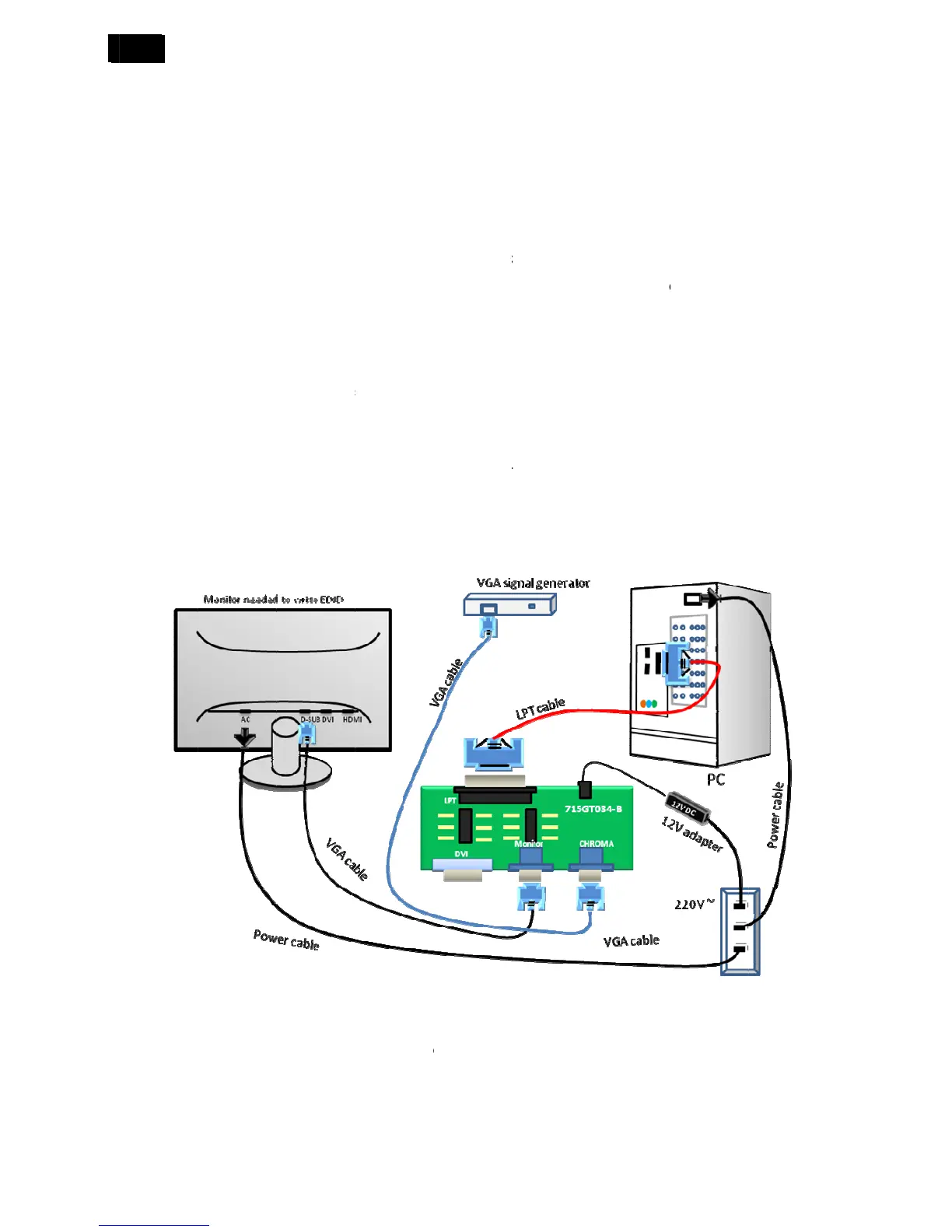
DDC BOA
R
LPT cablex
EDID Data
.1 Connect
.2. Install t
h
e process o
f
o
blem, plea
s
n
structi
o
e
BDL4645
E
programmin
g
a
in EEPRO
M
e
repaired m
o
re-solder th
e
n
replaced, i
r
mation abo
u
E
SA). Exten
above) pers
p
eration sys
t
N
T.exe”, “VG
R
D (715GT0
3
1, VGA cabl
e
the DDC B
o
h
e “PORT95
f
installing “
P
s
e read it.
o
n
E
EDID SOP
g
M
with Softw
a
o
nitor have t
e
main EEP
R
n this case t
u
t DDC (Dis
p
ded Display
onal compu
t
t
em Window
s
A20110512
_
3
4-B) x1
e
x 1, power
o
ard as foll
o
NT.EXE”, a
n
P
ORT95NT”
for exampl
e
a
re DDC whi
c
o be re-prog
R
OM with S
o
he DDC dat
a
p
lay Data Ch
Identificatio
n
t
er or compa
s
95/98/200
0
_
NDSCDT2.
0
cord x 2, 12
o
w:
n
d restart t
h
has been s
p
e
(the BDL3
c
h store all f
a
rammed.
o
ftware DD
C
a
does not n
e
annel) may
b
n
Data (EDI
D
tible.
0
/XP.
0
.exe”, “TP
V
V DC powe
r
h
e compute
r
p
ecified in, s
o
2
45E & BD
L
a
ctory settin
g
C
from the ol
d
e
ed to be re
-
b
e obtained
D
) informatio
V
HDMI.exe”
p
r
source
r
.
o
it will not b
e
L
4245E SO
P
g
s were repl
a
d
board onto
-
programme
d
from Video
E
n may be al
s
p
rogram.
e
specified a
P
are almos
t
a
ced for a d
e
the new bo
a
d
.
E
lectronics
S
s
o obtained
f
gain. If you
h
t
the same
a
e
fect, the se
r
a
rd if circuit
S
tandards
f
rom VESA.
h
ave any
a
s
r
ial

Table of Contents

Related product manuals