16
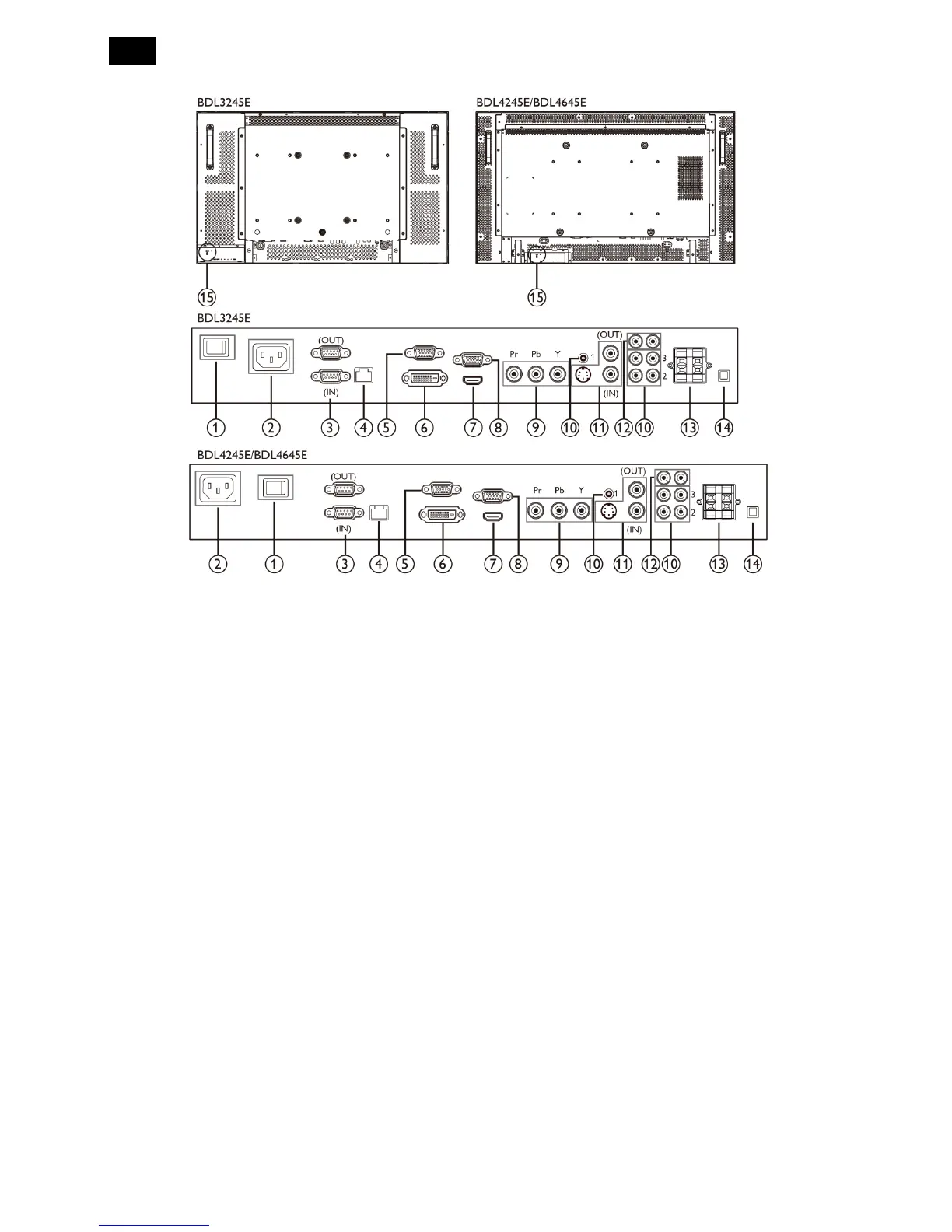
3.2 Input/ Output Terminal
.
1. MAIN POWER SWITCH
Press to switch the main power on/off.
2. AC IN
Connect the supplied power cord to the wall outlet.
3. RS232C (OUT/IN)
RS232C network input/output connection is for the
use of loop-through function.
4. RJ-45
LAN control function for the use of remote control
signal from control center.
5. VGA OUT
Output the VGA signal from the VGA IN (D-SUB)
6. DVI-D IN
Connect the DVI-D output of a PC, or the HDMI
output of an AV device by using a DVI-HDMI cable.
7. HDMI IN
Connect the HDMI output of an AV device, or the
DVI-D output of a PC by using a DVI-HDMI cable.
8. VGA IN (D-SUB)
Connect the computer VGA output.
9. COMPONENT IN (BNC)
Connect the component YPbPr output from
external AV device.
10. AUDIO IN 1,2,3
Connect audio input from external AV device.
AUDIO IN 1: 3.5mm stereo phone jack
AUDIO IN 2,3: RCA phone jack
11. VIDEIO IN/OUT
S-VIDEO IN (Mini DIN 4 pin): Connect the
S-VIDEO (Y/C separate signal) input.
VIDEO IN (BNC): Connect the composite video
signal input.
VIDEO OUT (BNC): Connect the composite
video signal output from VIDEO IN (BNC)
12. AUDIO OUT R/L (RCA)
Connect the audio signal output from AUDIO IN 1,
2, or 3 jack to an external AV device.
13. SPEAKERS OUT R/L
Connect the audio output to external speakers.
14. SPEAKER SWITCH
Press to switch the internal speaker on/off
15. KENSINGTON LOCK
For security and theft prevention












 To Next Page