20
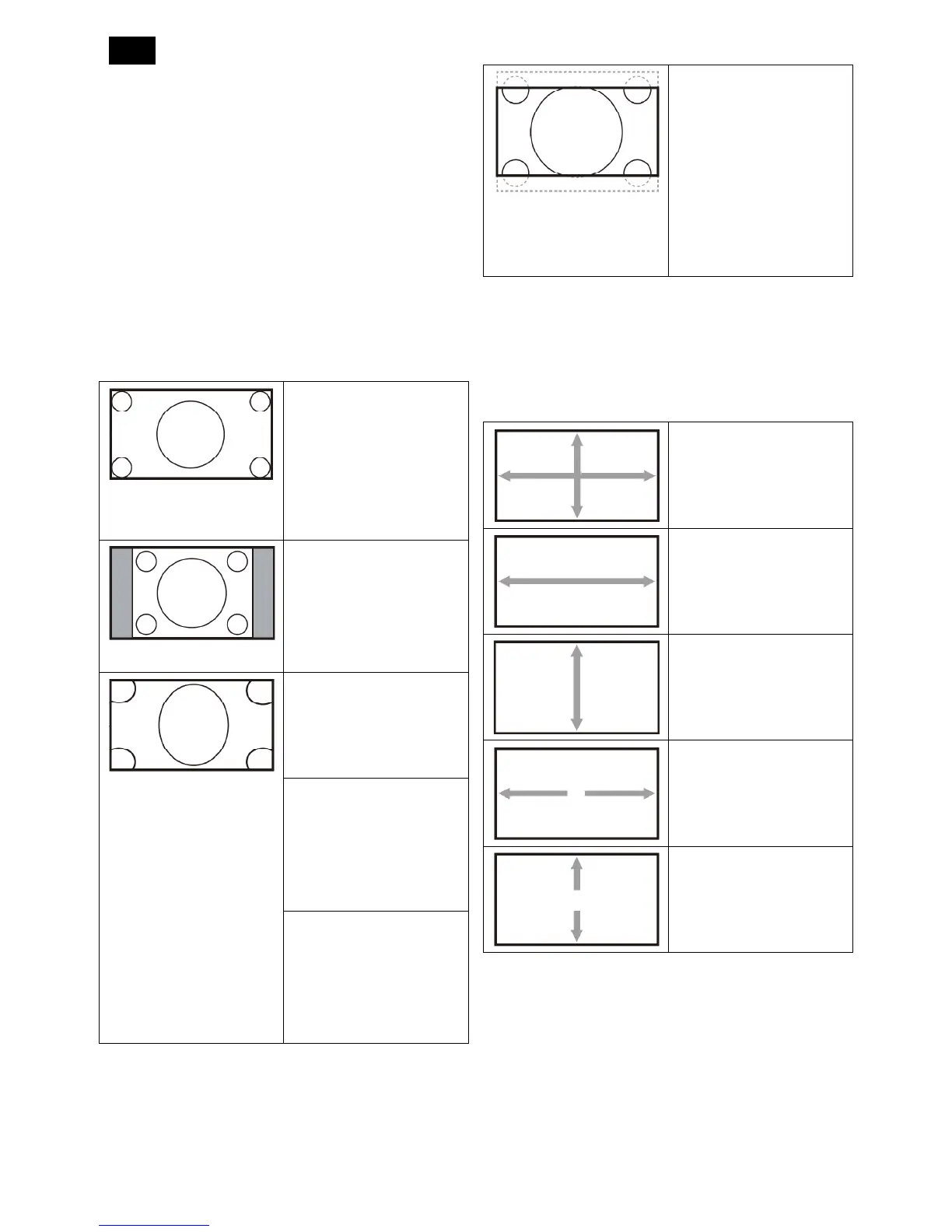
Zoom mode
The pictures you receive may be transmitted in 16:9
format (wide screen) or 4:3 format (conventional
screen). The 16:9 pictures sometimes have a black
band at the top and bottom of the screen (letterbox
format).
This function allows you to optimize the picture display
on screen. The following zoom modes are available
for:
PC mode: {Full} / {Normal} / {Custom} / {Real}.
Video mode: {Full} / {Normal} / {Dynamic} / {Custom}
/ {Real} / {21:9}.
Full
This mode restores the
correct proportions of
pictures transmitted in
16:9 using the full screen
display.
Normal
The picture is reproduced
in 4:3 format and a black
band is displayed on
either side of the picture.
Dynamic
Fill the entire screen by
stretching 4:3 pictures
non-proportionally.
Custom
Choose to apply the
custom zoom settings in
the Custom Zoom
submenu.
Real
This mode displays the
image pixel-by-pixel on
screen without scaling the
original image size.
21:9The picture is
enlarged to 16:9 format.
This mode is
recommended when
displaying pictures that
have black bands at the
top and bottom (letterbox
format).
Custom zoom
You can use this function to further customize the
zoom settings to suit the image you want to display.
NOTE: This item is functional only when the Zoom
mode setting is set to Custom.
Zoom
Expands the horizontal
and vertical sizes of the
image simultaneously.
H zoom
Expands the horizontal
size of the image only.
V zoom
Expands the vertical size
of the image only.
H position
Moves the horizontal
position of the image left
or right.
V position
Moves the vertical
position of the image up
or down.
Screen reset
Reset all settings in the Screen menu to factory preset
values












 To Next Page