E9480UD_EN.qx3 04.7.22 8:26 PM Page 31 <)
Clock Setting (cont'd) 31
Time/Date Manual
If the Recorder does not set the time and date correctly using the
Time/Date Automatic feature, set the clock manually by following the steps
below, Manual clock setting overrides Automatic clock setting.
®_Make sure the Recorder is in DVD mode, Press DVD so the DVD light
appears on the front of the Recorde_
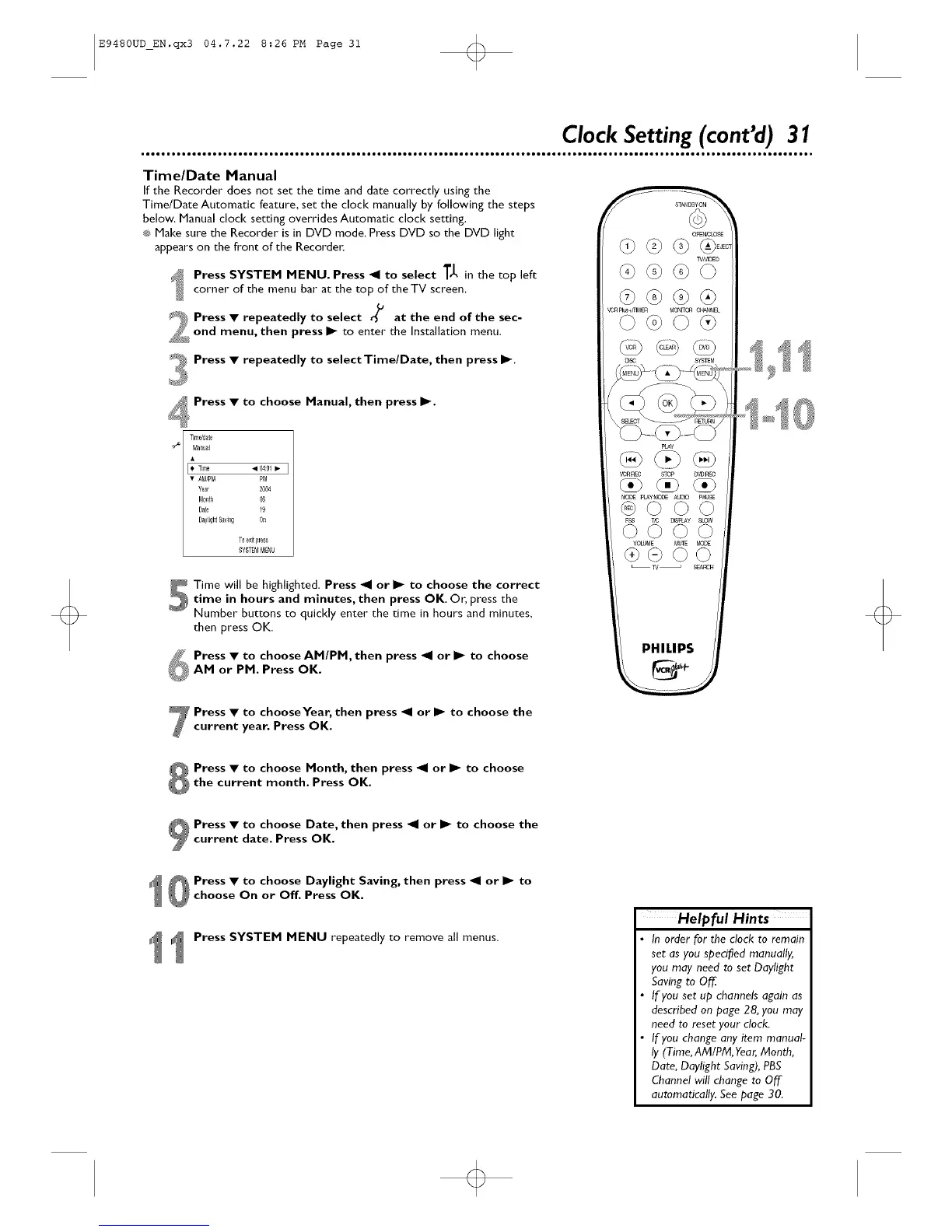
Press SYSTEM MENU. Press _1 to select T_, in the top left
corner of the menu bar at the top of the TV screen.
S_J_Press • repeatedly to select % at the end of the sec-
2:ond menu, then press I_ to enter the Installation menu,
Press • repeatedly to select Time/Date, then press I_.
Press • to choose Manual, then press I_.
Timddae
Manual
• 04:01• I
• AM/PM PM
Year 2004
Mo_tl 06
Date 19
DaylightS_ving Or_
To _xitpTess
SYSTEMM_NU
S Time will be highlighted. Press _1 or I_ to choose the correct
time in hours and minutes, then press OK, Or, press the
Number buttons to quickly enter the time in hours and minutes,
then press OK.
Press • to choose AM/PM, then press _1 or I_ to choose
AM or PM. Press OK.
TV_EO
¢0n_+mM£R MON_ O_NNEL
_ SYSTEM
PHILIPS
Press • to chooseYear, then press _1 or I_ to choose the
current year. Press OK.
Press • to choose Month, then press _1 or I_ to choose
the current month. Press OK.
Press • to choose Date, then press _1 or I_ to choose the
current date. Press OK.
Press • to choose Daylight Saving, then press _1 or I_ to
choose On or Off. Press OK.
Press SYSTEM MENU repeatedly to remove all menus.
Helpful Hints
In order for the clock to remain
set as you specified manually,
you moy need to set Daylight
Saving to Off
If you set up channels again as
described on page 28, you may
need to reset your clock.
If you change any item manual-
ly (Time, AM/PM, Yeor,Month,
Date, Daylight Saving), PBS
Channel will change to Off
automatically. See page 30.













 To Next Page