E9480UD_EN.qx3 04.7.22 8:26 PM Page 75 <_
Time Search,Index Search 75
Time Search
Follow the steps below to search forward or backward on a tape a specific
length of time.There must be a tape in the cassette compartment.
_ Before you begin, make sure the Recorder is inVCR mode. PressVCR so
theVCR light appears on the front of the Recorder.
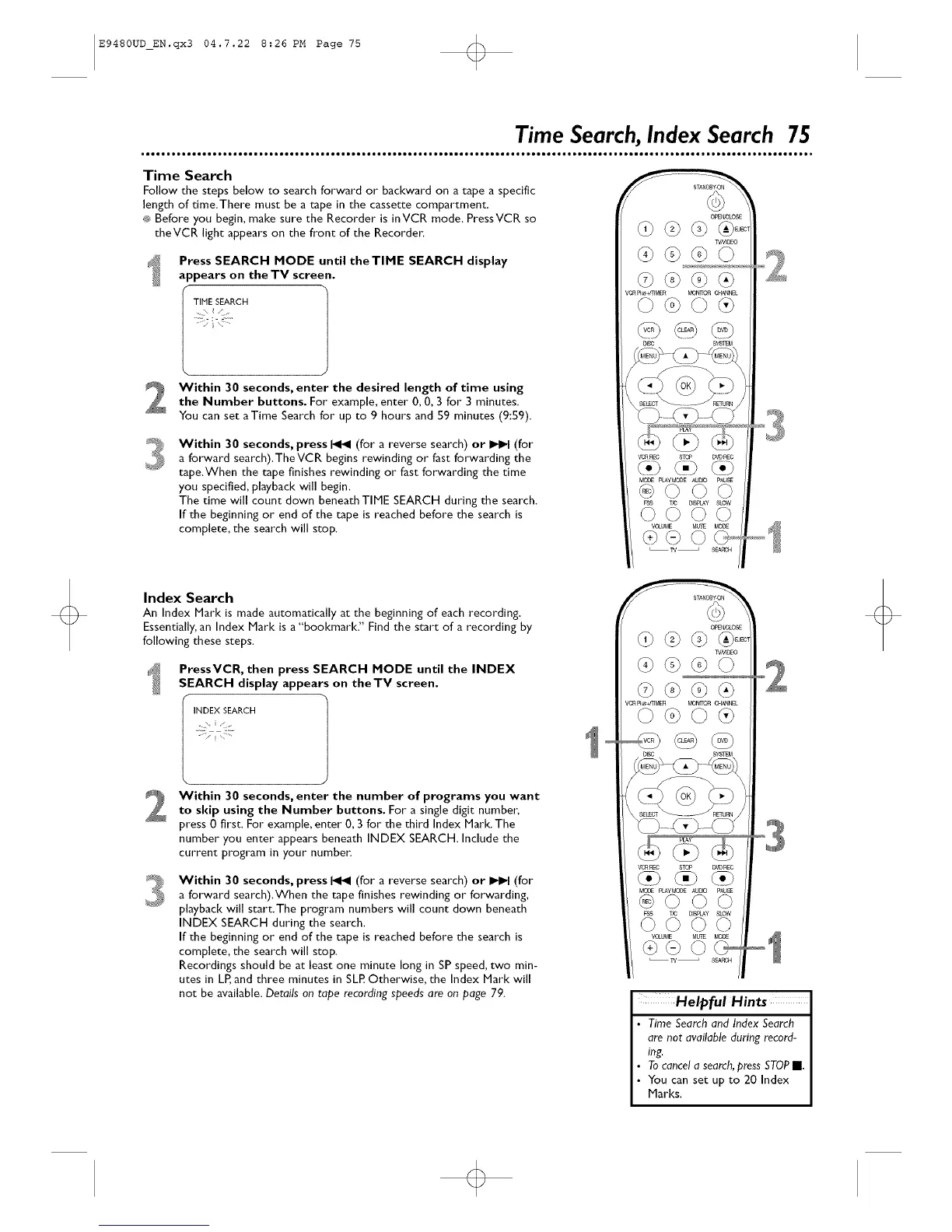
Press SEARCH MODE until theTIME SEARCH display
appears on the TV screen.
F
TIME SEARCH
.....j
Within 30 seconds, enter the desired length of time using
the Number buttons. For example, enter 0, 0, 3 for 3 minutes.
You can set aTime Search for up to 9 hours and 59 minutes (9:59).
Within 30 seconds, press _ (for a reverse search) or _ (for
a forward search),TheVCR begins rewinding or fast forwarding the
tape.When the tape finishes rewinding or fast forwarding the time
you specified, playback will begin.
The time will count down beneath TIME SEARCH during the search.
If the beginning or end of the tape is reached before the search is
complete, the search will stop.
Index Search
An Index Mark is made automatically at the beginning of each recording.
Essentially,an Index Mark is a "bookmark." Find the start of a recording by
following these steps.
ProssVCR, then press SEARCH MODE until the INDEX
SEARCH display appears on theTV screen,
INDEX SEARCH
2
Within 30 seconds, enter the number of programs you want
to skip using the Number buttons. For a single digit numbe_,
press 0 first. For example, enter 0, 3 for the third Index Mark. The
number you enter appears beneath INDEX SEARCH. Include the
current program in your number.
Within 30 seconds, press _ (for a reverse search) or _ (for
a forward search).When the tape finishes rewinding or forwarding,
playback will start.The program numbers will count down beneath
INDEX SEARCH during the search.
If the beginning or end of the tape is reached before the search is
complete, the search will stop.
Recordings should be at least one minute long in SP speed, two min-
utes in LR and three minutes in SLP.Otherwise, the Index Marl< will
not be available. Details on tape recording speeds are on page 79.
_E_OS£
v_ _MER MON_ _L
_R REC ST_ D_gP_C
<-><.>
MODE PLAyMODEADD PAU_
@©©©
VOLUME MUlE MODE
@@
Helpful Hints
Time Search and Index Search
are nat available during record-
ing.
Tocancela search,press STOPII.
You can set up to 20 Index
Marks.













 To Next Page