E9480UD_EN.qx3 04.7.22 8:26 PM Page 69 <_
Videotape Recording 69
Read and follow the steps below to record a current television program
onto a videotape.
_ Before you begin, make sure the Recorder is inVCR mode. PressVCR so
theVCR light appears on the fl'ont of the Recorder.
Turn on theTV and set it to channel 3 or 4 or theVideo In
channel. If you connected the Recorder to the TV using the sup-
plied audio and video canes, select your TV'sVideo In channel,
Details are on page 14.
If you connected the Recorder to the TV using the supplied RF
coaxial cable, choose channel 3 (or 4) at the TV. Details are on pages
10-11.
You must use composite video or the RF coaxial cane connection
for VCR features,
Insert a videotape with its record tab intact into the cas-
sette compartment of the Recorder. If videotape playback
begins, press STOP II,
Press REC MODE until the desired tape speed (SP or SLP)
appears briefly on theTV screen. Details about tape speed are on
page 79.
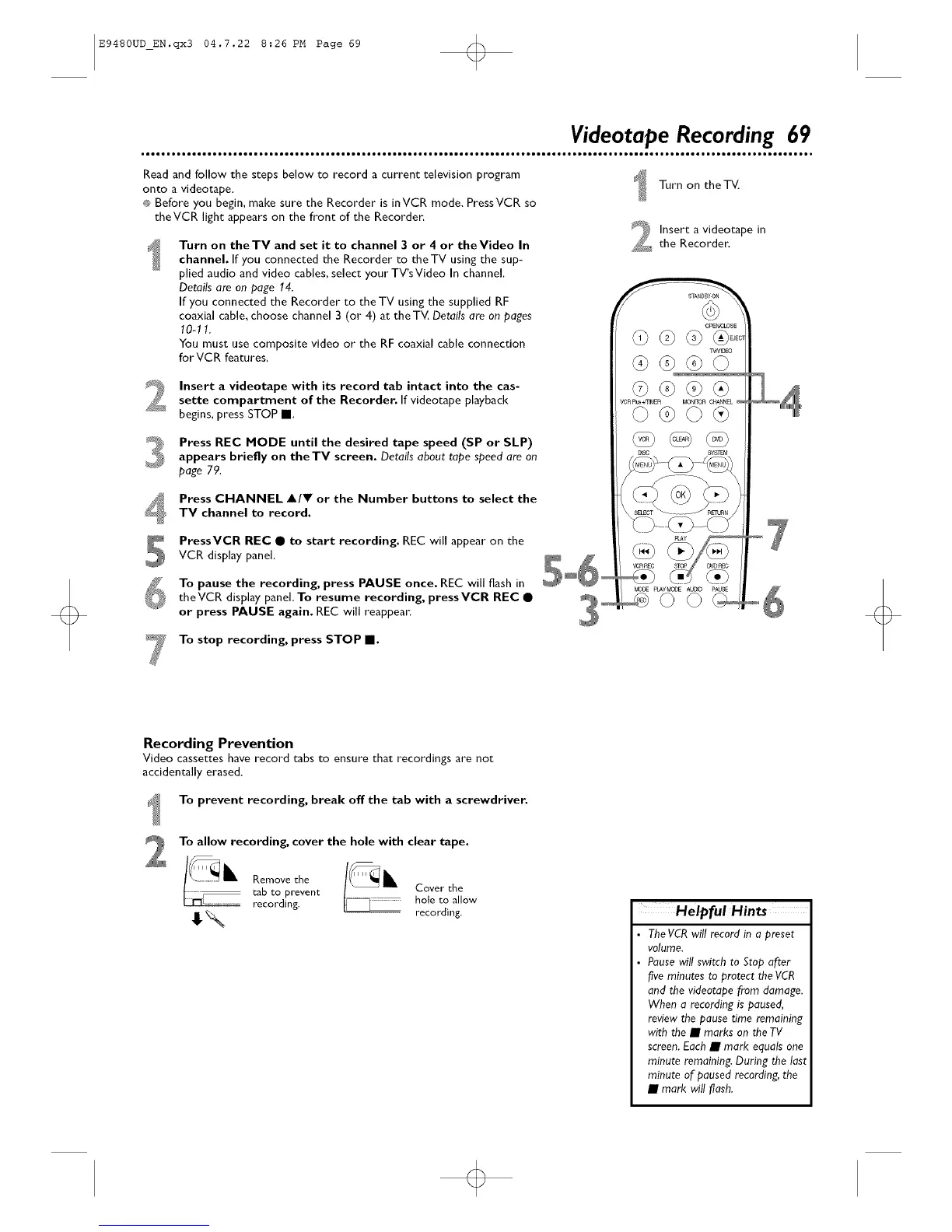
Press CHANNEL A/V or the Number buttons to select the
TV channel to record.
PressVCR REC • to start recording. REC will appear on theVCR display panel,
To pause the recording, press PAUSE once. REC will flash in
theVCR display panel. To resume recording, pressVCR REC •
or press PAUSE again. REC will reappear.
Turn on the T_
Insert a videotape in
the Recorden
OPEt'#'_OSE
o6
To stop recording, press STOP El.
Recording Prevention
Video cassettes have record tabs to ensure that recordings are not
accidentally erased.
To prevent recording, break off the tab with a screwdriver.
To allow recording, cover the hole with clear tape.
Removethe
tab to prevent
recording.
Cover the
hole to allow
recording. Helpful Hints
TheVCRwill record in o preset
volume.
Pausewill switch to Stop after
five minutes to protect the VCR
and the videotape from damage.
When a recording is paused,
review the pause time remaining
with the • marks on the TV
screen.Each • mark equals one
minute remaining. During the last
minute of paused recording, the
• mark will flash.
o













 To Next Page