Service Modes, Error Codes, and Fault Finding
EN 23JL2.1E AA 5.
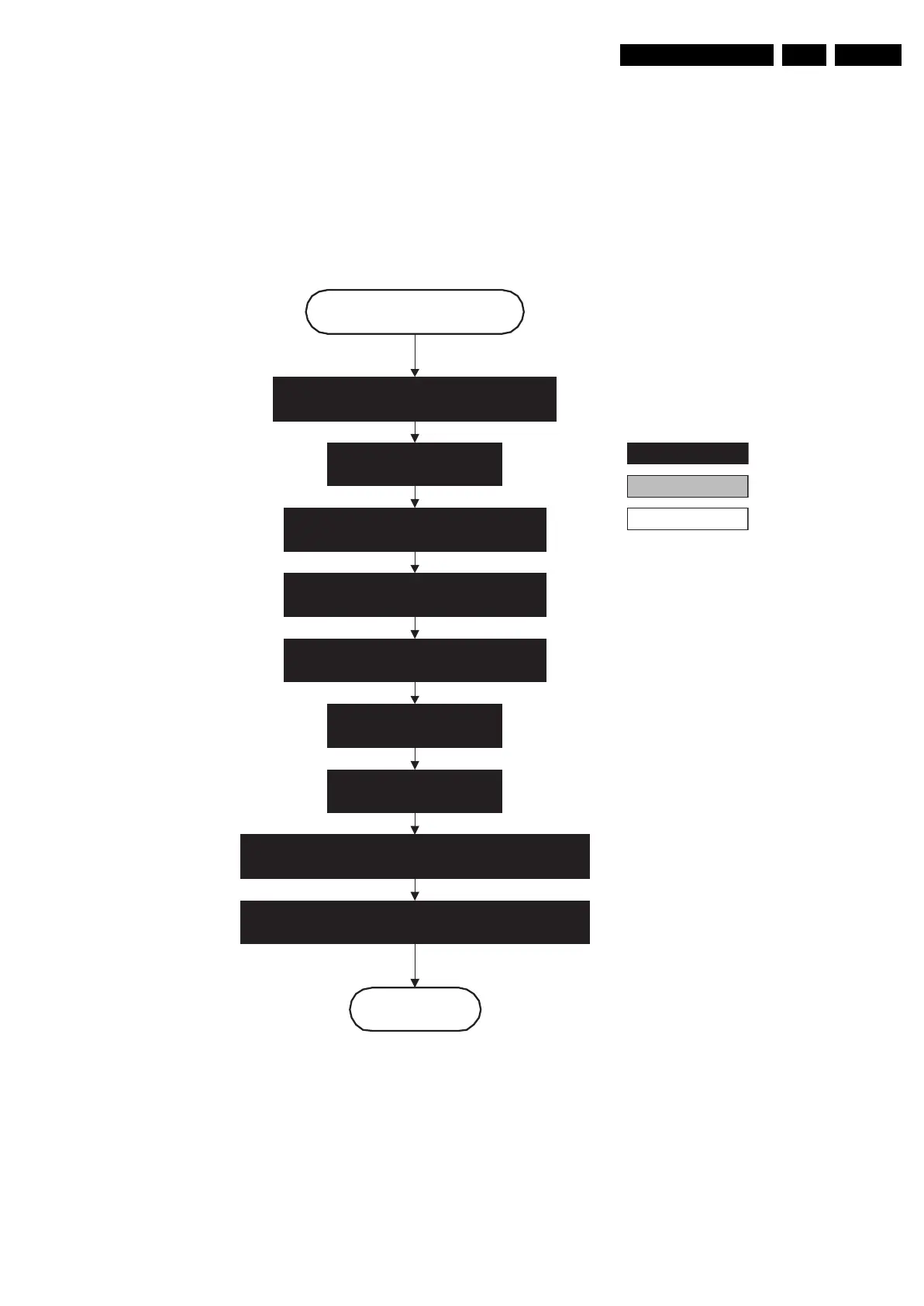
Figure 5-6 “Semi Stand-by” to “Active” flowchart
Active
Semi Standby
autonomous action
action holder: St-by
action holder: MIPS
Switch “on” the display by sending the Output-
Enable (I²C) command to the MOP.
Wait 250ms (min. = 200ms).
(lamp ready delay)
Switch “on” LCD lamp after valid, stable video, corresponding
to the requested output is delivered by the Viper.
Switch “off” RGB blanking.
Switch Audio-Reset and Sound Enable “low” and demute.
Initialize audio and video processing IC's and
functions according needed use case.
Assert RGB video blanking
and audio mute.
Wait until previous on-state is left more than 1
second ago (to prevent LCD display problems).
Wait until QVCP generates a valid LVDS output
clock.
F_15710_153.eps
200905










 To Next Page