28
For assistance, call the Support Center at 1-888-632-3261.
Demonstration Program
The demonstration program allows you to demonstrate the functions and features of
thePhilipsMedicationDispenser.Youwillbeinstructedtoloadthreemedicationcups.
Donotllthecupswithmedication.Thecupswillthenbedispensed,oneevery4-8
minutes.
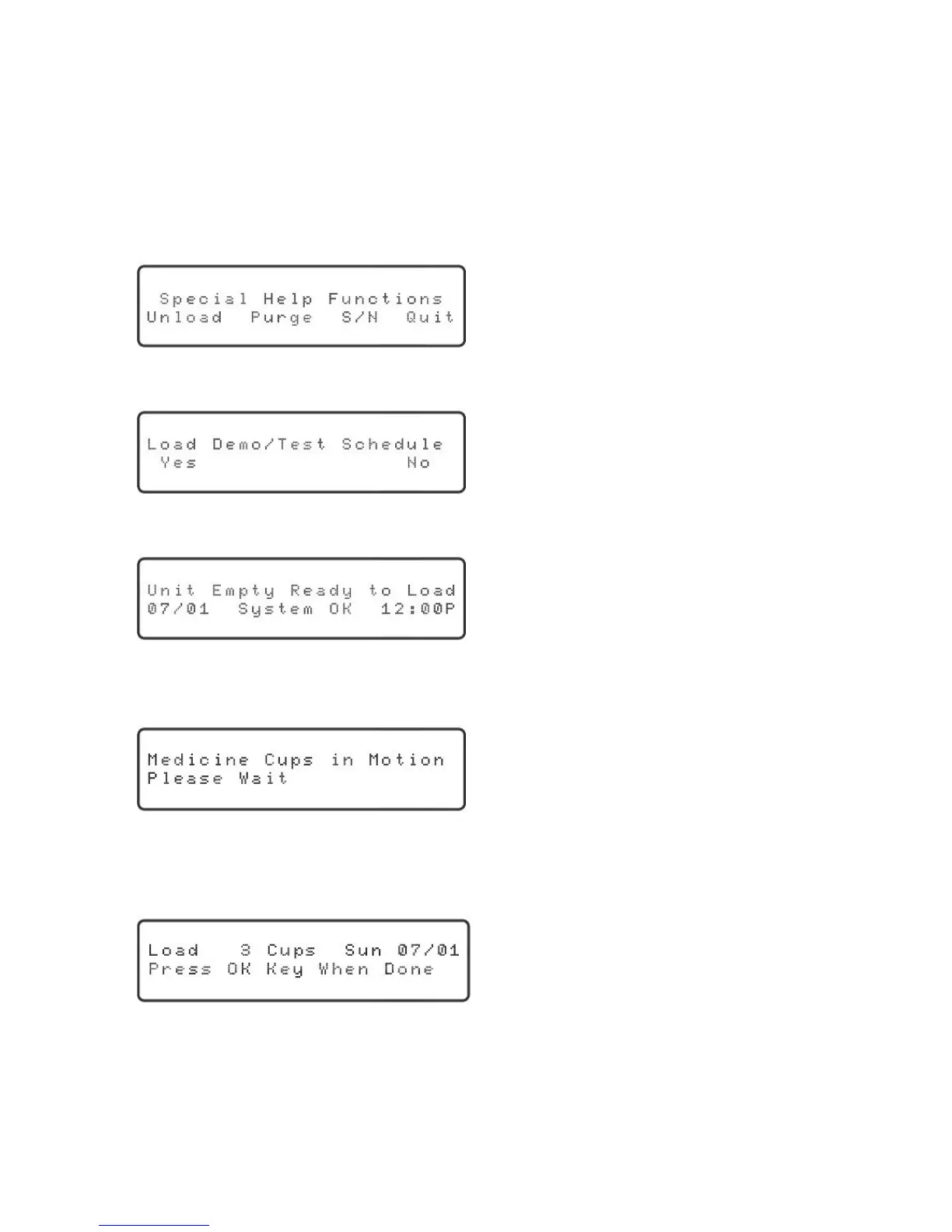
1. Tostartthedemonstrationprogram,pressthe“Help”key.Thedisplaywillshow:
“Unload” will be blinking.
2. Presstheupordownarrowkeytoselect“Special.”Thedisplaywillshow:
“Yes”willbeblinking.
3. Pressthe“OK”key.Thedisplaywillshow:
4. Pressthe“Load”key.Youwillhearandseethecylindersbeingrotated,andthe
displaywillshow:
5. Itcantakeuptotwominutesforthedispensertocorrectlypositionthe
cylinders.Oncecomplete,“Cupsmustbeloadedupsidedown”and“Pleaseload
3medicinecups”willbeannounced,andthedisplaywillshow:
“OK” will be blinking.
6. Load3cupsintothecylinder.Donotllthecupswithmedication,butmakesure
thattheyareupsidedownandthelidsaresecure.



 To Next Page