40
For assistance, call the Support Center at 1-888-632-3261.
Manual Scheduling (no phone line)
1. Turnthekeyclockwisetoopenthedoorandexposethekeypad.
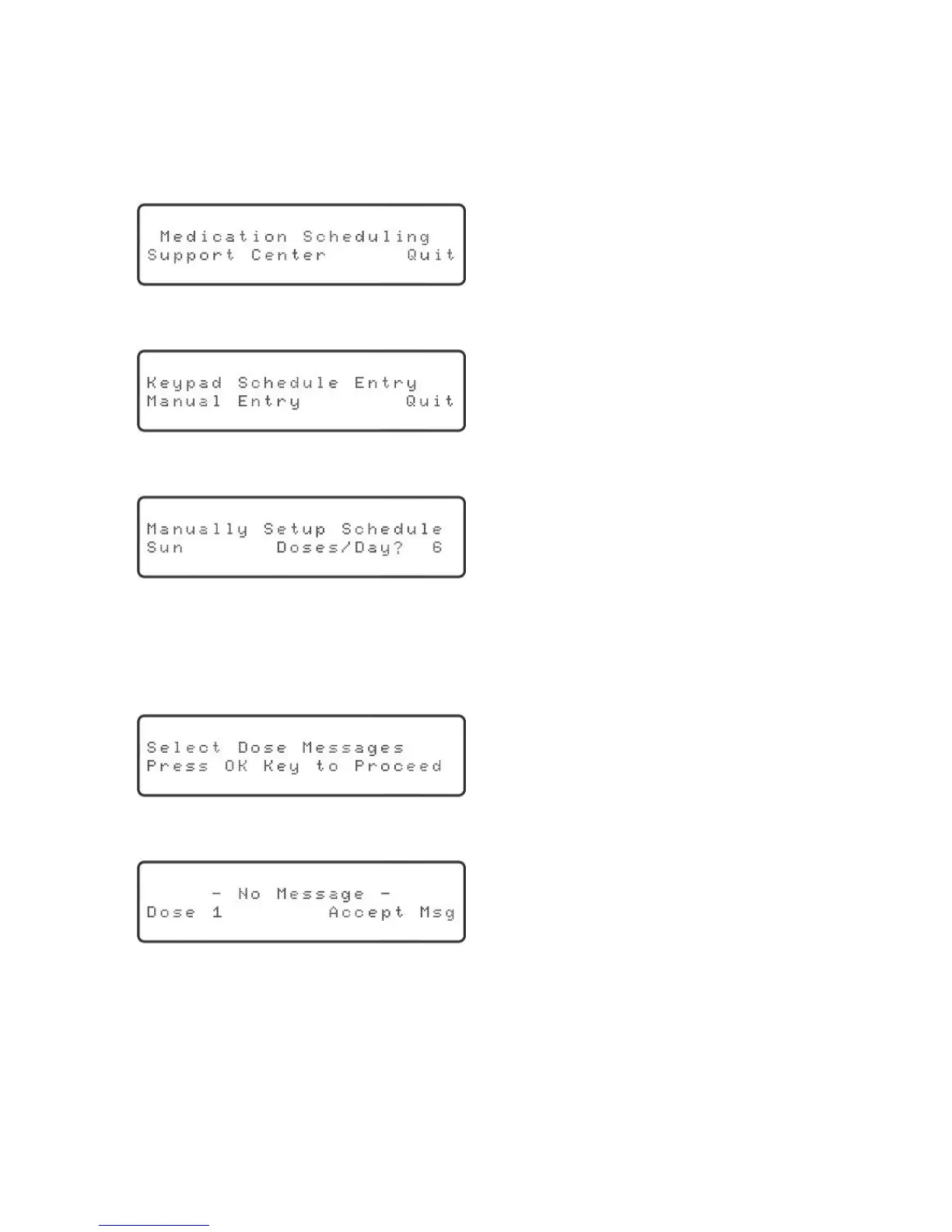
2. Pressthe“Schedule”key.Thedisplaywillshow:
“Support Center” will be blinking.
3. Presstheuparrowkey.Thedisplaywillshow:
“Manual Entry” will be blinking.
4. Pressthe“OK”key.Thedisplaywillshow:
“6” will be blinking.
5. Usetheupordownarrowkeytoadjustthenumberofdosesfortheday
displayed.Remember,adosecanbeeitheracupofmedicineorareminder
message.Oncethecorrectnumberofdosesisdisplayed,pressthe“OK”keyto
proceed.Thedisplaywillshow:
6. Pressthe“OK”key.Thedisplaywillshow:
“Accept Msg” will be blinking.
7. Usetheupordownarrowkeytoscrollthroughallthepossibledosemessages.
Oncetheappropriatemessageisdisplayed,pressthe“OK”keytoacceptthe
message.



 To Next Page