Step-by-step development of an example project
105724_en_01 PHOENIX CONTACT 67
Variables of the POU
“Main”
• Double-click on the POU “Main” and then on the “Variables Worksheet” icon in the
toolbar.
The status of the variables used in the POU “Main” is displayed in the table that opens.
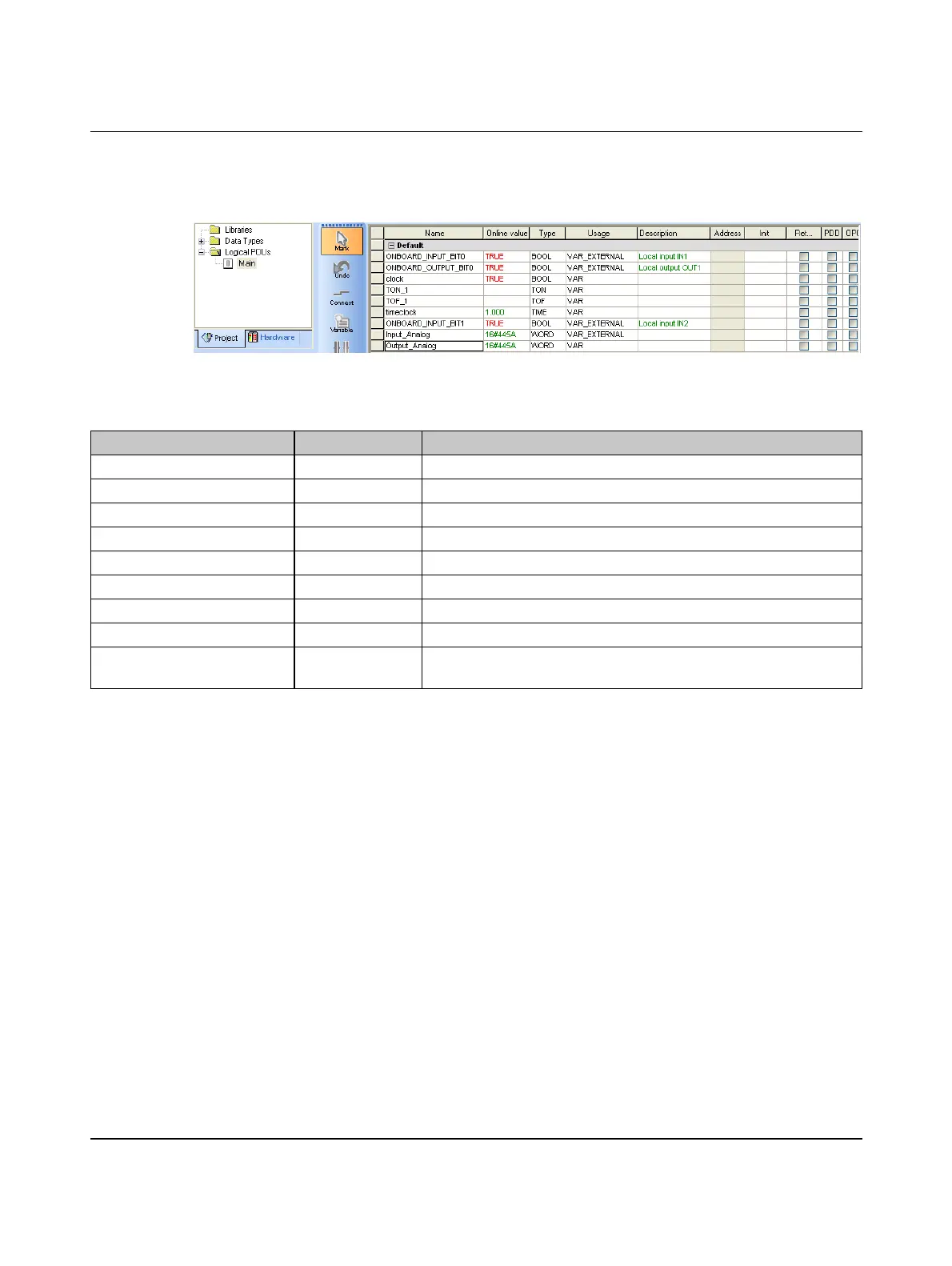
Figure 5-49 Variables in debug mode: POU “Main” variables (examples)
The following states are illustrated in Figure 5-49 (examples):
Variable Online value Description
ONBOARD_INPUT_BIT0 TRUE Switch 0 ON
ONBOARD_OUTPUT_BIT0 TRUE Clock signal at output Q1 of the controller
clock TRUE Variable (clock signal)
TON_1 – Instance of function block TON (switch-on delay)
TOF_1 – Instance of function block TOF (switch-off delay)
timeclock 1000 Variable (clock frequency)
ONBOARD_INPUT_BIT1 TRUE Switch 1 ON
Input_Analog 16#445A Analog input value at input I1
Output_Analog 16#445A Analog variable that is described with the value of the Input_Analog
variable



 To Next Page