Visualization with WebVisit
105724_en_01 PHOENIX CONTACT 77
7 Visualization with WebVisit
7.1 General
The WebVisit software is used to visualize the global variables of the Inline controller used
under PC WORX EXPRESS. WebVisit is a software tool used to generate web pages. The
software runtime component is a web server, which is stored on the controller. The variable
values are actually visualized via a Java-compatible standard browser.
Variables in
PC WORX EXPRESS
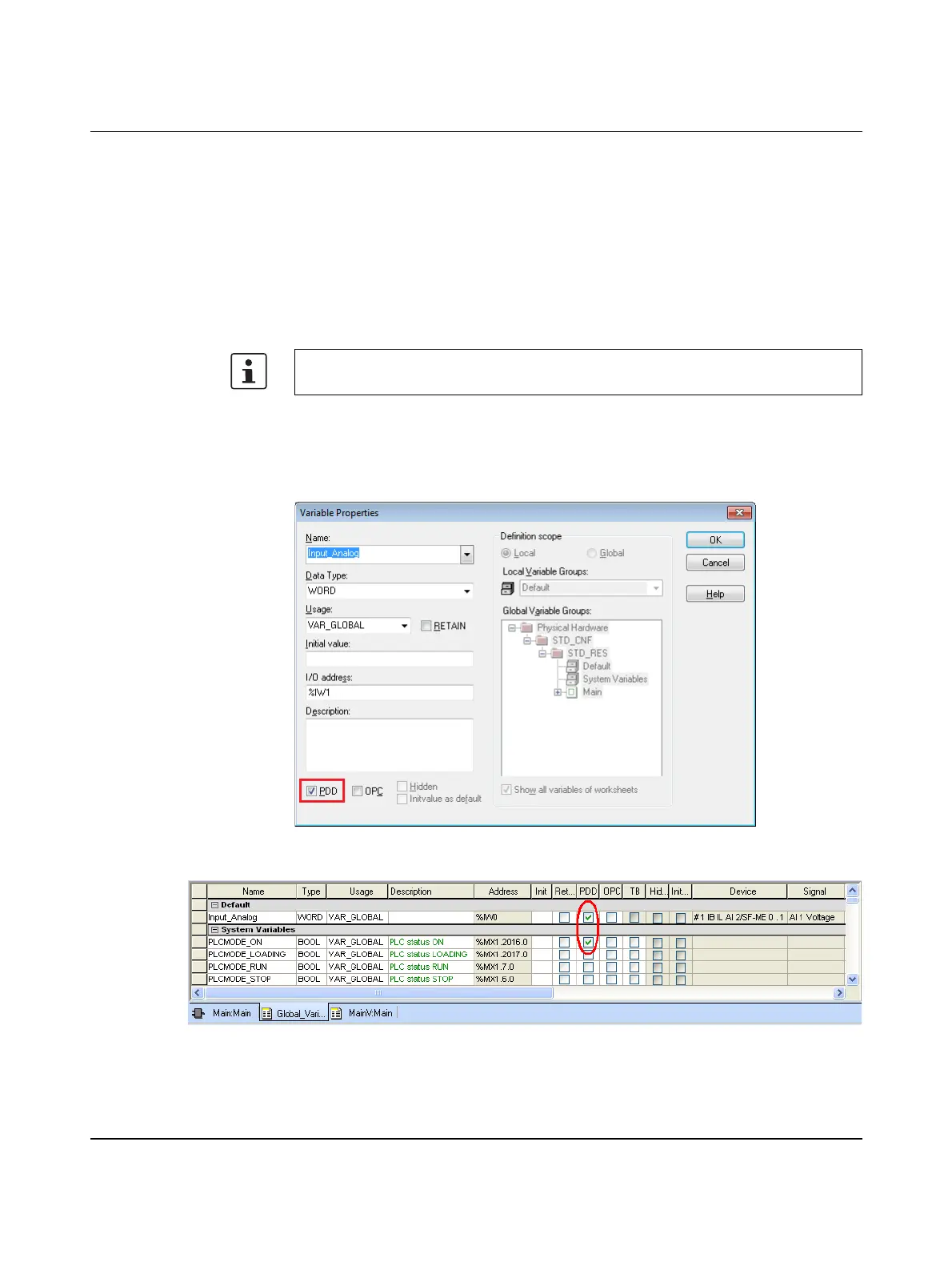
To visualize variables from your PC WORX EXPRESS project in WebVisit, activate the
“PDD” checkbox in PC WORX EXPRESS:
– In the “Variable Properties” window (Figure 7-1)
– Or in the variables worksheet (Figure 7-2)
Figure 7-1 Activating the “PDD” checkbox in the “Variable Properties” window
Figure 7-2 Activating “PDD” in the variables worksheet (Global_Variables)
For visualization, you need a web browser with Java Standard Edition SE 6 (or later) with
at least Java Runtime Environment JRE 6 (Version 1.6.x or later).










 To Next Page