© PSI (Photon Systems Instruments), spol. s r. o.
54
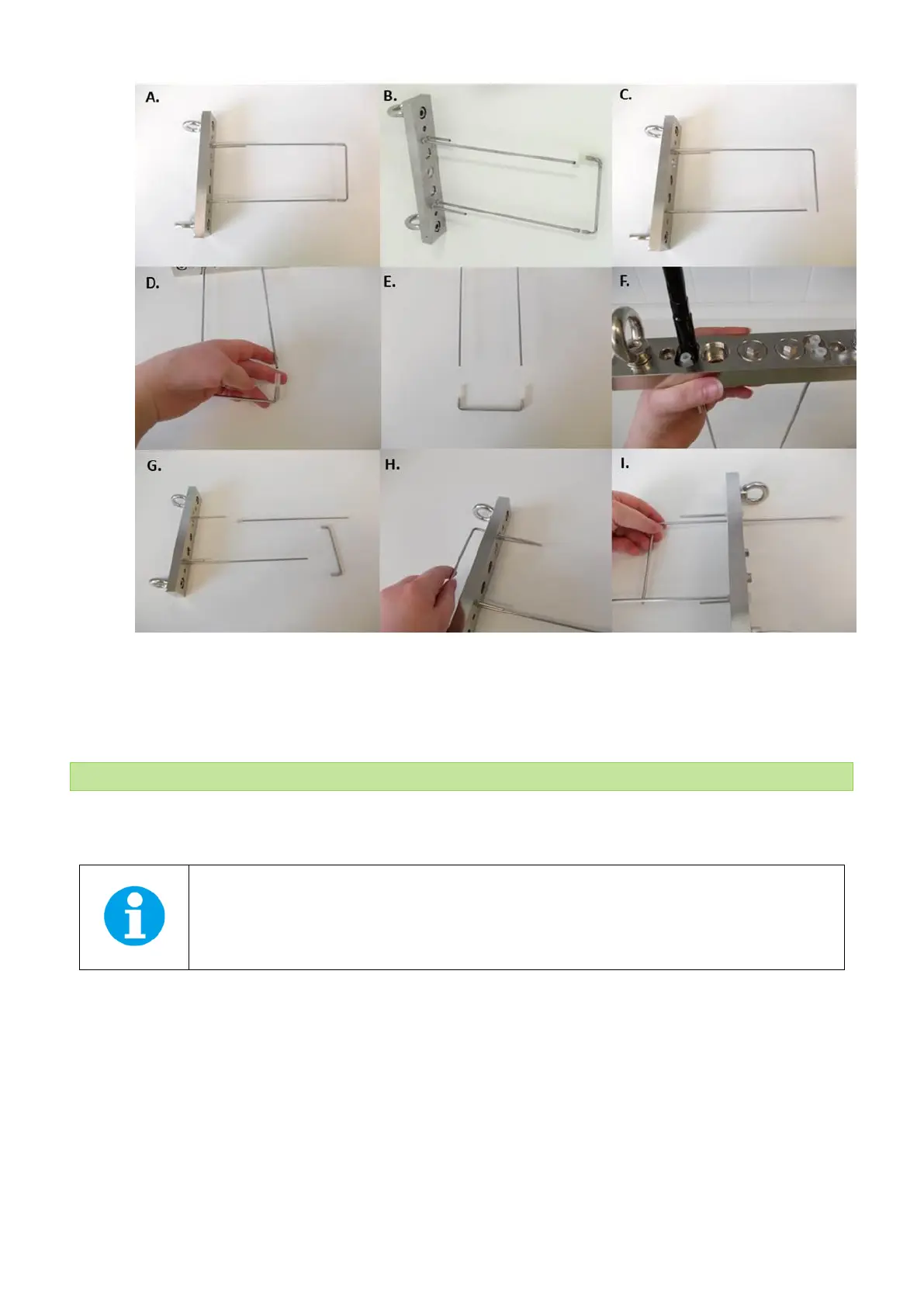
Fig. 45 Vessel lid with standard and GAS aeration U-tubing. Pictures D – I show individual steps for changing the standard aeration
tubing and exchange with GAS aeration U-tubing. NOTE: Use spanner (n°15 in Tab. 4) to release the value plastic connectors from the
vessel lid.
5.10 PERISTALTIC PUMP PP600
Peristaltic pump PP600 (Fig. 46) can be used in chemostat, turbidostat or standalone cultivation mode. Please note that
PBR software is required to use the pump in turbidostat or chemostat mode.
Note: the operation of the peristaltic pump cannot be controlled by the front panel of the PBR FMT150
control unit. Without the PBR software, the operation of peristaltic pump is controlled solely by the
Peristaltic pump Control display.
Important note: It is essential to define if the pump is serving for turbidostat or chemostat module or if it is working in
standalone mode. It is done in the Peristaltic Pump control display – go to Menu > Setting > Pump-ID [x] and set the
required mode as described below:
• [0] should be set for turbidostat mode
• [1] should be set for chemostat mode – Acid
• [2] should be set for chemostat mode – Base
• [3-7] should be set for standalone mode



 To Next Page