16
BIP-6000
Manual
Inserting/removing MicroSD card
4
MicroSDcardisamicroashmemorymediawhichis
used to store and move data.
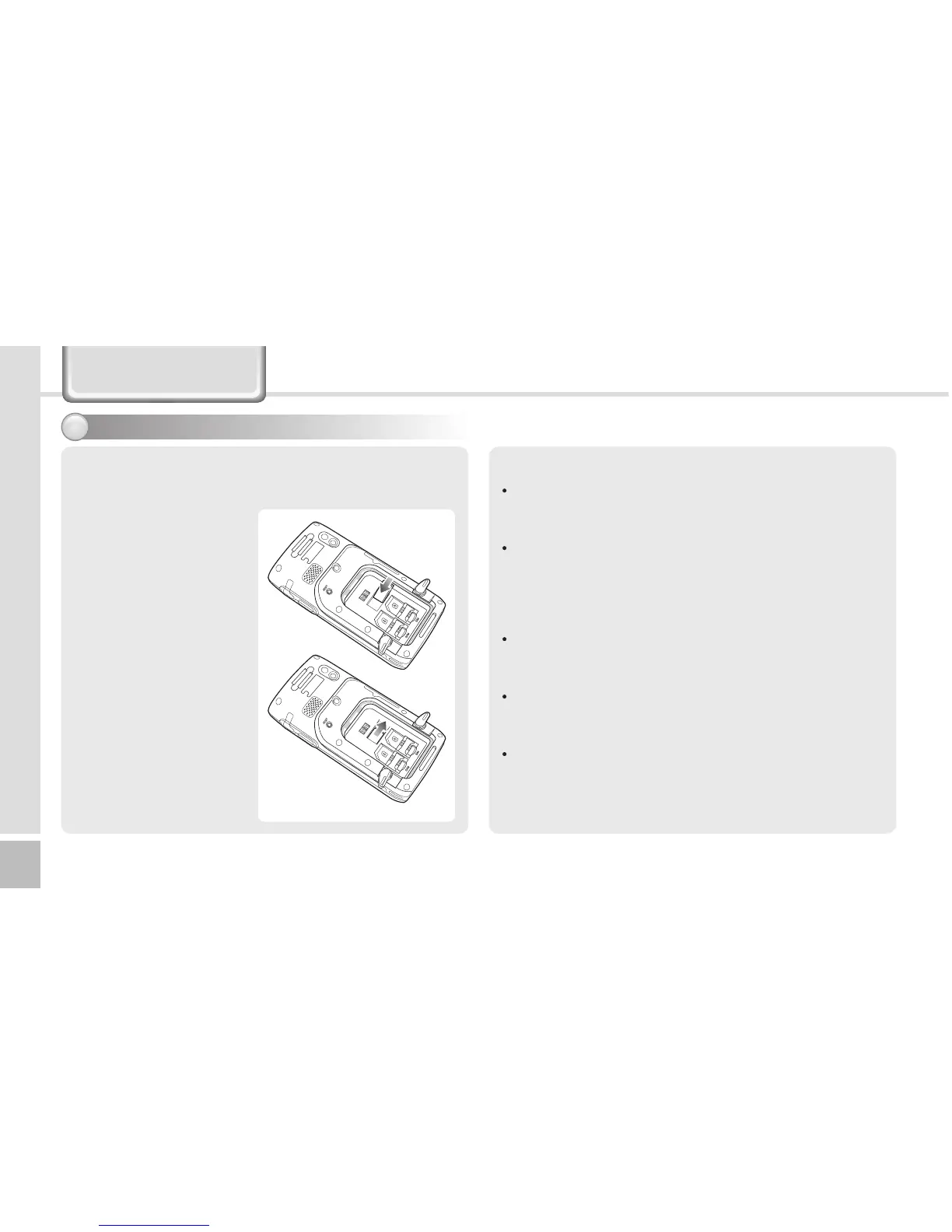
Inserting MicroSD card
Push in a memory card
to the arrow direction on
the SD card slot until it is
completely inserted.
Removing MicroSD
card
If you push the memory
card in, it springs out.
Then, pull out the card.
Precautions
Make sure to push in the memory card completely.
If it is not inserted completely, the device cannot
recognize the memory card.
In order to remove the memory card, push the
inserted memory card once, and the card springs out
slightly. Then, pull out the memory card. Applying
excessive force to remove the memory card will result
in a fault of the device.
Removing the memory card or shutting power off
while using a memory card may result in loss of data,
or malfunction of the card and the terminal.
Make sure to back up critical data in the computer.
The manufacturer resumes no responsibility for loss
of data in the device.
If the memory card gets stuck to the device, do not
remove the card by force, but visit the nearest
after-sales service center. And then, replace or return
the card to the dealer from which you purchased the
card.
Learning basics



 To Next Page