BIP-6000
37
Making a call
1
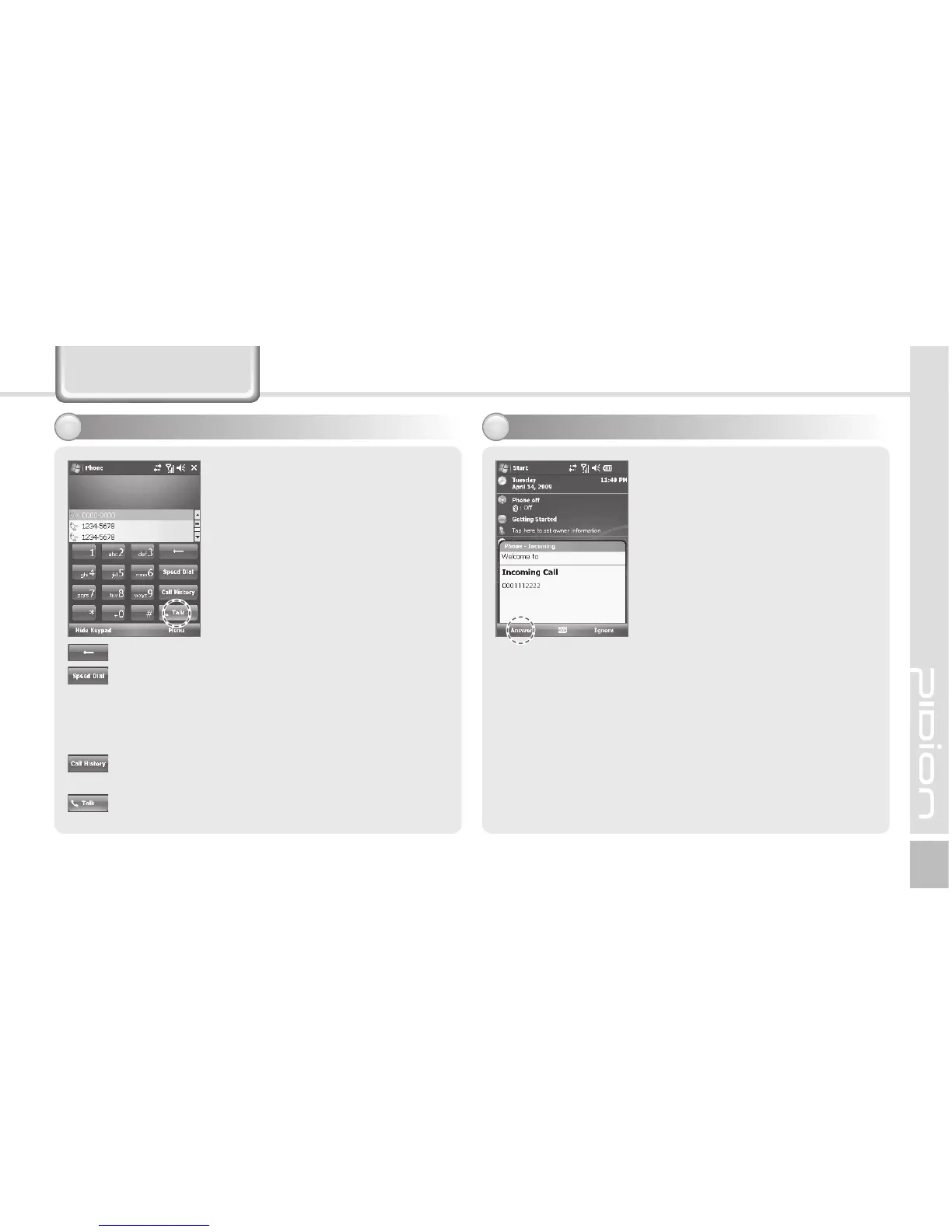
Execute the phone program by
selecting the [Phone] button,
enter a telephone number, and
press the [Call] button to make
a call.
Redialing
If you press the [Call] button
without entering a phone number,
the terminal automatically makes
a call to the last call party.
Receiving a call
2
If the terminal rings and a call
receiving message is displayed,
click the [Call] button or select
the [Answer] button in the bottom
of the screen.
ö The calling party information
message can be indicated
differently from the one of
normal phones.
ö The phone functions are the
same as the normal phones.
Refer to p.21 if you wish to
use an earphone.
Phone program
: Cancel numbers one by one.
: You can make a call with speed dial number.
If you select menu in the bottom right of the
speed-dial screen, you can add/edit/delete
speed-dial numbers. (You can save up to 98
speed-dial numbers.)
: You can view the list of received calls/originated
calls/missed calls.
: Enter a phone number and press this button to
make a call.



 To Next Page