42
BIP-6000
Manual
Text Message
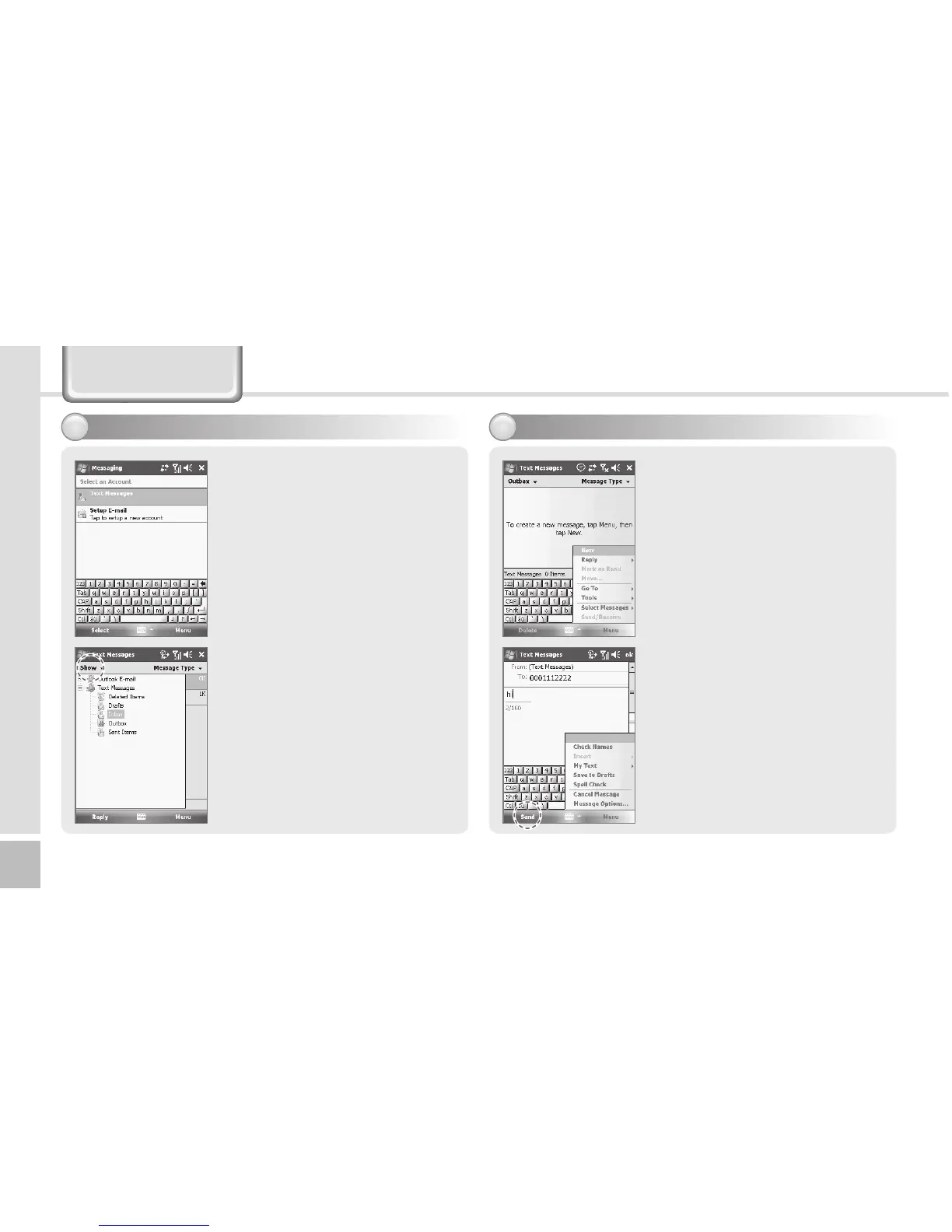
Sending a Text Message
2
Start ► Messaging ► Text
Messages ► Outbox
After creating Text message
including masaage receiver,
tap Send on the Text Messages
screen.
On the Text Messages screen,
tap Menu and select [Add
Recipient...] to add massage
receiver.
Maximum 18 people can be
added to message reciever.
Start ► Messaging ► Text
Messages
or
on the Today screen, tap
Messages.
Go to Text Message screen, tap
[Menu] and select [New]
or Go to Phone screen, Select a
contact name from Call History.
Tap Menu and Select tap
Contacts and select [Send Text
Message]
Tap Inbox on Text Message
screen.
Inbox shows Deleted Items/
Drafts/Outbox/sent Items folders
Creating a Text Message
1



 To Next Page