Operation
Operating Manual PITreader, PITreader Firmware V1.5.x
1004806-EN-08
| 46
10 Operation
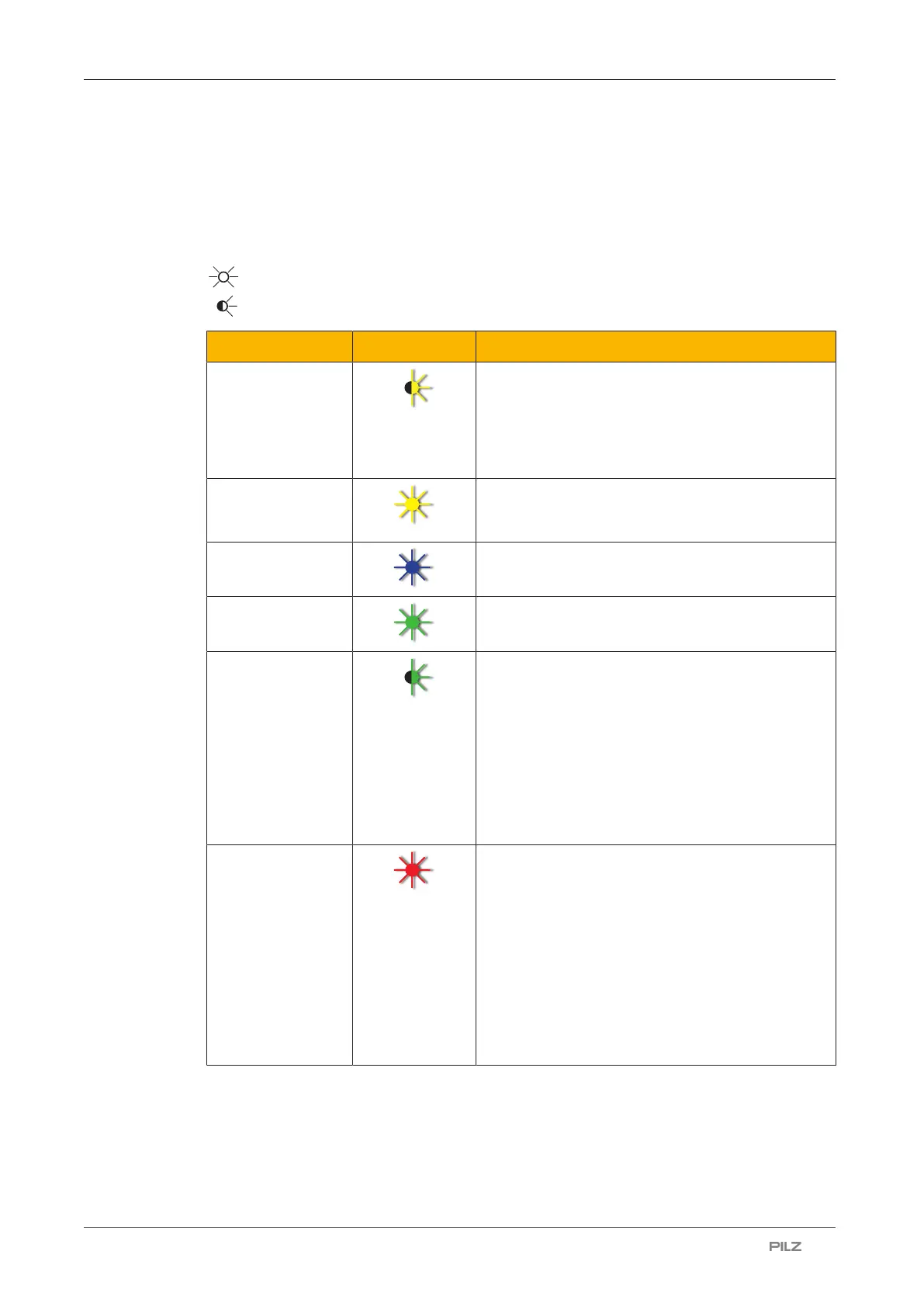
10.1 LED indicator
Legend
LED on
LED flashes
Colour State Meaning
Yellow Device is starting up
or
the firmware is being updated (if the device is re-
starting after uploading a firmware update and the
firmware update is being applied, the LED flashes
yellow)
Yellow Device is in external authentication mode and as
yet no authentication has been set for the inserted
transponder key
Blue Device is ready for operation, no transponder key
has been inserted
Green Transponder key has been recognised as valid
Green 2-person rule
Possible reasons:
} The authentication process was started with the
first transponder key.
} When the first transponder key is removed, the
LED flashes until the second transponder key is
inserted or the 30-second time window has
elapsed.
Red Transponder key has been recognised as invalid
Possible reasons:
} When the transponder key is inserted:
Authentication is denied (e.g. permission = 0).
} When the transponder key is not inserted:
Authentication on the device is blocked (e.g. via
24V I/O port or single authentication)
You’ll find further information in the web applica-
tion under Status -> Authentication



 To Next Page