22
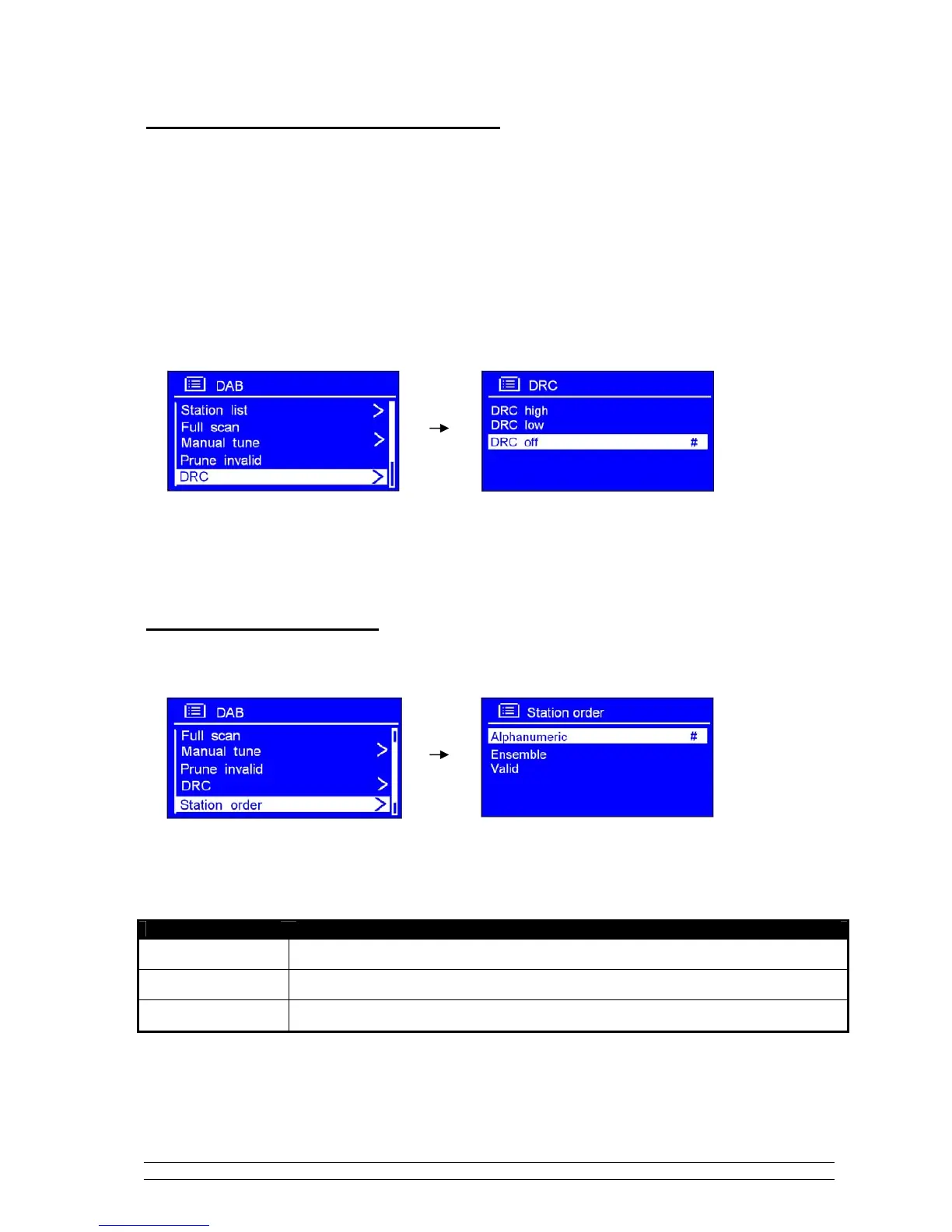
DRC (Dynamic Range Control) value
You can set the level of the compression of stations to eliminate the differences in dynamic range or
sound level between radio stations.
Note: a. Set DRC to off indicates no compression.
b. set DRC to low indicates little compression.
c. set DRC to high shows maximum compression.
1. Press MENU, and then turn the SCROLL knob to < DRC >, press it to confirm.
2. Turn the SCROLL knob to your ideal option, press it to confirm.
To change station order
1. Press MENU, and then turn the SCROLL knob to < Station order >, press it to confirm.
Note: There are 3 options: Alphanumeric, Ensemble and Valid. #shows before the default of your setting option
to indicate current station order.
STATION ORDER DESCRIPTION
Alphanumeric
Display all stations in alphanumeric order.
Ensemble
List active stations [ones that are currently broadcasting] before inactive ones.
Valid
Remove inactive stations from the station list.
2. Turn the SCROLL knob to your ideal option, press it to confirm.



 To Next Page