4
Controls Overview (a)
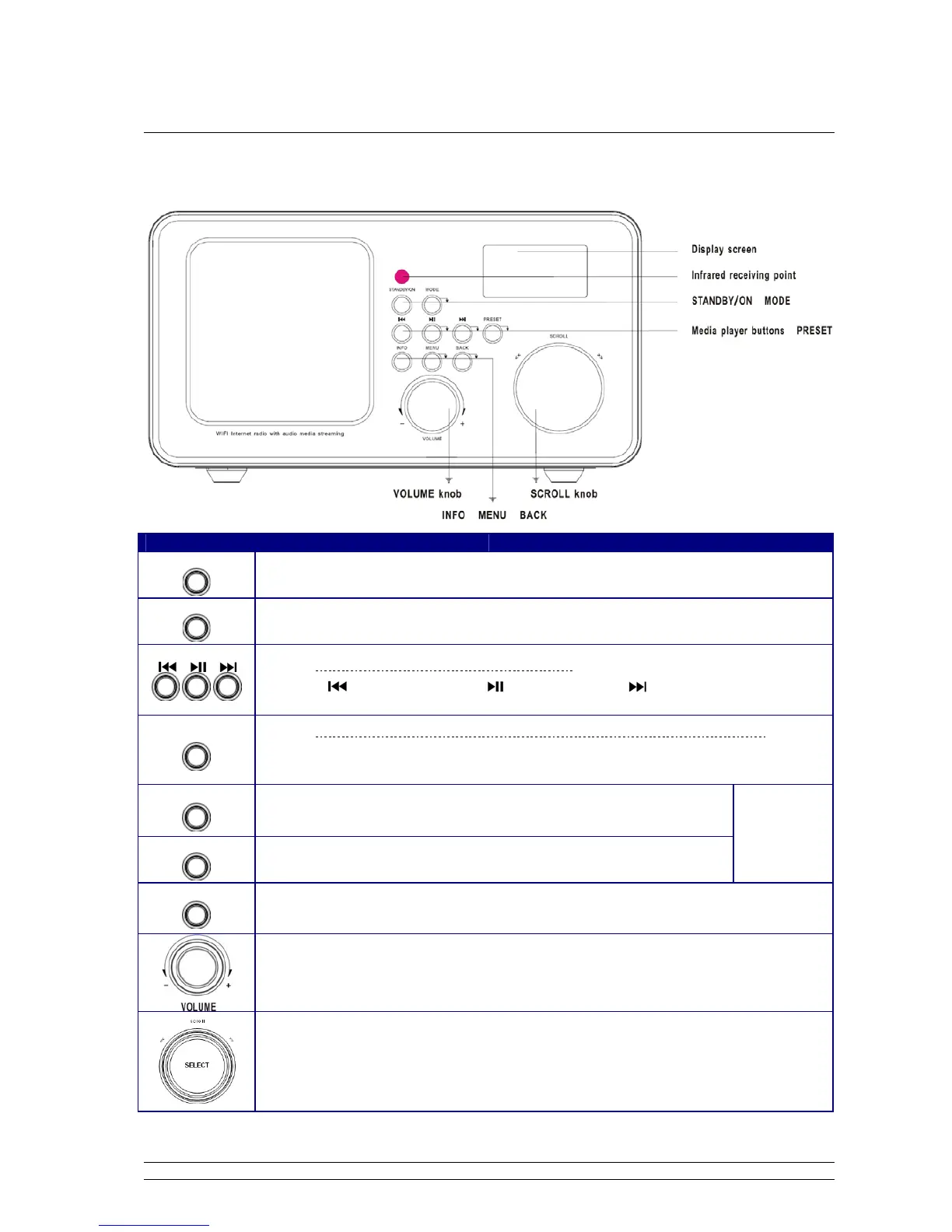
Unit Front Overview
Control Internet DAB + FM Media Player AUN in
STANDBY/ON
Press to turn on/off Radio
When alarm is coming, press to turn it off.
MODE
Press to convert among Internet, Music player, DAB (DAB+), FM and AUX IN mode in turn.
Note: Media player, AUX in mode use only.
Press to previous track, press to play/pause, press to next track
PRESET
Note: Internet, DAB+ and FM mode use only, for detail please refer page 26.
Press and hold to store preset stations, Press to load the station have been stored.
INFO
Press to display queue information
No function
BACK
Press to goes back
MENU
Press to Main menu or other options
Turn to adjust volume level
a. Turn to browse options, press to confirm
b. FM mode: press to searching active station
c. When alarm is coming, press it to postpone alarm between 5-30minutes.



 To Next Page