Troubleshooting • 4
4-9SV61749 Rev. D
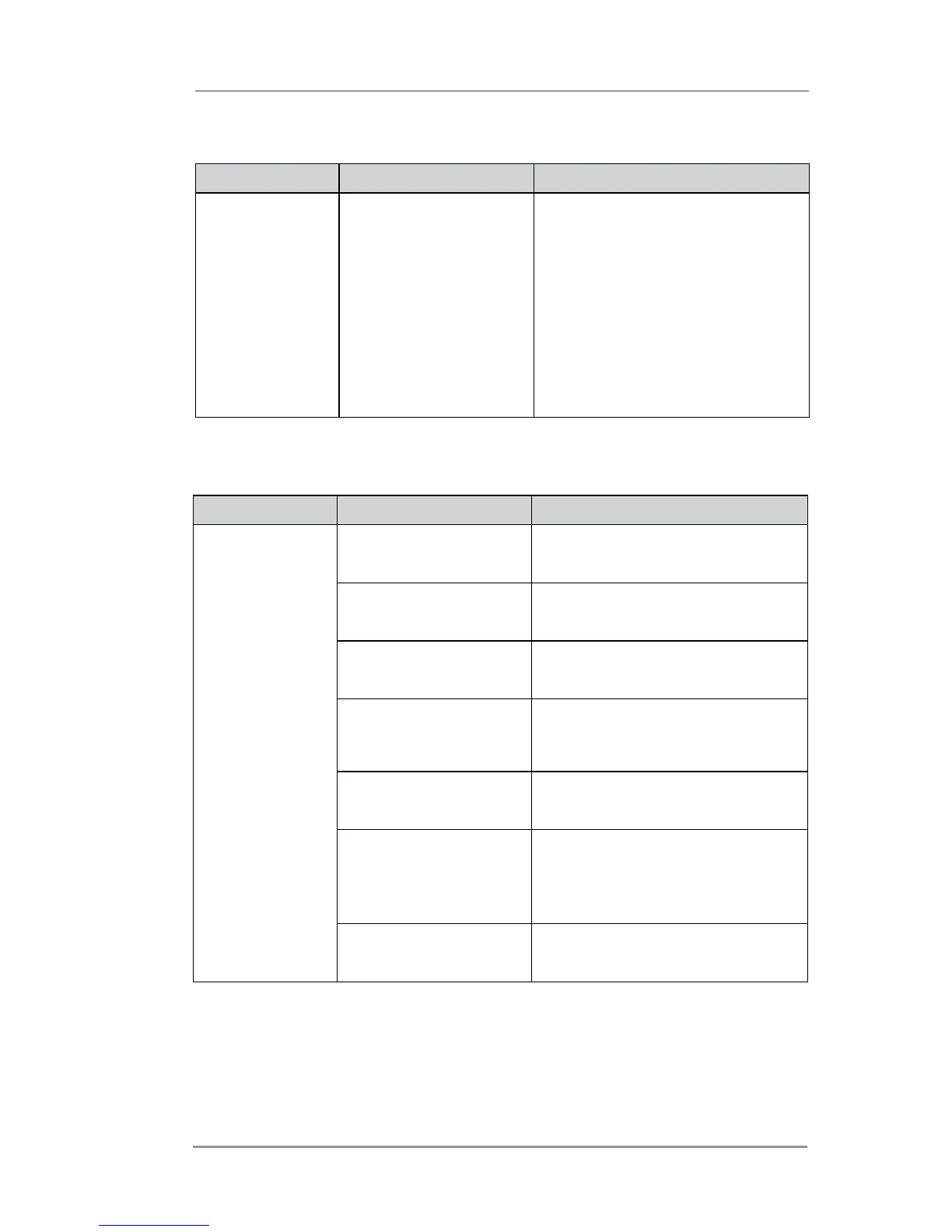
Memory Problems
Problem Reason Solution
Out of Memory The printer can run
out of memory when
downloading fonts or
graphics.
This generally means you’re
trying to use a graphic (artwork)
that’s too big or you have too
many fonts or too large a font
size. If the out-of-memory
message appears, try reducing
the size of your art and limiting
the number and size of your
fonts. Then turn the printer OFF,
then ON and retry.
Paper Out/Paper Jam Problems
Problem Reason Solution
Paper Out or
Paper Jam
Input area is empty. Refill the input area.
Paper jam obstructing
paper path.
Clear obstructed path.
Paper jam in exit
roller area.
Make sure exit rollers are
rotating freely.
Dirty paper feed
sensor.
Clean sensor with compressed
air or dry cotton swab. See
Chapter 3, Printer Maintenance.
Stuffed envelopes not
feeding properly.
Try running job with envelopes
unstuffed.
Separator assembly
not adjusted correctly.
Adjust the separator assembly
to the thickness of the material
you're running. See Chapter 2,
Printer Basics.
Thickness setting too
tight.
Adjust the media thickness knob
clockwise to widen the gap.



 To Next Page