EasyManua.ls Logo

Pittsburgh Modular Voltage Lab 2 - Touch Controller Layout

Pittsburgh Modular Voltage Lab 2
64 pages
Print Icon
To Next Page IconTo Next Page
To Previous Page IconTo Previous Page
Loading...
33
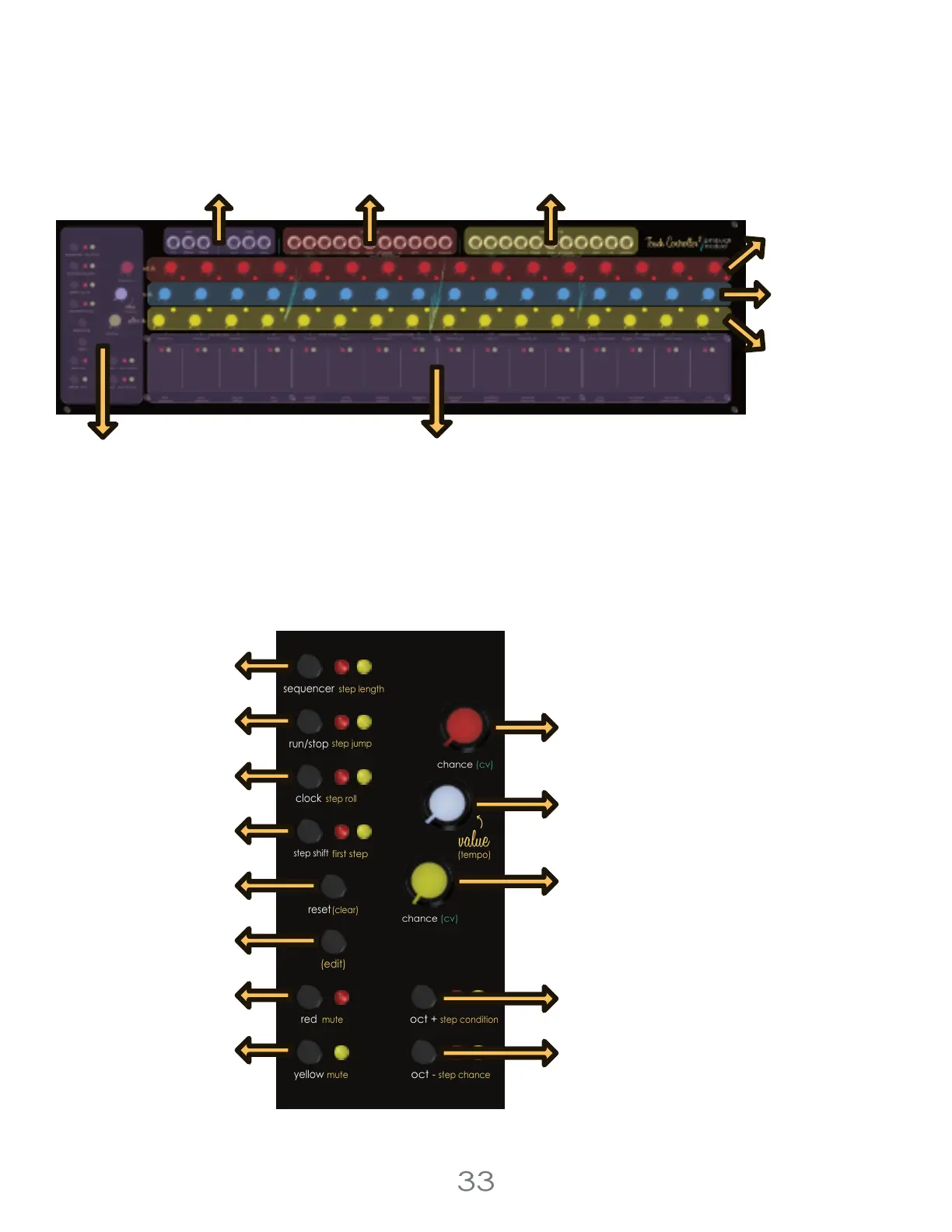
Touch Controller Layout
Control Section
Holding the controller section’s [EDIT BUTTON] and pressing any of the Touch Pads triggers the alternate function
written under the Touch Pad in YELLOW or WHITE. Each of these functions will be described in detail below.
`
4 Voltage Lab 2 Touch Controller
Control
Section
Sequencer Button
Red Chance Knob
Yellow Chance Knob
Oct+ Button
Oct- Button
Value Knob
Run/Stop Button
Clock Button
Step Shift Button
Reset Button
Edit Button
Red Button
Yellow Button
Touch Pads 1-16
Global I/O
Jacks
Yellow I/O
Jacks
Yellow Pitch
Knobs
CV Channel
Knobs
Red Pitch
Knobs
Red I/O
Jacks
chance (cv)
chance (cv)
step shift
(edit)
mute step condition
red
mute
yellow
run/stop
step roll
clock
oct +
oct -
first step
sequencer
step jump
reset
(clear)
(tempo)
step chance
step length

Related product manuals