Internet Telephony PBX System
IPX-330/IPX-2100
105
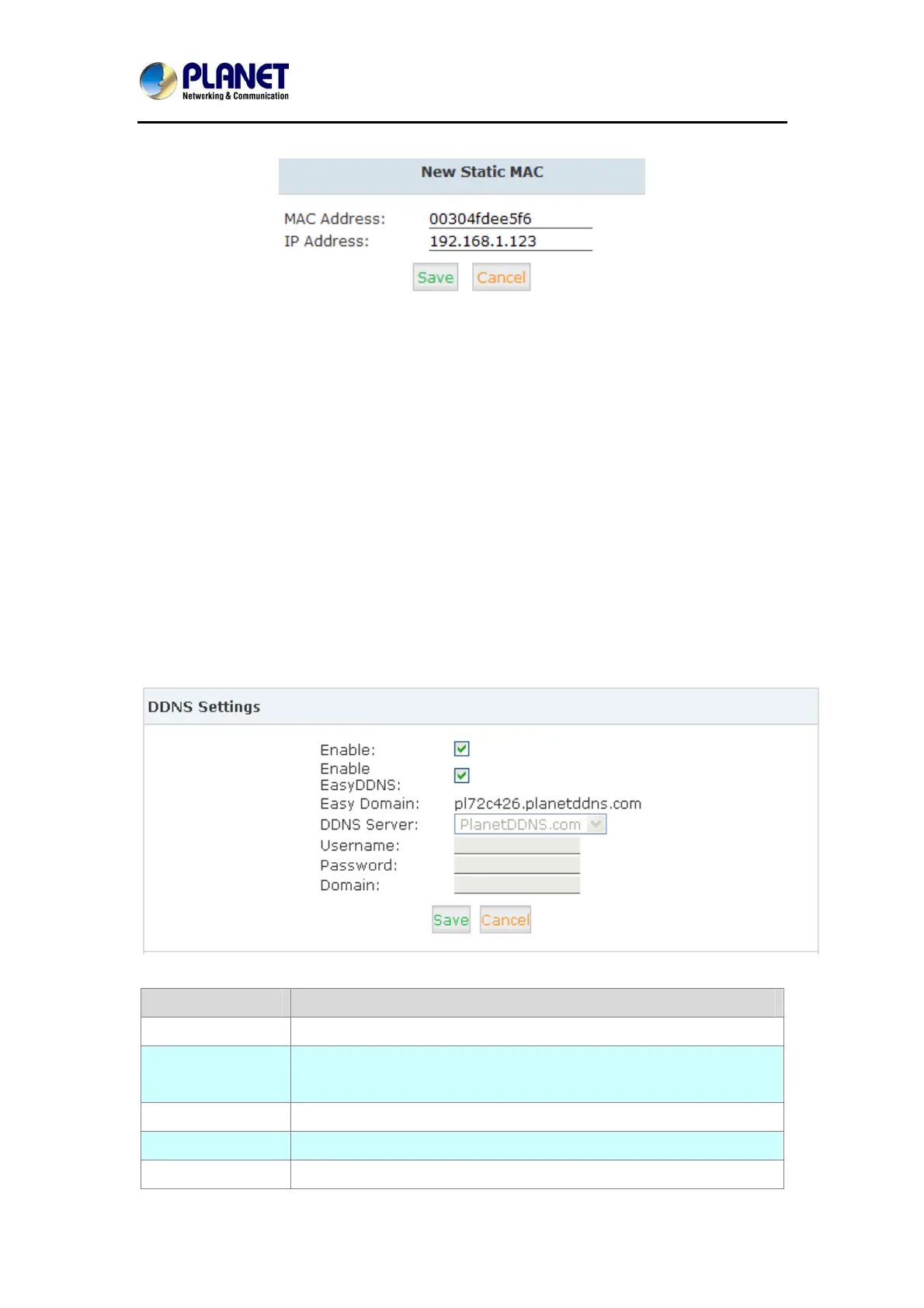
Click “New Static MAC” to add a record to the IP PBX system.
4.6 DDNS Settings
Unlike DNS that only works with static IP addresses, DDNS (Dynamic Domain Name Server)
is designed to also support dynamic IP addresses, such as those assigned by a DHCP server.
Built-in DDNS feature on IP PBX system only needs a simply signs up with a Dynamic DNS
provider, with the domain name they gave which maps your IP address on the Internet, you
can access IP PBX and also other services within your LAN via the domain name without
getting to know Dynamic public IP.
After setting DDNS, IP PBX phone services can be accessed from remote site via the domain
name which DDNS provider gave. Also remote management is possible even without a static
public IP.
Click【Network Settings】->【DDNS Settings】:
Item Explanation
Enable Tick to enable DDNS service
DDNS Server Select the DDNS service provider which you subscribed the DDNS
service.
Username Username you subscribed to the service provider.
Password Password you used to sign up to the service provider.
Domain Your domain name.



 To Next Page