User Manual of WAP-252N/WAP-552N
-42-
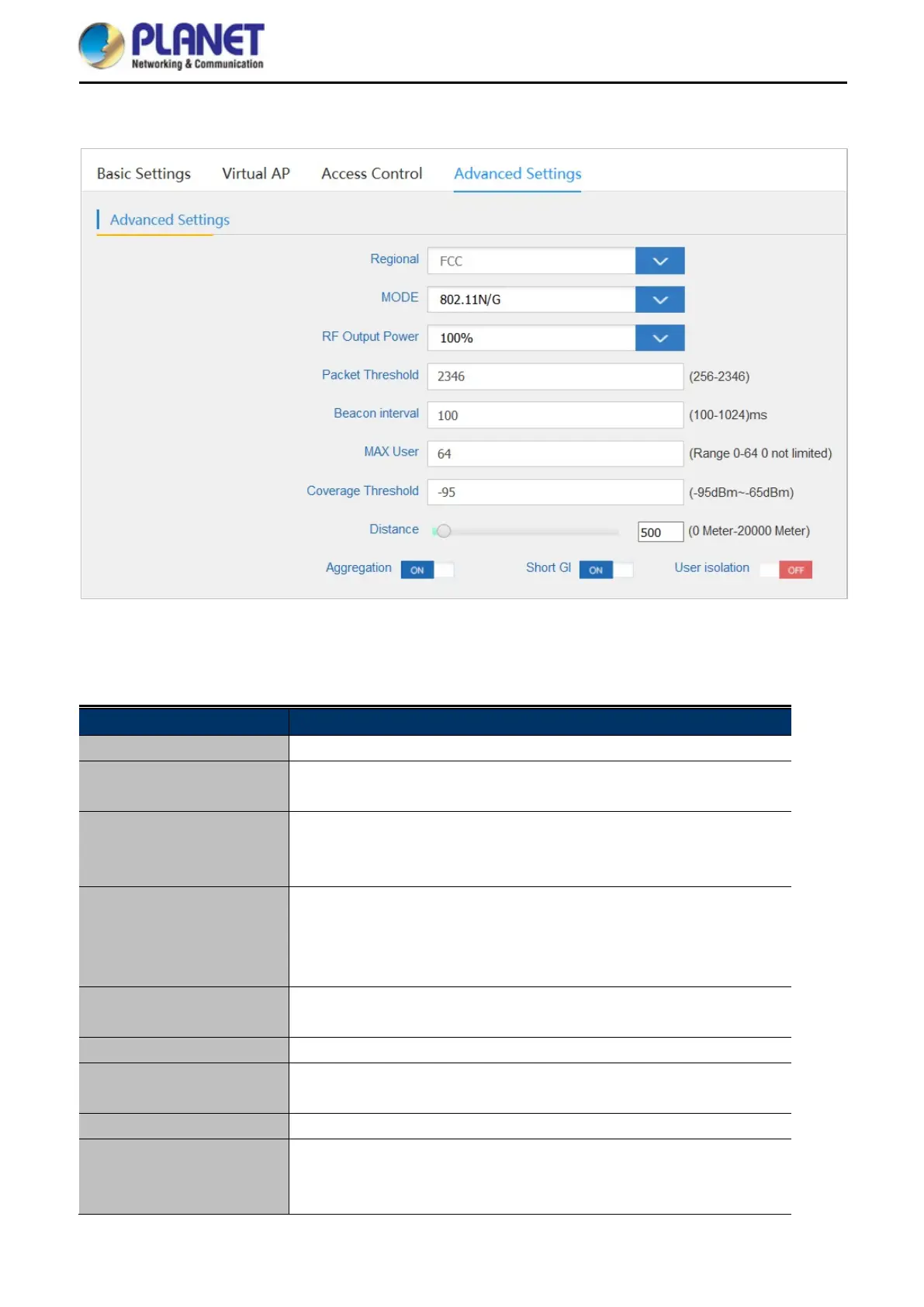
5.7.2.4. Advanced Settings
Figure 5-27 Advanced Settings
The page includes the following fields:
Object Description
Regional It shows FCC or ETSI depending on the firmware.
Mode Select 802.11N/G or 802.11B/G in 2.4G AP
Select 802.11A or 802.11AN in 5G AP
RF Output Power The range of transmit power is 100%, 75%, 50%, 25% or 12.5%. In
case of shortening the distance and t he coverage of the wireless
network, input a smaller value to reduce the radio transmission power.
Packet Threshold
When the length of a data packet exceeds this value, the router will
send an RTS frame to the destination wireless node, and the latter will
reply with a CTS frame, and thus they are ready to communicate. The
default value is 2346.
Beacon Interval
Set beacon interval, the value range is from 100 to 1024. The default
value is 100.
Maximum Users The maximum users are 64.
Coverage Threshold
The coverage threshold is to limit the weak signal of clients occupying
session. The default is -95dBm.
Distance
Select a specified distance of the two nodes.
Aggregation
A part of the 802.11n standard that allows sending multiple frames per
single access to the medium by combining frames together into one
larger frame. It creates the larger frame by combining smaller frames














 To Next Page