User’s Manual of WGSW-24040 / WGSW-24040R
SGSW-24040 / SGSW-24040R
175
4.11.3.3 Set up Typical Network Application Rules
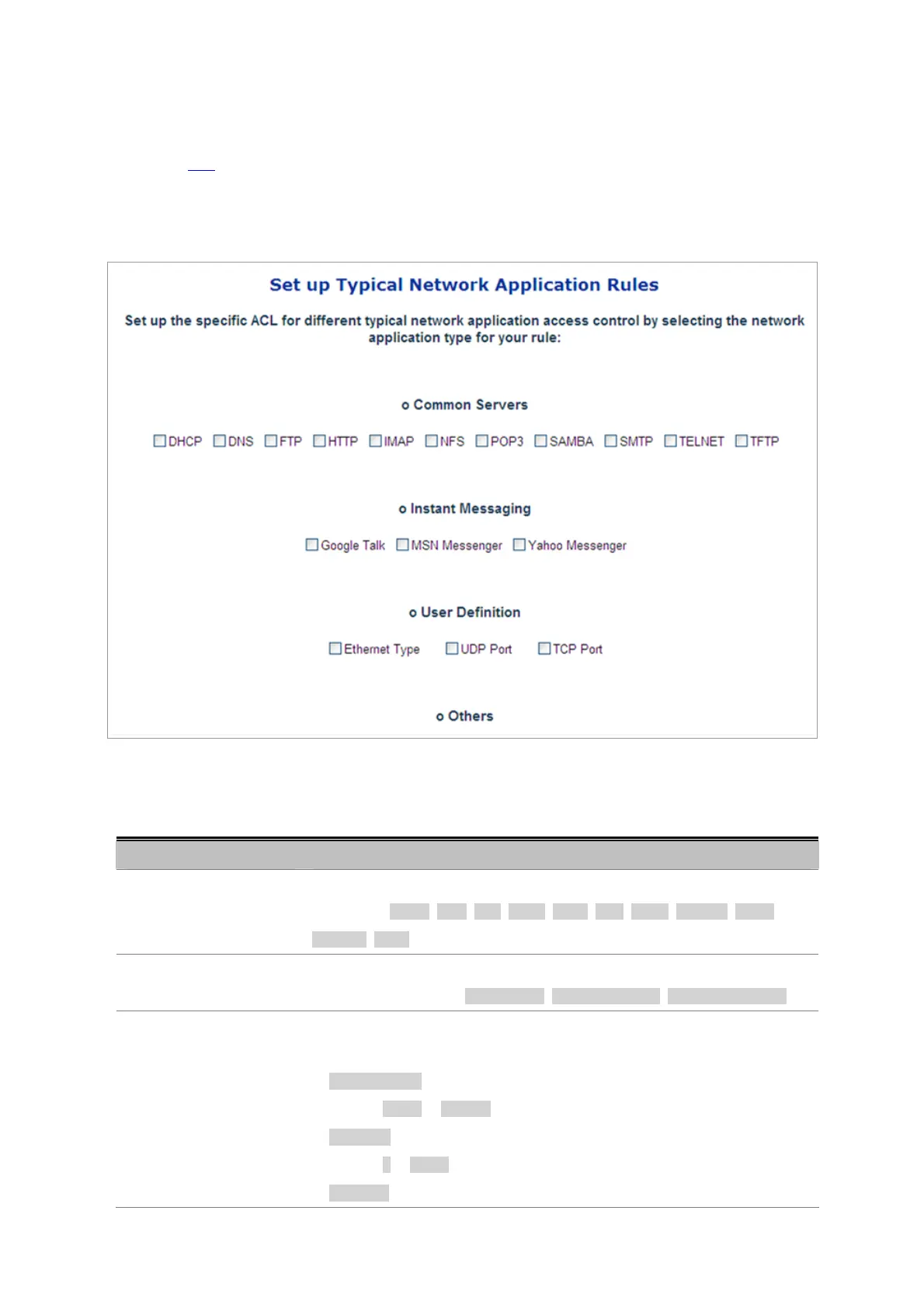
Set up the specific ACL for different typical network application access control. The screen in Figure 4-11-5 appears.
STEP-1: Selecting the Network Application Type:
Figure 4-11-5 Set up Typical network Application Rules page screenshot
The page includes the following fields:
Object Description
• Common Servers
Indicates the common servers that applies to the specific ACE. The common
servers are: DHCP, DNS, FTP, HTTP, IMAP, NFS, POP3, SAMBA, SMTP,
TELNET, TFTP.
• Instant Messaging
Indicates the instant messaging service that applies to the specific ACE. The
instant messengers are: Google Talk, MSN Messenger, Yahoo Messenger.
• User Definition
Indicates the user definition that applies to the specific ACE. The user definitions
are:
• Ethernet Type: Specify the Ethernet Type filter for this ACE. The allowed
range is 0x600 to 0xFFFF.
• UDP Port: Specify the UDP destination port filter for this ACE. The allowed
range is 0 to 65535.
• TCP Port: Specify the TCP destination port filter for this ACE. The allowed



 To Next Page
 Loading...









