User’s Manual of WNRT-627
-148-
Appendix A: FAQ
1. How do I configure the Router to access Internet by ADSL users?
1) First, configure the ADSL Modem configured in RFC1483 bridge model.
2) Connect the Ethernet cable from your ADSL Modem to the WAN port on the Router. Plug the
telephone cord into the Line port of the ADSL Modem.
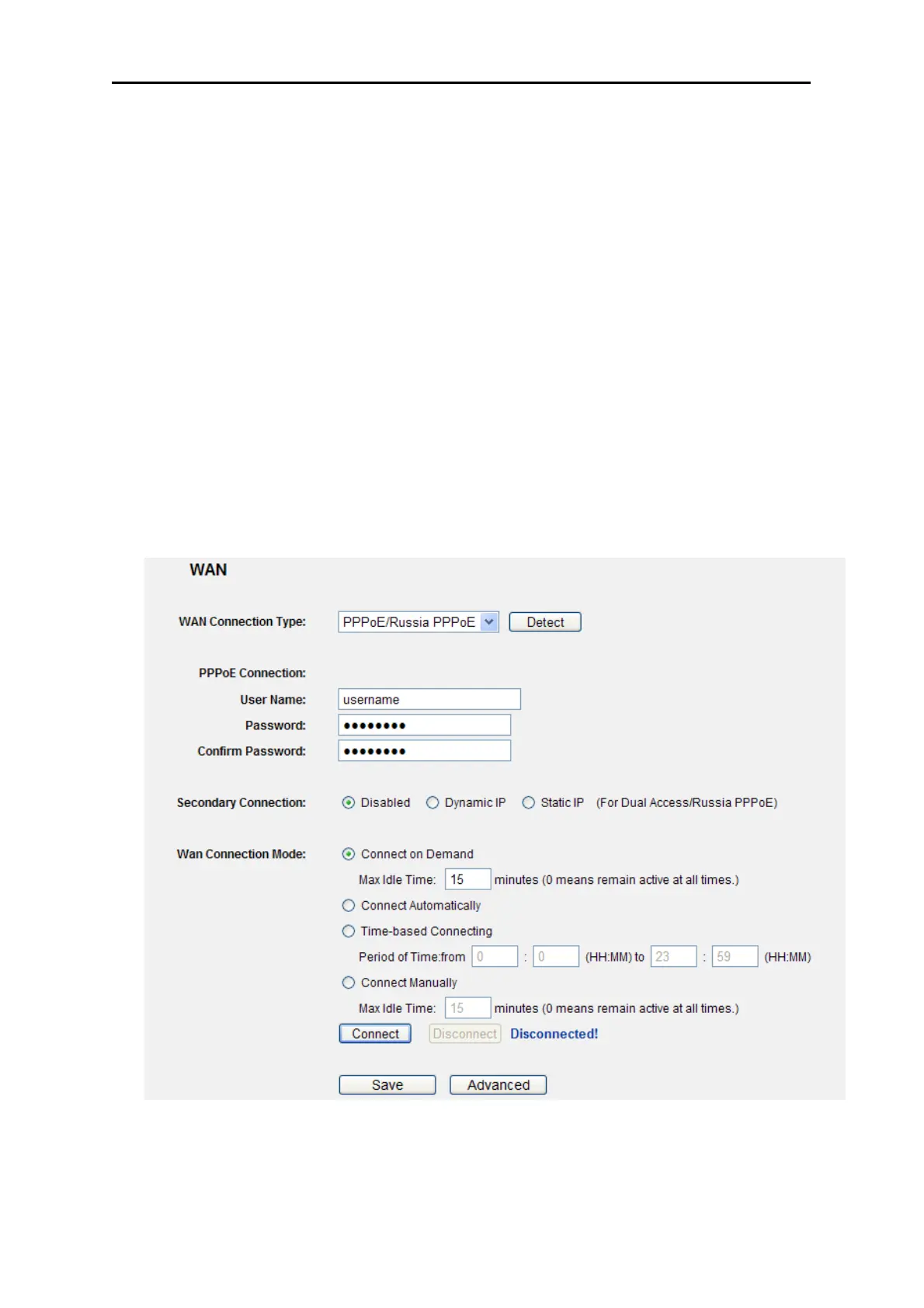
3) Login to the Router, click the “Network” menu on the left of your browser, and click "WAN"
submenu. On the WAN page, select “PPPoE” for WAN Connection Type. Type user name in
the “User Name” field and password in the “Password” field, finish by clicking “Connect”.
4) If your ADSL lease is in “pay-according-time” mode, select “Connect on Demand” or
“Connect Manually” for Internet connection mode. Type an appropriate number for “Max Idle
Time” to avoid wasting paid time. Otherwise, you can select “Auto-connecting” for Internet
connection mode.
Figure A-1 PPPoE Connection Type



 To Next Page