User’s Manual of WNRT-627
-90-
Click the Blocked DoS Host List button to display the DoS host table by blocking.
DoSProtection will take effect only when the Traffic Statistics in “System Tool →
Traffic Statistics” is enabled.
5.10.3 Local Management
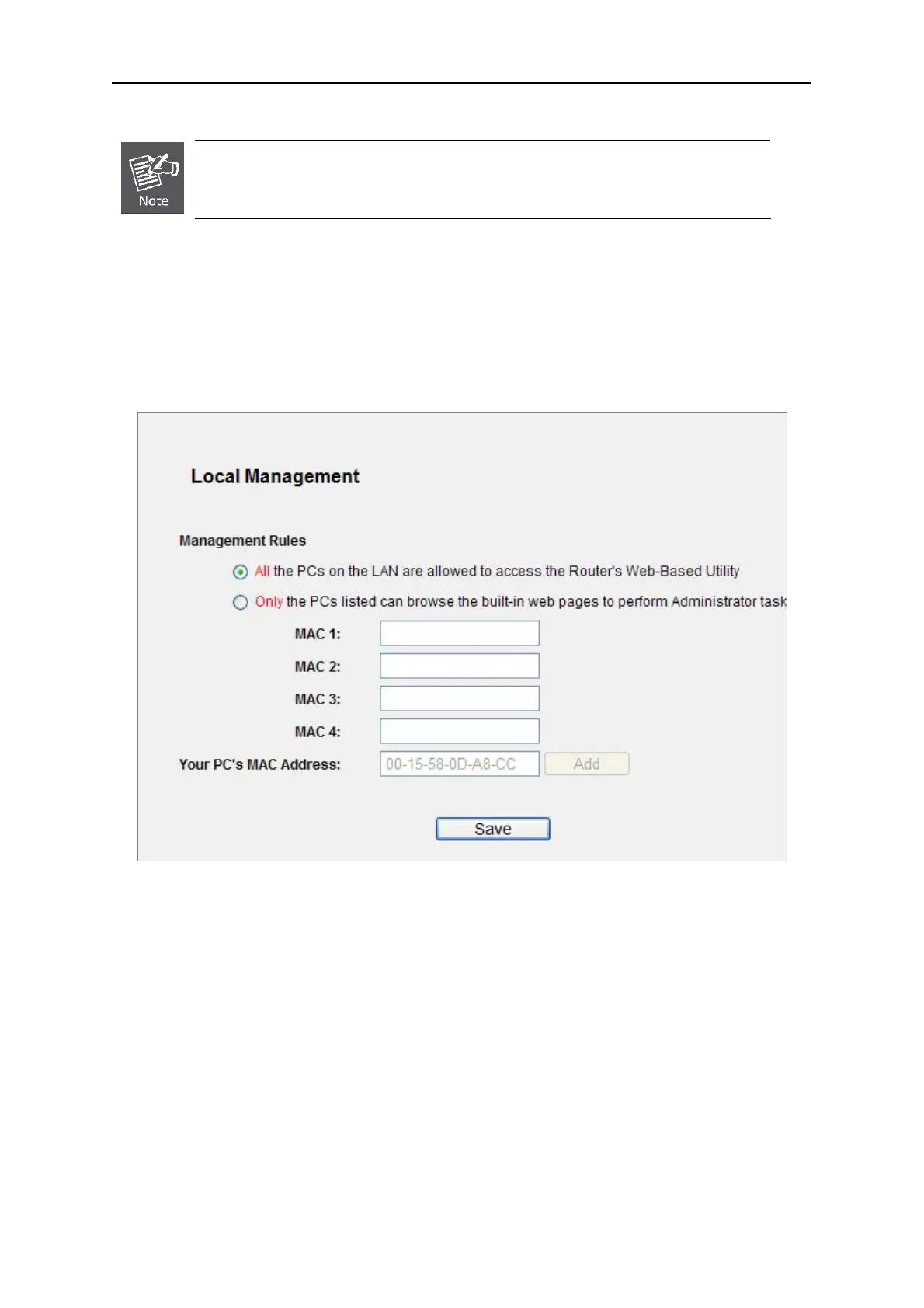
Choose menu “Security → Local Management”, and you can configure the management rule in the
screen as shown in Figure 5-46. The management feature allows you to deny computers in LAN from
accessi
ng the Router.
Figure 5-46 Local Mana
gement
By default, the radio button “All the PCs on the LAN are allowed to access the Router's
Web-Based Utility” is checked. If you want to allow PCs with specific MAC Addresses to access the
Setup page of the Router's Web-Based Utility locally from inside the network, check the radio button
“Only the PCs listed can browse the built-in web pages to perform Administrator tasks”, and
then enter each MAC Address in a separate field. The format for the MAC Address is
XX-XX-XX-XX-XX-XX (X is any hexadecimal digit). Only the PCs with MAC address listed can use the
password to browse the built-in web pages to perform Administrator tasks while all the others will be
blocked.
After clicking the Add button, your PC's MAC Address will be placed in the list above.



 To Next Page