22
6. Remote Controller
6.1 Oveiew
Potensic PT 1 remote controller is specically designed by Potensic for ATOM 2. It utilizes PixSync 4.0 video
transmission technology, allowing full control and conguration of the drone up to a maximum distance of
10 km in a straight line in an unobstructed, inteerence-free environment at a ight altitude of 120 m.
Through the App, users can view real-time HD footage captured by the drone’s camera on their mobile
devices. PixSync 4.0 uses a 2.4G frequency band with dual high-gain directional antennas, delivering video
transmission quality of up to 1080p@30 fps. It also suppos seamless switching between up to 8 adaptive
channels to ensure smooth and uninterrupted HD video transmission.
The remote controller has a built-in 5200mAh batte and comes with a dedicated USB-C charging po
that suppos 18W fast charging. When charging a mobile device, the maximum batte life of the remote
controller can reach up to 4 hours.
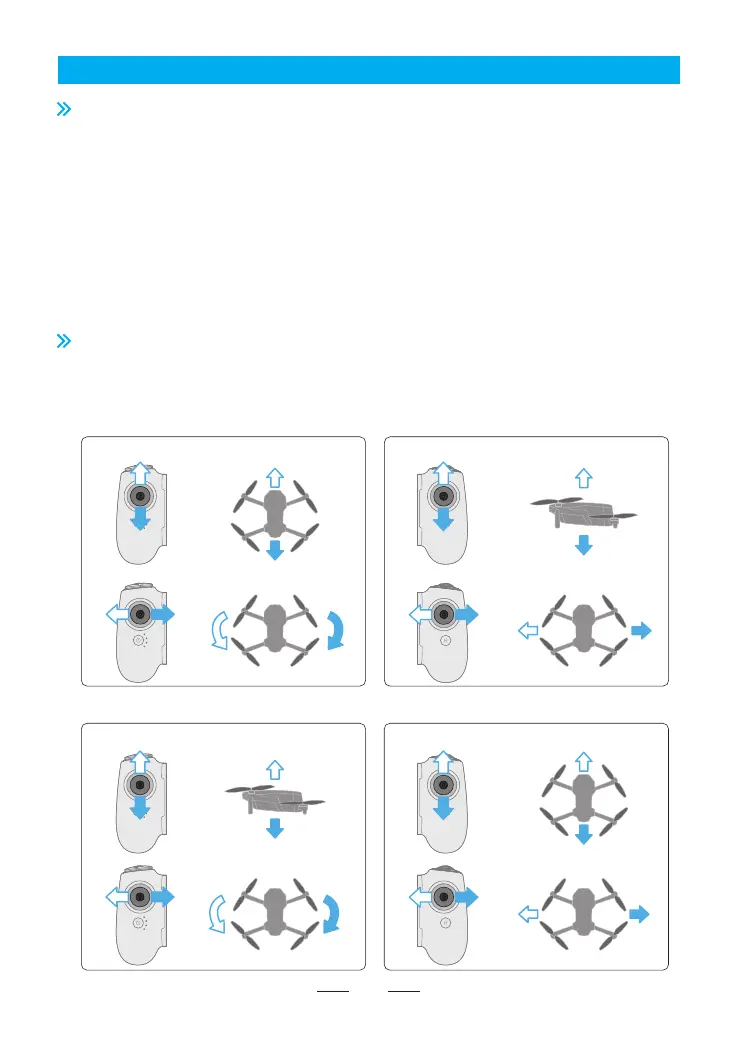
6.2 Control Stick Mode
Mode 2 (Left Hand Throttle)
Left stick Right stick
Left Right
Up
Down
Turn left Turn right
Turn left Turn right
Forward
Backward
Forward
Backward
Left Right
Up
Down
Mode 1 (Right Hand Throttle)
Left stick Right stick
In the Potensic Eve App, go to Settings > Control > Remote Controller Settings > Control Stick Mode to set
the control stick mode. The options include Mode 1 (Right Hand Throttle), Mode 2 (Left Hand Throttle), and
Custom, as shown below.



 To Next Page