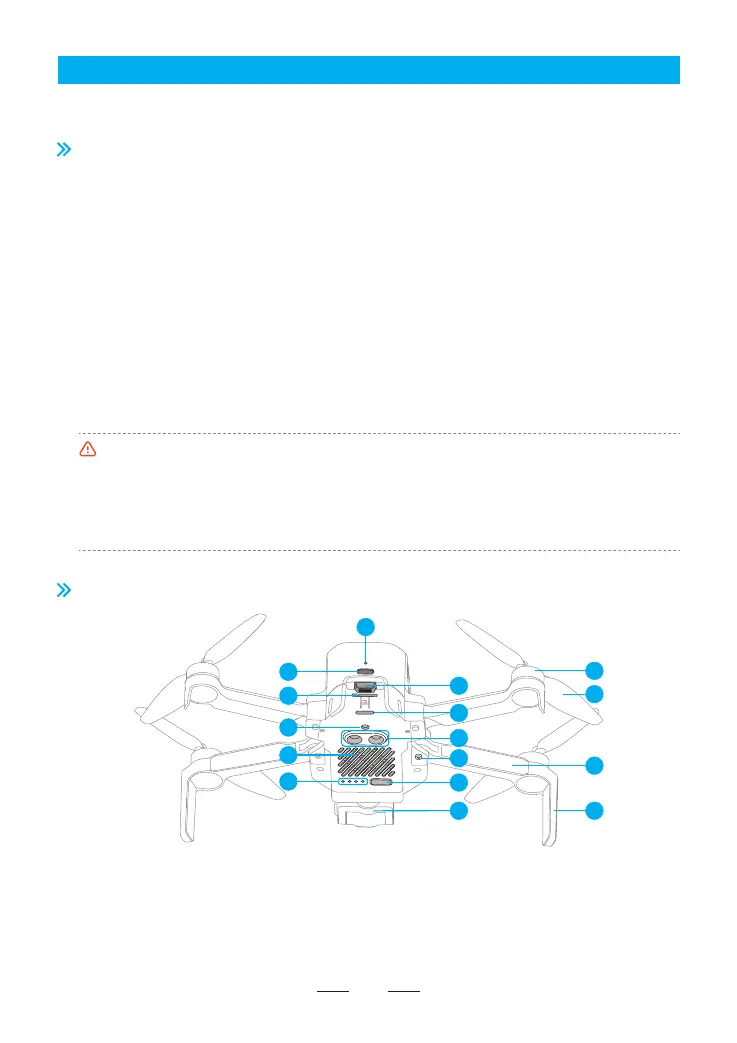
3.2 Drone Diagram
1. Charging indicator
2. USB-C charging po
3. Batte buckle
4. SD card slot
5. Tail indicator
6. Monocular visual module
7. TOF module
8. Bottom cooling hole
9. Power indicator
10. Power/pairing button
11. 3-axis gimbal and camera
12. Brushless motor
05
13. Propeller
14. Arm
15. Antenna tripod
16. Arm shaft
•Test conditions of the max. ight time: at an ambient temperature of approximately 25℃ in a windless
environment, ying forward at a constant speed of 5 m/s, switched to 1080p/24 fps video recording
mode (without video recording operation during ight) from 100% batte charge until 0%.
•Power consumption will increase considerably when the drone is returning against the wind. If you
receive a prompt of encountering strong wind from the App, please make sure to lower the ight
altitude and return in time to ensure safety of the drone.
3. Oveiew
This chapter introduces the functional characteristics of ATOM 2, as well as the diagrams of the drone and the
remote controller.
ATOM 2 features foldable arms for convenient poability, with a lightweight body weighing only 245 g. The
drone possesses a Vision Positioning System, which allows for precise hovering in low-altitude indoor and
outdoor environments. Equipped with a GNSS sensor, the drone enables positioning and automatic return.
The camera utilizes a 1/2-inch Sony CMOS image sensor, capable of capturing high-denition 4K/30 fps video
and 48MP photos. The camera is mounted on a 3-axis gimbal, which allows the camera to acquire stable
footages while operating the drone.
ATOM 2's remote controller utilizes the PixSync 4.0 digital transmission technology, achieving a maximum
communication distance of up to 10 km and 1080p video transmission in ideal conditions. The controller
features a retractable and foldable design, providing a placement for your mobile device when unfolded.
When connected to the controller via a USB cable, you can operate and congure your drone through the
App, as well as view high-denition video transmission. The built-in lithium batte in the remote controller
has a maximum working time of approximately 4 hours.
ATOM 2 utilizes proprieta SurgeFly ight control technology, achieving a maximum ight speed of 16 m/s
(52 ft/s)and a maximum ight time of approximately 32 minutes, with resistance against wind up to Level 5.
3.1 Introduction
4
9
1
5
7
12
13
14
15
16
8
10
11
2
3
6



 To Next Page