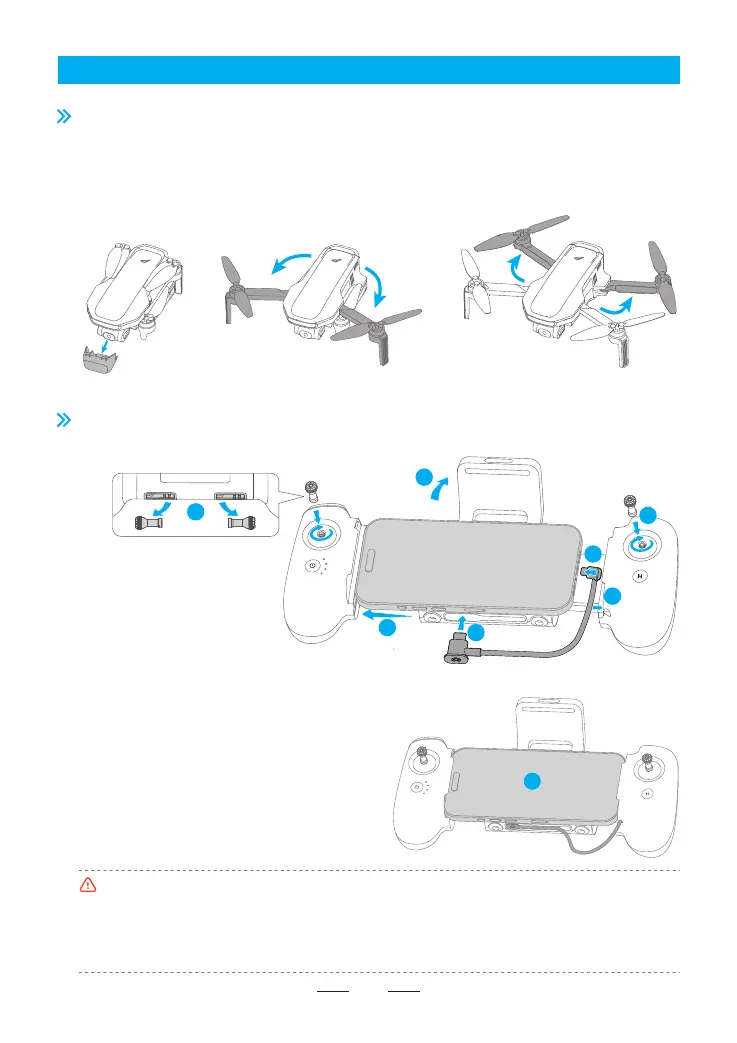
1. Unfold the antennas.
2. Remove the control sticks from the storage slots.
3. Mount the control sticks on the remote controller.
4. Connect the adapter cable with the remote
controller logo with the remote controller.
5. Connect the other end of the cable with your
mobile device.
6. Push the cable into the slot inside the right handle
of the remote controller.
7. Pull open the remote controller with both hands
and secure your mobile device in place.
8. Preparation completed.
•The remote controller adapter cable is directional; do not swap the ends of the cable.
•Do not inse the USB-C end of the remote controller adapter cable into the remote controller’s
USB-C charging po, as this may cause a sho circuit.
•When connecting to an Android phone, if the system prompts for a USB connection mode, please
select "Data Transfer". Other options may cause the connection to fail.
4. Using for the First Time
07
4.1 Preparing the Drone
The product is delivered under folded status. Please unfold it as follows:
4.2 Preparing the Remote Controller
Mount the mobile device and the control sticks
1. Remove the gimbal protector.
2. Unfold the front arm before the rear arm.
3. Unfold the propeller blades.
8
1
7
4
5
6
3
2



 To Next Page