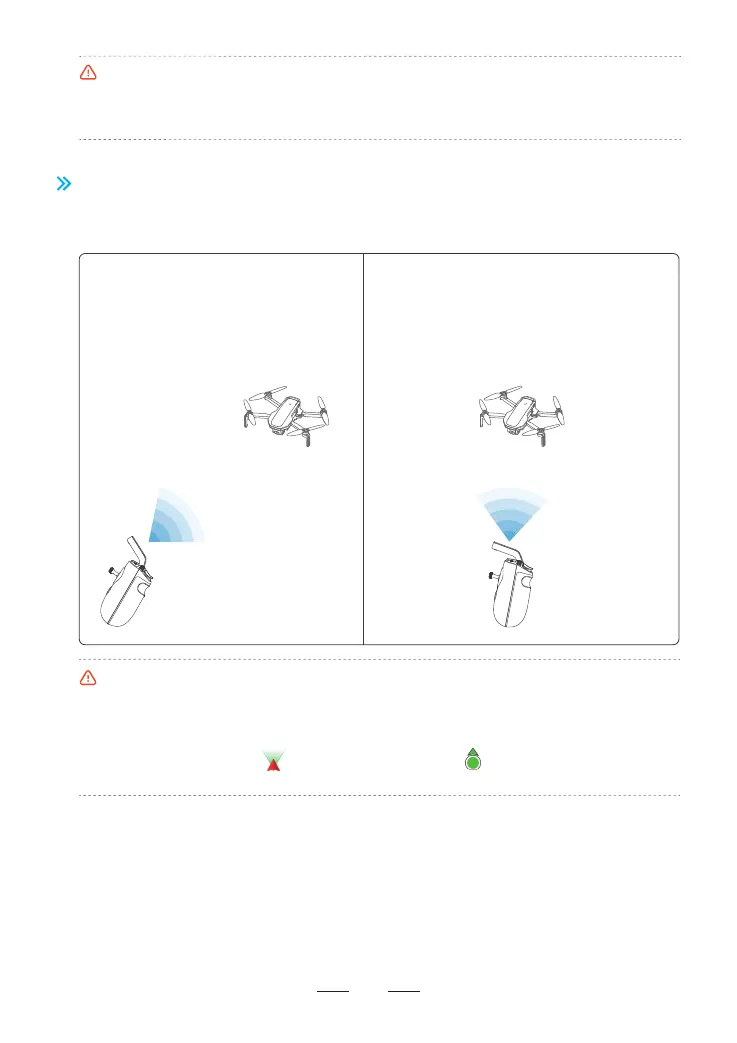
6.4 Optimal Transmission Zone
The angle of the remote controller's antenna should be adjusted promptly according to the drone's altitude
and distance to ensure optimal transmission range.
26
During ight, always keep the the antenna
plane of the remote controller pointed in the
direction of the drone to ensure the best
transmission quality and a longer ight
distance.
When the drone is ying directly above the remote
controller at a high altitude, the communication
quality will noticeably decrease due to the poor
antenna angle. Please lower the altitude or y
horizontally for some distance to ensure the antenna
of the remote controller is directly facing the drone.
•The Emergency Propeller Stop Mid-Flight feature is designed for situations where the drone is out of
control or in other emergencies. By immediately stopping the motors, this feature reduces the risk of
the propellers causing inju to people or damage to valuable objects. The drone may be damaged
upon crashing, please use this feature with caution.
•During ight, do not use other 2.4G devices simultaneously to avoid inteerence with the remote
controller’s communication.
•In actual ight, you can use the map/attitude indicator in the lower-left corner of the ight inteace
in the Potensic Eve App to help determine whether the remote controller is aligned with the drone.
When both the drone icon and the remote controller icon turn green, it indicates that the
remote controller is aligned with the drone.



 To Next Page