06
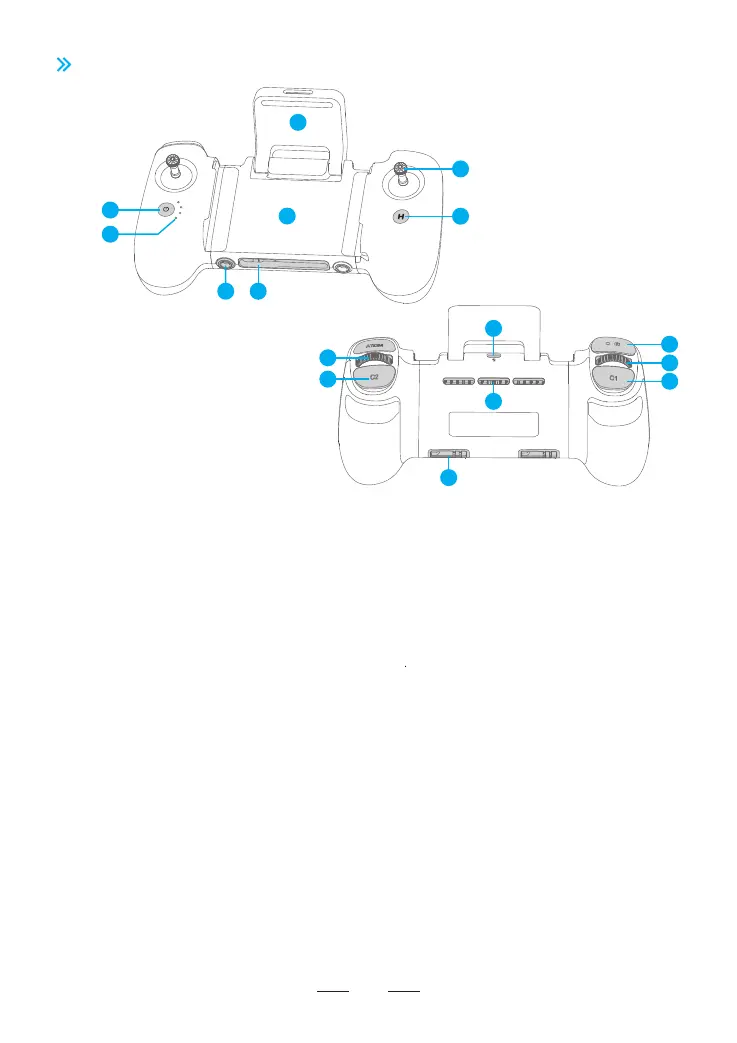
1. Power Button
Press once to check the current batte
level. Press and hold to power the
remote controller on or o.
2. Power Indicator
Displays the current batte level or
status of the remote controller.
16. Control Stick Storage Slot
For storing the control sticks.
9. USB-C Charging Po
For charging the remote controller.
4. USB-C Connecting Po
For connecting the remote controller.
5. Return to Home (RTH) Button
Press once to make the drone brake and
hover from auto-ight modes. Press and hold
to initiate RTH. Press again to cancel RTH.
6. Control Sticks
7. Foldable Directional Antenna
8. Mobile Device Holder
For mounting the mobile device securely
on the remote controller.
14. Shutter/Record Button
Press once to take a photo or sta/stop recording.
Press and hold to switch between photo/video.
13. Left Dial
15. Cooling Holes
12. Customizable C1 Button
11. Customizable C2 Button
Control the tilt of the camera.
10. Right Dial
For digital zoom control.
3.3 Remote Controller Diagram
3. 1/4 Nut Mounting Slot
For attaching a remote controller
strap (*sold separately).
Use the control sticks to control the drone
movements. Set the control stick mode in
Potensic Eve App by entering Settings >
Control > Remote Controller Settings >
Control Stick Mode.
Transmits control and video wireless
signals to the drone.
Press once to switch the speed mode (Video/Normal/
Spo). Press twice to set the Cruise Control
(enable/disable/update). Press C2 and Left Dial to
adjust the White Balance. Press C2 and Right Dial to
adjust the EM. Set the function in Potensic Eve App
by entering Settings > Control > Remote Control
Settings > Button Customization.
Press once to switch the camera tilt angle (0°/-90°).
Press twice to switch the camera mode (auto/manual).
Press C1 and Left Dial to adjust the shutter speed.
Press C1 and Right Dial to adjust the ISO. Set the
function in Potensic Eve App by entering Settings >
Control > Remote Control Settings > Button
Customization.
1
6
7
8
2
5
3 4
13
12
14
9
15
16
10
11



 To Next Page