27
6.5 Remote Controller Calibration
6.5.1 When to Peorm Remote Controller Calibration
1. When the drone drifts automatically in one direction without any toggling of the control sticks.
2. When the drone auto-rotating sideway continuously.
3. When the control sticks are over-sensitive or lack sensitivity.
6.5.2 Calibration Procedure
1. Power on the remote controller, and connect to your mobile device. Open Potensic Eve App and go to
Settings > Calibration > Remote Controller Calibration.
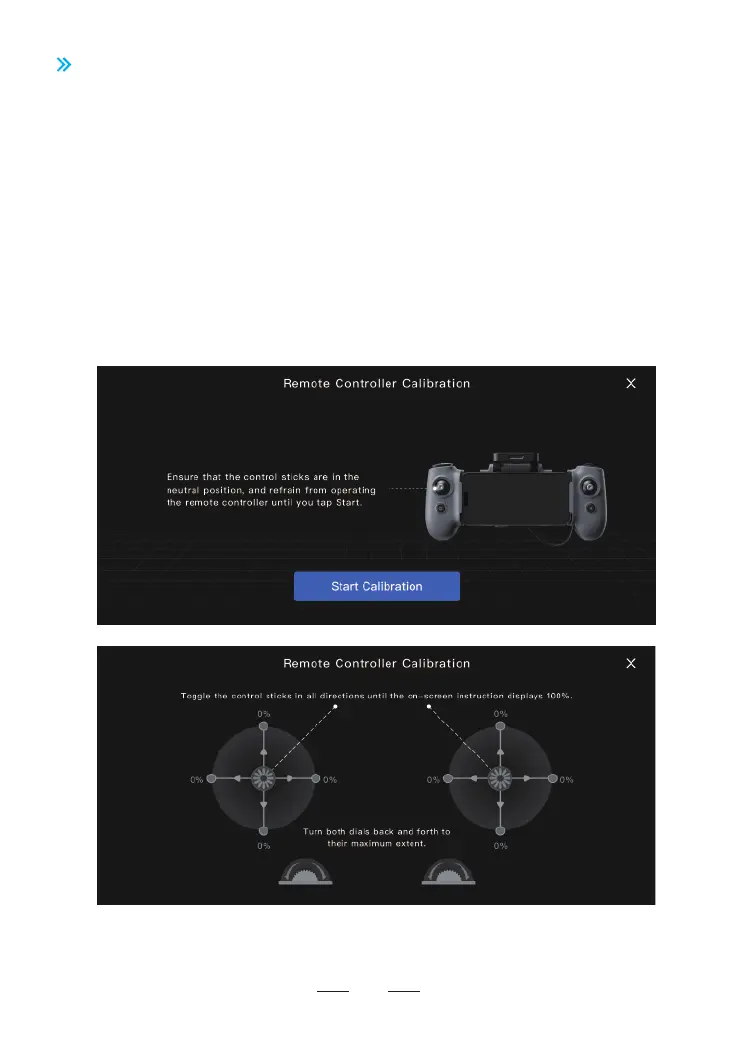
2. Make sure the control sticks are in the middle position and do not operate it before tapping to sta the
calibration.
3. Tap "Sta Calibration", then follow the on-screen instructions and toggle the sticks in all directions until
the Potensic Eve App displays 100%, and rotate the dial back and foh to its maximum extent.
4. When Potensic Eve App prompts "Calibration Succeeded", the remote controller calibration is completed.



 To Next Page