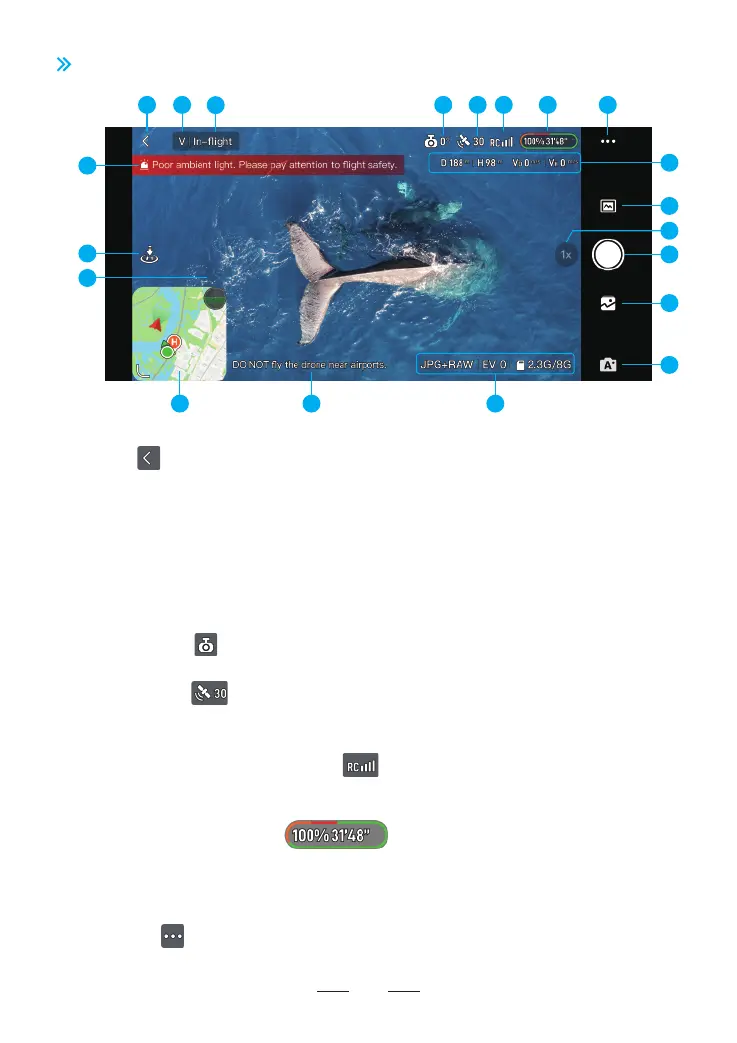
4. Gimbal Angle: Displays current gimbal tilt angle. Tap to view more information.
5. GNSS Status: Displays the current GNSS signal strength and connected satellites.
Tap to view more information (Connected satellite quantities and positioning accuracy).
6. Video Transmission Signal Strength: Displays the videl transmission signal strength
between the drone and the remote controller. Tap to view the RC channel diagram.
7. Sma Batte Information: Displays the current batte level and
remaining ight time. Tap to view more information (time left before low batte return or
forced landing; power consumption rate).
8. Settings: Tap to view or set parameters for safety, control, camera, video transmission
and About. Refer to 7.3 Settings section for more information.
7.2 Flight Inteace
29
1. Back: Tap to return to the home screen
2. Flight Mode: V: Video Mode N: Normal Mode S: Spo Mode
3. System Status Bar: Displays drone ight status.
Tap to access the Quick Settings panel, where you can view helpful tips, set ight modes,
RTH altitude, viual fence, and change HOME point.
76
10
17 16
19
18
20
1 2
3
15
9
11
13
14
5 84
12



 To Next Page